
How long does it take to build a website? Anywhere from a weekend to six months. That's the honest answer, and I know it's not the one you wanted.
The real answer depends on three things: what you're building, who's building it, and how fast you can make decisions. That last one is the factor nobody talks about, and it's usually the one that doubles the timeline.
I've been building websites for over ten years. I've shipped sites in four days and I've watched projects drag on for eight months. The difference was rarely about code. It was almost always about clarity: did the client know what they wanted before we started?
The Quick Answer: Website Build Timelines by Type
Before we get into the details, here's a table you can screenshot and send to whoever is asking you this question in a meeting right now.
| Website Type | DIY / Website Builder | Professional / Agency |
|---|---|---|
| Single landing page | 1-3 days | 1-2 weeks |
| Small business site (5-10 pages) | 1-3 weeks | 4-8 weeks |
| Ecommerce store | 2-4 weeks | 6-12 weeks |
| Custom web application | Not realistic | 3-6+ months |
| Enterprise or multi-language site | Not realistic | 4-8+ months |
Those ranges are based on projects where the client had their content ready and could provide feedback within a few business days. Add 2-4 weeks to any of those numbers if content isn't prepared upfront. I've seen a "4-week" project stretch to 12 weeks because the client hadn't written a single word of copy when we kicked off.
What Actually Determines How Long Your Website Takes
Every article on this topic lists the same factors: complexity, number of pages, design requirements. Those are real, but they're not the whole picture. Here's what I've seen matter most across dozens of projects.
Content Readiness (The #1 Bottleneck)
This is the thing that stalls more projects than anything else. Not code. Not design. Copy.
When a client comes to us with their pages outlined, headlines drafted, and images selected, we can move fast. When they come with "we'll figure out the content as we go," we've just added weeks to the timeline. Sometimes months.
If you want to speed up your website project, write your content first. Before you talk to a designer. Before you pick a platform. The content shapes everything else.
Decision-Making Speed
Here's what nobody in web development talks about openly: the biggest delay in most projects is the client's own approval process.
I once had a homepage design sitting in a client's inbox for three weeks. Three weeks. When they finally responded, the feedback was "looks great, just change the button color." That's not a design revision. That's a bottleneck wearing a disguise.
If your organization needs five people to sign off on a homepage layout, build that into your timeline. Every round of internal review adds 3-5 business days, minimum. Two or three rounds of revisions, plus a week of silence between each one, and your "6-week project" is now 10 weeks.
Project Complexity
A five-page brochure site with no integrations is a fundamentally different project from an ecommerce store with inventory management, payment processing, and shipping calculations. The number of pages matters less than what those pages need to do.
Custom functionality adds time. Third-party integrations add time. Multi-language support adds time. These aren't surprises if you scope the project properly upfront, but they're surprises if you treated them as "we'll handle that later" items in the initial brief.
I keep a mental list of features that sound simple in a meeting but cost weeks in development: user authentication, search functionality, booking systems, real-time anything. If your project includes any of these, your timeline just grew. Not because they're hard to build, but because they're hard to get right.
Design Approach
Starting from a template versus starting from a blank canvas makes a massive difference. A Webflow template gives you a 1-2 week head start over a fully custom design. That doesn't mean templates are always the right call, but if speed matters more than originality, templates win.
Custom design means wireframes, mockups, revisions, and sign-off before a single line of code gets written. That process alone takes 2-4 weeks for a small site.
Platform Choice
Your technology stack affects the timeline more than most people realize. Building on a platform like Webflow or Squarespace is faster than building from scratch with a custom framework. The tradeoff is flexibility versus speed.
According to Nielsen Norman Group's research on web usability, what matters more than how your site was built is how quickly it communicates value to visitors. A fast-built site that's clear beats a slow-built site that's clever.
The Six Phases of a Website Build (And Where Time Actually Goes)
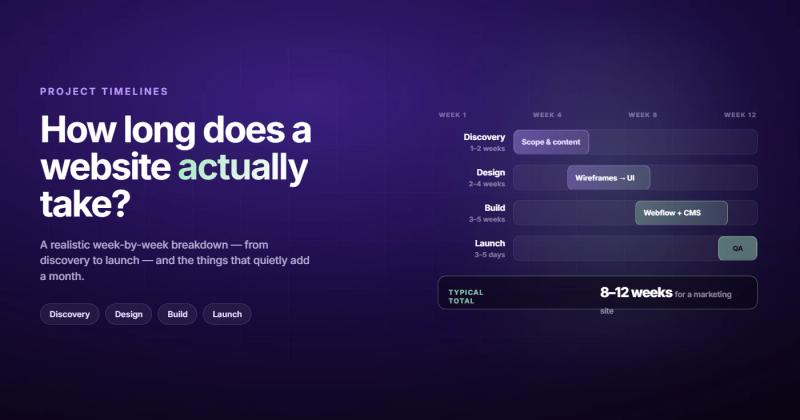
If you're hiring a professional or an agency, here's what the process typically looks like. These phases overlap, but understanding them helps you set realistic expectations.
Phase 1: Strategy and Planning (1-2 weeks)
This is where you define the goals, target audience, sitemap, and key messaging. Skip this step and you'll pay for it later in revisions. Every hour spent planning saves roughly three hours of development time.
This is also where website strategy gets set. What pages do you need? What's the primary conversion goal? What does the user journey look like? If you can't answer these questions, you're not ready to build yet.
Phase 2: Design (1-4 weeks)
Wireframes first, then visual design. The wireframe stage is where structure gets locked in. Changing the layout of a page is cheap at the wireframe stage and expensive once it's been designed and coded.
Most of the delay in this phase comes from revision rounds. Two rounds of revisions is normal. Five rounds means the brief wasn't clear enough. If you're on round five, stop revising and go back to strategy.
Phase 3: Development (1-8+ weeks)
This is where the design becomes a real, functioning website. For a standard business site on a platform like Webflow, development might take 1-3 weeks. For a custom-coded application with databases, authentication, and API integrations, it could take two months or more.
The development phase is also where SEO foundations get built in. Page speed, meta tags, schema markup, heading structure, and URL patterns. Retrofitting SEO after launch is possible but costs more time and money than building it in from the start.
Phase 4: Content Population (1-3 weeks)
Remember the content bottleneck from earlier? This is where it shows up. If your copy and images are ready, populating a CMS takes days. If you're still writing headlines and sourcing stock photos, this phase drags.
One technique that works: write content in parallel with design. While your designer is working on mockups, your copywriter is drafting page content. When development wraps, the content is ready to drop in.
Phase 5: Testing and QA (1-2 weeks)
Cross-browser testing, mobile responsiveness, form submissions, page speed, accessibility checks. This is the phase that gets compressed when deadlines are tight, and it's the phase you'll regret compressing.
A site that looks perfect on Chrome but breaks on Safari is a site that wasn't tested properly. Budget a full week for QA, minimum. According to Google's Core Web Vitals documentation, performance metrics directly affect your search rankings, so this isn't optional.
Phase 6: Launch (1 day to 1 week)
DNS propagation, SSL certificates, redirects, analytics setup, search console verification. Launch itself is fast if everything else was done right. The "week" buffer is for the inevitable last-minute changes that someone will request after seeing the site on their phone for the first time.
If you're migrating from an old site, this phase also includes setting up 301 redirects for every URL that's changing. Miss this and you'll lose whatever search authority you've built. Our CMS migration SEO guide covers this in detail.
DIY vs. Hiring a Professional: Which Is Actually Faster?
This depends entirely on what you value more: time or money.
A website builder like Wix or Squarespace lets you launch a basic site in a weekend. That's real. If you need a simple online presence with your contact info and a few pages about your services, a DIY approach is genuinely the fastest path.
But "fastest to launch" and "fastest to results" aren't the same thing.
A professionally built site takes longer to launch but tends to perform better from day one. The design is more intentional. The messaging is sharper. The SEO foundation is built in, not bolted on. The conversion paths actually convert.
I've seen business owners spend a weekend building a Wix site, then spend the next six months wondering why it's not generating leads. Then they hire an agency and the "faster" option turned out to be the slower one.
The real question isn't "how fast can I get a website up?" It's "how fast can I get a website that works for my business?" Those are different timelines. A site that loads fast, ranks for the right keywords, and converts visitors into inquiries takes longer to build than one that just exists. But it starts paying for itself much sooner.
Why Redesigns Take Longer Than New Builds
Here's something the other guides don't mention: redesigning an existing website almost always takes longer than building a new one.
With a new site, you start from a blank slate. Nobody has emotional attachment to existing pages. There's no "but we've always had that section" conversation. There's no legacy content to migrate or redirect.
A redesign brings baggage. Stakeholders who remember why the old homepage looked that way. Content that "might still be getting traffic" but nobody has checked. URL structures that need redirects so you don't lose search rankings.
I've been through this. We once quoted six weeks for a redesign, and it took fourteen. The code was done in five weeks. The other nine were spent negotiating which sections from the old site could be removed, waiting for updated headshots, and having the same conversation about the homepage hero three times. The redesign itself wasn't the hard part. Getting everyone aligned on what "redesign" actually meant was the project.
If you're planning a website redesign, add 20-30% to whatever timeline you'd estimate for a new build. That buffer is for the conversations, not the code.
How to Make Your Website Project Go Faster
After building dozens of sites, these are the things that consistently separate fast projects from slow ones.
Write your content before kickoff. Not during. Before. This alone can cut 2-4 weeks off your timeline.
Appoint one decision-maker. Not a committee. One person who can approve designs, copy, and direction without scheduling a meeting with six other people.
Provide feedback in batches, not drips. Consolidated feedback in one document beats seven separate emails over two weeks.
Be honest about your timeline. If you tell your developer you need the site in four weeks but your real deadline is eight weeks away, you'll get a better site. Artificial urgency leads to cut corners.
Choose your platform before you start design. Switching platforms mid-project is one of the most expensive decisions you can make, both in time and money. If you're weighing options, read our Webflow vs WordPress comparison before committing.
Don't treat SEO as a post-launch task. Build it into the SEO checklist from day one. According to Google's SEO Starter Guide, structural decisions made during development directly impact your ability to rank.
Frequently Asked Questions
Can you build a website in one day?
Yes, if it's a single landing page using a template on a platform like Webflow or Squarespace. You won't get custom design or deep SEO work in a day, but you can get a functional, professional-looking page live. For a full business site with multiple pages, custom content, and integrations, one day isn't realistic.
How long does it take to build a website from scratch?
If "from scratch" means custom code with no templates or website builders, expect 2-6 months for a standard business site. That includes design, frontend development, backend logic, content management system setup, and testing. Most businesses don't need to build from scratch, though. Platforms like Webflow give you custom design flexibility without the development timeline of pure code.
What's the single biggest cause of website project delays?
Content. Not having copy, images, or brand assets ready when development starts. The second biggest cause is slow feedback loops, where designs or mockups sit unapproved for weeks. Together, these two factors account for more delay than any technical challenge I've encountered.
How long does it take to build an ecommerce website?
A basic ecommerce store with 10-50 products on a platform like Shopify takes 2-4 weeks. A custom ecommerce build with inventory management, payment gateway integrations, shipping calculators, and customer accounts takes 2-4 months. The product catalog size matters less than the complexity of your checkout flow and backend requirements.
Should I build my website myself or hire someone?
Build it yourself if you have the time, your needs are simple, and you're comfortable with a website builder. Hire someone if your website is a core business tool, you need custom functionality, or your time is worth more than the cost of hiring a professional. The question isn't "can I do this?" It's "is doing this the best use of my time?"
How much does it cost to have a website built?
DIY website builders run $10-50 per month. A freelance designer or developer charges $2,000-10,000 for a small business site. Agencies typically charge $5,000-30,000+ depending on complexity. Custom web applications can run $50,000 or more. The cost usually correlates with the timeline: faster builds cost less because they involve less custom work.
Comments