
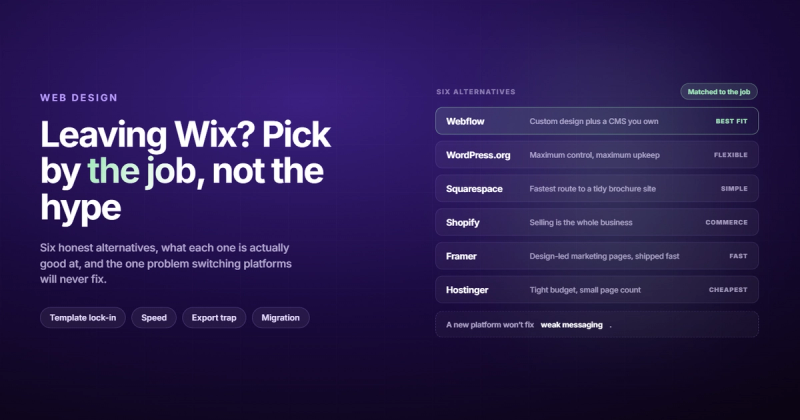
The search usually starts the same way. Something breaks, or the renewal email lands and you do the math, or you look at your site on a client's phone and watch it crawl through a loading spinner that feels like it has personal reasons for being slow. Whatever the trigger, you end up here: searching for wix alternatives at some point after midnight.
Here's the honest answer: there isn't one perfect Wix replacement. What there is is a set of tools that do different things better. Your job is to match the right one to what you actually need, not what a listicle tells you everyone needs.
I've spent ten years building websites across pretty much every major platform, including Wix. Here's what I've actually observed about each of the real alternatives.
What's Actually Frustrating About Wix
The frustrations people have with Wix fall into a few honest categories. Not all of them are Wix's fault, but they're real.
Template lock-in. This is the big one. Once you pick a template and start building, you can't swap it out without rebuilding from scratch. Not "it's annoying," but literally starting over. For a business that's grown and wants a different look three years in, that's a trap nobody warned them about when they signed up.
The editor also slows down noticeably on complex pages. It's subtle at first. Then you add a few sections, install a couple of apps, and suddenly everything feels sluggish.
Page speed is a genuine issue. Wix injects a lot of JavaScript into every page by default. Their Core Web Vitals scores have improved in recent years, but they still lag behind platforms that give developers more control. If your site's performance directly affects your conversions or rankings, that gap matters.
There's also the cost reality. The free plan looks good right up until you try to do anything real with it. By the time you add a custom domain, remove Wix branding, unlock e-commerce, and pay for the apps you actually need, the monthly cost has climbed well past what most people budgeted for.
And then there's the lock-in problem beyond templates: you can't export your site and move it somewhere else. Wix is a closed platform. The content is yours, technically, but the design and structure live on Wix's servers. If you want to leave, you're rebuilding, not migrating.
I've had clients come to us after three years on Wix, genuinely surprised that there was no export button. They'd assumed they "owned" their website. They owned their content. The website itself was rented.
Before You Switch, Answer These Questions
Most "wix alternatives" articles skip this part. They assume everyone switching from Wix has the same problem and needs the same solution. They don't.
Before you start comparing platforms, answer these honestly:
- Is e-commerce your primary goal, or is it a side feature?
- Do you have a developer or designer, or will you be building this yourself?
- How important is design quality and customization to your business?
- What's your realistic monthly budget, including apps and add-ons?
- Do you expect the site to need significant changes over the next two years?
The answers determine which alternative actually makes sense. A solopreneur selling digital products has different needs than a B2B company with a 12-page website and a dedicated marketing team.

The Best Wix Alternatives in 2026
Here are the platforms I'd actually consider, and who each one is right for.
Webflow
Webflow is what happens when you give designers the ability to build in the browser without writing code, and then give developers access to the underlying HTML and CSS when they need it. The result is a platform that produces genuinely professional websites.
It's not a drag-and-drop toy. There's a learning curve. But the output is in a different category than Wix. Webflow sites load fast, generate clean semantic HTML, and give you full design control without the constraints of a template system. You're designing on a canvas, not filling in a layout someone else decided on.
For SEO, Webflow is significantly better than Wix. You control everything: heading structure, schema markup, canonical tags, sitemap configuration. No app required.
Who it's for: Businesses that want a professional website and either have a designer/developer, or are willing to hire an agency to build it. Not a DIY tool for someone with no design experience.
Pricing: Plans start at $14/month for basic sites, $23/month for CMS-powered blogs. E-commerce plans start at $29/month.
What it does worse than Wix: Steeper learning curve. Not realistic for most people to build themselves without help. If you're looking to manage content after launch, the CMS is manageable, but the initial build requires real skill.
If you're thinking about Webflow specifically, we've written a detailed comparison of Webflow vs WordPress that covers the real trade-offs.
WordPress.org
WordPress runs about 43% of every website on the internet, according to W3Techs. That's not a coincidence. It's the most flexible platform available because it's open source, self-hosted, and has 60,000+ plugins for anything you could possibly want.
The catch? Flexibility comes with maintenance. You're responsible for updates, backups, security, and performance. A WordPress site with 40 plugins installed and no one watching it is a liability, not an asset. I once accidentally deleted a client's production WordPress database AND its backup on the same day. That's the kind of thing that makes you religious about backup systems.
With the right setup, WordPress can be extremely fast and extremely powerful. With the wrong setup, it's a plugin graveyard that loads in six seconds and gets hacked through an outdated form plugin from 2018.
Who it's for: Teams with a developer on staff or on retainer, businesses that need very specific functionality, and publishers running large content operations. Not great for people who want to "just manage it themselves" without technical comfort.
Pricing: Hosting costs $5-30/month depending on your provider. Premium themes and plugins add to that. The "free" part is only the software itself.
What it does worse than Wix: Out-of-the-box experience is rougher. You're assembling a site from components rather than working within a cohesive system. Support is community-based, not platform-provided.
Squarespace
If Wix is a Swiss Army knife, Squarespace is a good chef's knife. It does fewer things, but the things it does, it does well.
The templates are genuinely beautiful. Not "beautiful for a website builder" but actually good-looking by professional design standards. For service businesses, coaches, photographers, restaurants, and consultants, Squarespace hits a quality ceiling that Wix simply doesn't reach.
The editor is less flexible than Wix but more predictable. You're working within sections that snap into place. You'll hit fewer bugs and fewer "why does this look different on mobile" moments. What you see is closer to what you get.
Who it's for: Service businesses that want something that looks polished without much effort. Especially good for visual businesses: photographers, designers, restaurants, event planners.
Pricing: $16/month (Personal), $23/month (Business), $28/month+ for e-commerce. Slightly more expensive than Wix at comparable tiers.
What it does worse than Wix: Less flexibility for custom layouts. The app ecosystem is smaller. E-commerce features are solid but not as deep as Shopify. SEO customization is limited compared to Webflow.
If you've already considered Squarespace, we covered the full comparison in our Squarespace alternatives guide as well, which might be useful if you're still weighing options.
Shopify
If you're selling products online and e-commerce is the core of your business, not an add-on feature, Shopify is probably where you should be.
Shopify is purpose-built for selling. The checkout flow, inventory management, shipping integrations, abandoned cart recovery, and payment processing are all first-class features, not bolted-on apps. The platform processes billions in transactions every year and has the infrastructure to match.
For a "website plus online store" combination, Wix can keep up. For a real e-commerce operation with hundreds of SKUs, multiple sales channels, and serious fulfillment requirements, Shopify wins by a significant margin.
Who it's for: Businesses where online sales are the primary revenue source. Product companies, physical retailers with online stores, subscription businesses.
Pricing: Starts at $29/month (Basic), $79/month (Shopify), $299/month (Advanced). Transaction fees if you don't use Shopify Payments. It adds up, but so does the revenue it enables.
What it does worse than Wix: Not great for content-first or service businesses. The page builder is functional but not beautiful. If your site needs to sell services and look premium, Shopify is the wrong tool.
Framer
Framer is the newest player on this list and probably the least known outside of design circles. It started as a prototyping tool, pivoted to full website building, and has become genuinely impressive in a short time.
Torn between Framer and Webflow specifically? My Framer vs Webflow comparison puts the CMS, pricing and SEO side by side.
The design capabilities are a step above anything else on this list. If you want scroll animations, custom interactions, and a site that feels alive in a way that most platforms can't produce, Framer can do it without code. It's also worth noting that Framer sites tend to load fast because the platform generates clean, optimized code.
The CMS is developing but still limited compared to WordPress or Webflow. For blogs with complex content structures, Framer isn't quite there yet. For landing pages, marketing sites, and product pages where design is the priority, it's excellent.
Who it's for: Design-forward startups, SaaS companies, and tech businesses that want a visually impressive site and have someone on the team comfortable with a design tool.
Pricing: Free plan available. Paid plans from $10/month (Mini) to $30/month (Pro). Reasonably priced for what you get.
What it does worse than Wix: Smaller ecosystem, less mature CMS, fewer third-party integrations. Still relatively new, so edge cases crop up more often.
Hostinger Website Builder
If budget is the primary constraint, Hostinger is worth a serious look. The hosting and builder bundle starts around $2.99-$3.99/month on introductory pricing, which is genuinely cheap. For a small local business that needs a functional website and doesn't have much to spend, it works.
The AI-powered builder has improved significantly. You answer a few questions, and it generates a starting point that's reasonable. The editor is simpler than Wix, which is either a feature or a limitation depending on who's using it.
Don't expect the design flexibility or feature depth of Webflow or Squarespace. Hostinger is "gets the job done" rather than "does it well." For a local contractor, a service business without complex needs, or someone testing a new idea on a tiny budget, that's enough.
Who it's for: Cost-sensitive small businesses, solopreneurs, local services that need basic web presence without much investment.
Pricing: $2.99-$11.99/month. Watch the renewal rates; introductory pricing jumps after the first term.
What it does worse than Wix: Less design control, smaller app ecosystem, weaker e-commerce. If your business needs to look premium, Hostinger won't get you there.
Quick Comparison
| Platform | Best For | Starting Price | DIY-Friendly | SEO Control |
|---|---|---|---|---|
| Webflow | Professional businesses | $14/mo | No (needs skill) | Excellent |
| WordPress.org | Content-heavy, custom builds | ~$10/mo (hosting) | With tech comfort | Excellent |
| Squarespace | Service & visual businesses | $16/mo | Yes | Good |
| Shopify | E-commerce first | $29/mo | Yes | Good |
| Framer | Design-forward sites | $10/mo | With design skill | Good |
| Hostinger Builder | Budget-first | $3/mo | Yes | Basic |
The Question Nobody Asks
Here's something the platform comparison articles won't tell you, because it doesn't sell anything.
Most businesses that are unhappy with their Wix site aren't unhappy because of Wix. They're unhappy because the site isn't generating business. And switching platforms won't fix that.
A site that doesn't generate leads on Wix will not generate leads on WordPress. The problem is almost never the platform. It's the messaging, the offer, the traffic, or the conversion path. Those problems travel with you.
Before you spend the next three months rebuilding on a different platform, ask yourself what specifically is wrong. Is it slow? Is it ugly? Does it confuse visitors? Does it not rank? Each of those has a different answer, and only some of them require switching platforms.
If the site is slow, a platform switch might help or a performance audit might solve it without moving anything. If it doesn't rank, that's an SEO problem, not a Wix problem. If it's ugly but functional, a redesign on the same platform might cost less than a full migration.
The honest version of this post is: switching from Wix makes sense when you've genuinely outgrown what Wix can do technically, or when the platform's limitations are causing real, measurable problems. It doesn't make sense as a cure for "the website isn't working" when the website's problems have nothing to do with the platform.
If you've looked at your analytics and genuinely know the platform is the bottleneck, a migration from Wix to Webflow is a straightforward project with a clear process. If you're not sure what's causing the problem, start with a CRO audit before committing to a rebuild.
Understanding what Core Web Vitals actually measure is useful here too. A lot of the "Wix is slow" complaints are real, but the specific scores that affect rankings and conversions are more nuanced than most people realize.
Frequently Asked Questions
What is the best free Wix alternative?
Framer has a genuinely usable free plan for single-page sites. WordPress.org is free software but requires paid hosting. Webflow's free plan lets you build but not publish to a custom domain. If "free" is the hard requirement, Framer's free tier or a basic Hostinger plan are the most practical options. Most free plans have meaningful limitations, so budget at least $10/month if you want a real website.
Is Webflow better than Wix?
For professional results, yes. Webflow gives you more design control, cleaner code, better SEO capabilities, and faster page performance. The trade-off is that it's harder to use and isn't realistic for most people to build themselves without design or development experience. Wix is easier. Webflow is better, if you can use it.
Can you switch from Wix to WordPress?
You can, but it's not a migration in the traditional sense. Wix doesn't export to a WordPress-compatible format. You'll need to recreate your pages, import your blog posts manually, and rebuild your design from scratch. Some third-party tools claim to automate parts of this, but expect significant manual work regardless. Budget for it.
What are the main problems with Wix SEO?
Wix has improved significantly on SEO in recent years, and basic on-page SEO is manageable on the platform. The main limitations are page speed (Wix loads slower than Webflow or a well-optimized WordPress site), limited control over technical SEO settings, and the fact that the platform injects JavaScript that can affect crawlability. For local businesses or sites with low competition, Wix SEO is usually fine. For competitive niches where performance and technical precision matter, it becomes a handicap.
What's the cheapest Wix alternative?
Hostinger Website Builder at around $3/month is the cheapest legitimate option. There are free tiers on several platforms, but they come with enough restrictions that they're not practical for a real business website. If budget is genuinely tight, Hostinger gives you a functional, custom domain-connected website for less than a cup of coffee per month.
Is Squarespace or Webflow better for SEO?
Webflow gives you more control over technical SEO: custom schema markup, cleaner HTML structure, faster load times, and full control over redirects and meta tags. Squarespace handles the basics well but limits advanced configuration. For a service business without a developer, Squarespace's SEO is good enough. For a business that takes SEO seriously as a growth channel, Webflow is the better foundation.
Do Wix sites rank on Google?
Yes. Wix sites rank on Google regularly, especially for local and low-competition searches. The platform's Core Web Vitals performance and technical limitations start to matter more in competitive niches where every advantage counts. If you're competing for high-value keywords with well-optimized sites on Webflow or WordPress, Wix can put you at a disadvantage. For most small businesses, the platform is not why you're not ranking.
What's the best Wix alternative for e-commerce?
Shopify, without much debate. If selling online is your core business, Shopify's checkout experience, inventory management, and sales tools are significantly more developed than Wix's e-commerce features. If you need a site with some products but e-commerce isn't the main thing, Squarespace or Webflow e-commerce plans are solid alternatives worth considering.
Comments