
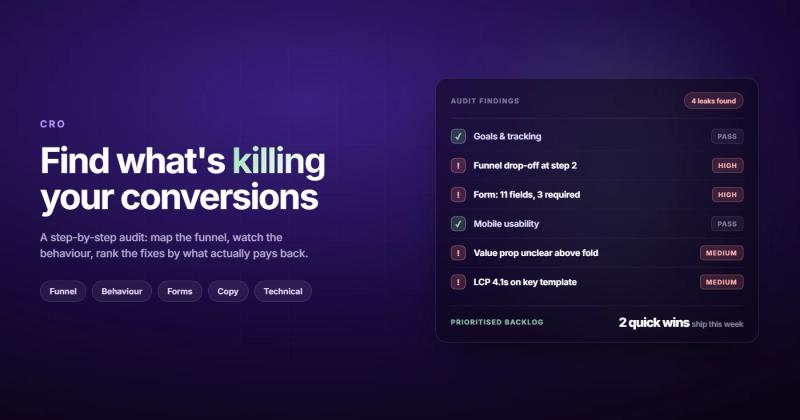
What Is a CRO Audit, Really?
A CRO audit is a structured review of your website that identifies why visitors aren't converting and what to fix first. Not a redesign. Not a vibe check. A diagnosis.
You look at your analytics, watch how people actually behave on your pages, find the spots where they hesitate, get confused, or leave, and then you build a plan to fix those spots in order of impact. That's it. The whole thing fits on one line, but most companies spend months avoiding it because "we already know what's wrong."
They don't. I've run dozens of these for clients, and the actual problem is almost never what the team assumed going in. The homepage everyone wanted to redesign? It was fine. The pricing page nobody thought about? Hemorrhaging visitors.

Why Your Website Needs a CRO Audit
Most businesses treat their website like a brochure. Build it, launch it, forget it. Then they wonder why their website conversion rate sits at 1-2% while their competitors pull 4-5%.
Here's the mechanism behind that gap: your competitors aren't smarter. They're just paying attention to what visitors actually do versus what the design team imagined they'd do.
A conversion rate optimization audit forces you to close that gap. It replaces gut feelings with evidence. Instead of "I think the hero section needs to be more engaging," you get "73% of visitors scroll past the hero in under 2 seconds, so the call to action needs to move above the fold or into the nav."
Three things a CRO audit gives you that nothing else does:
- A prioritized list of what to fix, ordered by potential revenue impact (not by what's easiest or what the CEO noticed)
- Baseline metrics so you can actually measure whether your changes worked
- Evidence to stop arguments. No more "I think the button should be green" debates. The data picks the winner.
If you're spending money driving traffic to your site through ads, SEO, or content marketing but you haven't audited your conversion funnel, you're filling a bucket with holes in it. A solid website strategy includes regular conversion audits, not just traffic growth.
Before You Start: What You Need in Place
Don't start a website conversion audit without these three things, or you'll waste your time drawing conclusions from bad data.
Analytics that actually work. Google Analytics 4, or whatever you use, needs to be properly configured. That means conversion events are set up (not just pageviews), filters exclude internal traffic, and you have at least 30 days of clean data. If your analytics setup is broken, fix that first. Everything downstream depends on it.
A behavior tracking tool. Analytics tells you what happened. Heatmaps and session recordings tell you why. Tools like Hotjar, Microsoft Clarity (free), or FullStory let you watch real users interact with your pages. You need at least one of these. According to Nielsen Norman Group's research on combining analytics with UX data, quantitative data alone misses the context that explains user behavior.
Access to your conversion data. Know your current website conversion rate for each goal. For e-commerce, that's purchases. For B2B, it's form submissions or demo requests. For SaaS, it's trial signups. Write these numbers down before you touch anything. They're your "before" photo.
The 8-Step CRO Audit Process
I've refined this process over years of running audits for clients. Some agencies charge $5,000-$15,000 for this. You can do the first pass yourself. Here's how.
Step 1: Define what "conversion" actually means for your site
This sounds obvious and it isn't. I once worked with a SaaS company that had been optimizing for email signups for two years. Their actual revenue came from demo requests. Different button, different page, different funnel entirely.
Write down your primary conversion (the one that makes money) and your secondary conversions (the steps leading up to it). For most businesses, it looks something like this:
- Primary: purchase, demo request, or contact form submission
- Secondary: add to cart, pricing page visit, case study download, email signup
Every step of your audit should trace back to these. If a change doesn't move one of these numbers, it doesn't matter.
Step 2: Map your conversion funnel and find the leaks
Open your analytics and build a funnel visualization. You want to see the path visitors take from landing on your site to converting, and where they drop off.
In GA4, use the Funnel Exploration report. Set your stages: landing page, product/service page, pricing or cart, conversion. The drop-off between each stage tells you where to focus.
The biggest drop usually isn't where you think. Most companies obsess over the landing page, but the real damage often happens between the product page and checkout, or between the pricing page and the contact form. That's where the friction lives.
Pay attention to traffic sources too. Your organic traffic might convert at 3% while your paid traffic converts at 0.5%. That's not a CRO problem on the page itself. That's a targeting problem in your ads. The funnel analysis should separate these so you don't misdiagnose a traffic quality issue as a page design issue.
Step 3: Audit your highest-traffic pages first
Pull your top 10 pages by traffic. These are your leverage points. A 1% improvement on a page that gets 10,000 visitors per month is worth more than a 10% improvement on a page that gets 100.
For each page, check:
- Bounce rate (above 70% on a non-blog page is a red flag)
- Average time on page (under 30 seconds means people aren't reading)
- Exit rate (high exit rate on a mid-funnel page means something is pushing people away)
- Scroll depth (if 80% of visitors never reach your CTA, you have a placement problem)
This is where understanding what makes a good landing page experience becomes practical. The principles apply to every high-traffic page on your site.
Step 4: Watch real users (this is where assumptions die)
Open your session recordings and watch 20-30 sessions. Not the ones where everything went smoothly. Watch the ones where people left without converting.
You're looking for patterns:
- Do visitors hover over a non-clickable element? They expected it to be a link or button.
- Do they scroll up and down repeatedly? They're looking for something they can't find.
- Do they start filling out a form and abandon it? The form is asking too much or something confused them.
- Do they rage-click? Something isn't working or isn't responding fast enough.
I once spent two days analyzing conversion data for a client's checkout flow, trying to figure out why 40% of users abandoned at the shipping step. Then I watched five session recordings and saw the problem in under a minute: the "Continue" button was below the fold on mobile. Nobody scrolled down far enough to see it. Two weeks of theorizing, five minutes of watching real humans.
Step 5: Evaluate your forms
Forms are where conversions happen or die. Every field you add reduces completion rates. Baymard Institute's research shows the average checkout has 12 form fields, but only 8 are actually necessary. That gap costs money.
Audit every form on your site:
- How many fields? Can you cut any without losing information you actually use?
- Is the CTA button specific? "Get Your Free Quote" converts better than "Submit."
- Are error messages helpful? "Invalid input" tells the user nothing. "Please enter a valid email address" tells them exactly what to fix.
- Does the form work on mobile? Test it. Actually test it. On a phone. With your thumb.
Step 6: Review your copy and messaging
This is the part everyone skips, and it's often the biggest lever. I've seen conversion rates double from copy changes alone, without touching design, layout, or anything technical.
Your website copy answers one question: "Why should I choose you?" If the answer isn't clear within 5 seconds of landing on any page, you have a messaging problem. And messaging problems are conversion problems in disguise.
Check each page for:
- A clear value proposition above the fold (not a clever tagline, an actual statement of what you do and who you do it for)
- Social proof near conversion points (testimonials, logos, review counts)
- Specific benefits, not features. "Save 10 hours per week on reporting" beats "Advanced analytics dashboard."
- Urgency or scarcity, if genuine. Fake countdown timers destroy trust.
If your copy reads like it could belong to any of your competitors, that's the problem. Good website conversion starts with saying something specific enough that the right visitors think "this is exactly what I need."
Step 7: Check the technical fundamentals
A page that loads in 5 seconds instead of 2 seconds loses roughly half its potential conversions. That's not an opinion. Google's own data confirms the relationship between page speed and bounce rates.
Run every key page through:
- PageSpeed Insights for Core Web Vitals (LCP under 2.5s, CLS under 0.1)
- Mobile responsiveness check. Over 60% of web traffic is mobile. If your site doesn't work flawlessly on a phone, you're losing more than half your potential conversions.
- Broken links and 404 errors. Nothing kills trust faster than clicking a link to nothing.
- SSL certificate. If your site shows "Not Secure" in the browser bar, visitors leave before reading a word.
Technical issues are the silent killers of conversion rates. You can have the best copy, the strongest offer, and the most persuasive design in the world. None of it matters if the page won't load. Our SEO checklist covers the technical foundations that support both rankings and conversions.
Step 8: Build your hypothesis list and prioritize
By now you've got a pile of observations. Turn them into testable hypotheses using this format:
"If we [change X] on [page Y], we expect [metric Z] to improve by [estimated %] because [evidence from audit]."
Rank each hypothesis using the ICE framework:
| Factor | Question | Score (1-10) |
|---|---|---|
| Impact | How much will this move the conversion needle? | 1-10 |
| Confidence | How sure are you this will work? (Based on evidence) | 1-10 |
| Ease | How easy/fast is this to implement and test? | 1-10 |
Average the three scores. Start with the highest-scoring hypotheses. Don't try to fix everything at once. Pick your top 3-5, A/B test them, measure the results, then move to the next batch.
5 CRO Audit Mistakes That Waste Your Time
I've seen these kill otherwise solid audits. Every single one.
1. Changing things without testing them. You found a problem. Great. You immediately changed the page based on your theory. Now you have no idea whether the change actually helped or whether something else shifted at the same time. Always A/B test changes on high-traffic pages. On low-traffic pages where A/B testing isn't statistically viable, at least track before/after metrics over the same time period.
2. Auditing with insufficient data. If your page gets 200 visitors a month, you don't have enough data to draw conclusions about conversion rates. You need statistical significance before making decisions. Google's own documentation on experiment validity emphasizes the importance of adequate sample sizes.
3. Ignoring mobile entirely. You ran the whole audit on your desktop. Congratulations, you've optimized for 35% of your traffic. Mobile users have different behaviors, different frustrations, and different conversion patterns. Audit both.
4. Focusing on cosmetic changes. Button color tests are the junk food of CRO. Yes, sometimes they matter. But if your value proposition is unclear, your form has 15 fields, and your page loads in 6 seconds, the button color is not your problem.
5. Running the audit once and calling it done. Your website, your traffic, and your customers change constantly. A CRO audit isn't a one-time project. It's a recurring practice. The companies that win at conversion optimization run audits quarterly and treat the results as an ongoing backlog, not a one-off punch list.
CRO Audit vs. UX Audit: They're Not the Same Thing
People use these interchangeably. They shouldn't.
A UX audit evaluates the overall user experience: navigation clarity, information architecture, accessibility, design consistency, and user satisfaction. It's about whether the site is pleasant and usable.
A CRO audit is narrower and more mercenary. It's specifically about conversion. Does this page turn visitors into customers? What's stopping them? How do we fix it?
There's overlap, obviously. Bad UX hurts conversions. But a page can have excellent UX and still convert poorly because the offer is wrong, the traffic source is mismatched, or the form asks for too much. A CRO audit catches those things. A UX audit might not.
If you're choosing between the two, start with the CRO audit. It's more directly tied to revenue, and it will surface most of the UX problems that actually matter to your bottom line. You can always run a broader UX audit later once the conversion-critical issues are resolved.
One more distinction worth making: a CRO audit measures against business outcomes. A UX audit measures against usability heuristics. Both matter, but when your boss asks "why aren't we getting more leads from the website," a CRO audit answers that question directly. A UX audit might tell you the site violates 3 of Nielsen's 10 heuristics, which is technically interesting but doesn't help the sales team hit their number this quarter.
Tools You Need for a CRO Audit
You don't need 15 tools. You need 4-5 good ones.
| Category | Free Option | Paid Option |
|---|---|---|
| Web analytics | Google Analytics 4 | Mixpanel, Amplitude |
| Heatmaps & recordings | Microsoft Clarity | Hotjar, FullStory |
| A/B testing | Google Optimize (sunset, use Growthbook) | VWO, Optimizely |
| User feedback | Google Forms | Typeform, Hotjar Surveys |
| Page speed | PageSpeed Insights | GTmetrix Pro |
Microsoft Clarity deserves a special mention. It's completely free, no traffic limits, and gives you heatmaps, session recordings, and rage click detection. For most small-to-mid businesses doing their first CRO audit, GA4 plus Clarity is enough to get real results.
One thing to watch out for: tool overload. I've seen companies install 8 different analytics and tracking tools, then never look at any of them because the data is scattered across too many dashboards. Pick one analytics tool and one behavior tool. Learn them well. Add more only when you've outgrown what these two can tell you.
How Often Should You Run a CRO Audit?
Quarterly for most businesses. Monthly if you're making frequent changes to your site or running significant traffic campaigns.
The full 8-step audit described above is the deep version. You don't need to do all of it every quarter. Here's a practical schedule:
- Monthly: Check your key conversion metrics. Compare to last month. Flag anything that dropped by more than 10%.
- Quarterly: Run the full audit process. Review session recordings. Update your hypothesis backlog.
- After major changes: Launched a new landing page? Redesigned checkout? Run a focused audit on the changed pages within 2-4 weeks of launch.
The companies I've seen get the best results from CRO treat it the same way they treat SEO: as an ongoing practice, not a project with an end date.
Frequently Asked Questions About CRO Audits
What is a CRO audit?
A CRO audit (conversion rate optimization audit) is a systematic analysis of your website to identify what's preventing visitors from converting. It examines analytics data, user behavior, page design, copy, forms, and technical performance to find specific problems and prioritize fixes based on potential revenue impact.
How long does a CRO audit take?
A thorough CRO audit takes 1-3 weeks depending on the size of your site and how much traffic data you have. Small sites with 10-20 pages can be audited in a week. Enterprise sites with hundreds of pages and multiple conversion funnels take closer to 3-4 weeks for a complete audit.
How much does a CRO audit cost?
Professional CRO audit services typically cost $3,000-$15,000 depending on scope. However, you can run a solid first-pass audit yourself using free tools like Google Analytics 4 and Microsoft Clarity. The 8-step process in this guide covers the same ground most agencies charge for.
What's the difference between a CRO audit and A/B testing?
A CRO audit identifies what to test. A/B testing validates whether your proposed fix actually works. The audit is the diagnosis; the A/B test is the clinical trial. Running A/B tests without an audit first means you're guessing what to test, which wastes time and traffic.
What tools do I need for a CRO audit?
At minimum, you need a web analytics platform (Google Analytics 4) and a behavior tracking tool (Microsoft Clarity is free). For A/B testing, GrowthBook is a solid open-source option. User surveys and page speed tools round out the toolkit, but you can start with just analytics and behavior tracking.
How often should I run a CRO audit?
Run a full CRO audit quarterly. Check key conversion metrics monthly. Run focused audits within 2-4 weeks after any major site change like a redesign, new landing page, or checkout flow update. The most successful teams treat CRO as an ongoing practice, not a one-time project.
Comments