
A company spends $15,000 on a redesign, launches it with champagne and a LinkedIn post, and three months later quietly asks why the leads haven't come. The site looks great. It just was never told what it was for.
What Is a Website Strategy (And Why Most Businesses Skip It)?
A website strategy is a plan that connects your business goals to every decision you make about your site: what pages exist, what they say, who they're for, and how you'll know if any of it's working. It's the difference between a website that generates leads and one that sits there looking pretty while your sales team cold-calls.
Most businesses skip this step entirely. They jump straight to picking colors and debating whether the hero section should have a video. Six months later, the site looks great and converts nobody.
I've watched this happen more times than I can count, and the answer is almost always the same: they built a website without a web strategy. They decorated a house before drawing the floor plan.
Redesigning your website because conversions are low is like repainting your restaurant because the food is bad. The walls were never the problem. Your menu is confusing, your prices don't make sense, and nobody can figure out where to park. But sure, let's try a new shade of blue.
Here's what a website strategy actually covers, step by step, without the fluff that most guides pile on.

Start With One Question: What Is This Website Supposed to Do?
This sounds obvious. It isn't. Ask five people at any company what their website is for and you'll get five different answers. The CEO says "brand awareness." Marketing says "lead generation." Sales says "it should have a demo booking form." The designer says "it needs to feel premium."
None of those are wrong. But none of them are a strategy either.
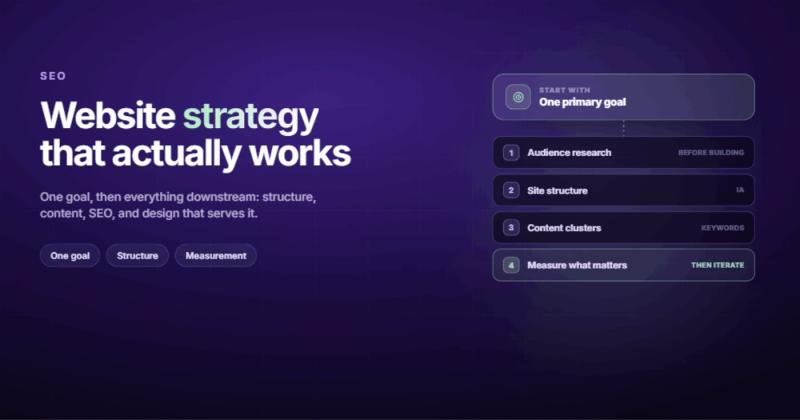
A website strategy plan starts with picking one primary goal. Not three. Not "all of the above." One. Everything else is secondary. When your primary goal is lead generation, you measure pages by whether they move people toward a form submission. When it's e-commerce revenue, you measure by transactions. When it's content authority, you measure by organic traffic and time on page.
The moment you try to optimize for everything, you optimize for nothing. I learned this the hard way with my own agency site. For months, we had a homepage trying to do brand storytelling AND lead generation AND portfolio showcase AND blog promotion. Four goals, zero focus. Conversion rate was embarrassingly low. We stripped it back to one CTA, one path, one goal. The results were immediate.
Know Your Audience Before You Write a Single Word
You can't build a website strategy without knowing who you're building it for. And "small business owners" isn't specific enough. Neither is "decision-makers in mid-market companies."
Get specific. What does this person Google at 11pm when they realize their website isn't working? What have they already tried? What are they afraid of getting wrong?
When we work on web design projects, the first thing we do is talk to the client's actual customers. Not their marketing team's idea of who the customer is. The actual people who bought something, signed up, or filled out a contact form. The gap between who companies think their audience is and who actually shows up is often enormous.
I run a car accessories e-commerce store on the side. Expected male buyers to dominate. The data showed women were actually the majority of our buyers. If I'd built the entire site around my assumption, I'd have missed the people actually spending money.
Data beats assumptions. Every time.
Site Structure: The Part Everyone Rushes Through
Your site structure is the skeleton of your website development strategy. Get it wrong and no amount of good content or nice design will save you.
Here's what most businesses do: they look at their competitor's navigation, copy the same pages (Home, About, Services, Blog, Contact), and call it done. That's not structure. That's mimicry.
Good site structure does three things:
- It gets visitors to the right page in two clicks or fewer
- It tells search engines what your site is about through logical hierarchy
- It creates clear paths from "just browsing" to "ready to buy"
Your main navigation should have five to seven items. Not twelve. Not a mega-menu with forty links that nobody reads. Five to seven. Every additional nav item dilutes the ones that matter.
Think about it as a funnel built into your architecture. Top-level pages catch broad intent. Service pages or product pages catch specific intent. Blog posts and guides catch informational intent. Each level links to the others. Search intent should drive your page hierarchy, not your org chart.
Content Strategy: What to Say and Where to Say It
Content isn't just your blog. It's your homepage headline, your service page copy, your about page story, your CTA button text. Every word on your site is content, and every word should be doing a job.
Start with your service or product pages. These are the pages closest to revenue. If someone lands on your service page and can't answer "what do they do, who do they do it for, and why should I care?" within five seconds, your content needs work.
Then build out supporting content. Blog posts, guides, case studies, comparison pages. Each piece should target a specific keyword cluster and link back to your money pages. This is how you build what Google calls topical authority: not by writing one post about everything, but by writing many posts that circle the same core topics from different angles.
A web design marketing strategy that works looks like this: your blog post about website marketing strategy links to your SEO service page. Your SEO service page links to case studies showing results. Your case studies link back to relevant blog posts. Everything connects. Nothing exists in isolation.
Build SEO Into the Strategy From Day One
SEO is not something you "add" after the site launches. That's like building a house and then deciding where the plumbing should go. You pour the SEO foundation before you write a single page.
Keyword Research Before Content
Every page on your site should target at least one keyword cluster. Your homepage targets your brand and primary service terms. Your service pages target "how" and "what" queries. Your blog targets informational queries that your audience searches before they're ready to buy.
Don't guess at keywords. Use actual data. Tools like Semrush or Ahrefs will show you exactly what people search for, how often, and how hard it is to rank. Pick battles you can win. A new site isn't going to rank for "web design" against agencies with fifteen years of backlinks. But "website strategy for small business" or "web strategy examples"? That's winnable.
Technical SEO Baked In
Page speed, mobile responsiveness, clean URLs, proper heading structure, schema markup, XML sitemaps. These aren't optional extras. They're the table stakes. If your site loads in six seconds on mobile, Google isn't sending you traffic. Period. We covered this in detail in our SEO checklist, but the short version: fix the technical foundation before you worry about content.
Design Serves Strategy, Not the Other Way Around
This is where most website projects go sideways. The design phase becomes a taste contest. "I don't like that shade of green." "Can we make the logo bigger?" "My competitor has parallax scrolling, we need that too."
None of that is strategy. That's decoration.
Design in a strategic context means: does this layout guide the user toward the goal? Does the visual hierarchy put the most important information first? Does the typography make long-form content readable? Does the page load fast enough that mobile users don't bounce?
I once spent two weeks building a custom animation system for a client's homepage. Silky smooth. Perfectly timed. The client's actual customers were on 4G connections in rural areas. Nobody ever saw the animations. They bounced before the page finished loading. That's when I stopped designing for my own internet connection.
The best web strategy decisions are boring. Clear headlines. Fast load times. Obvious CTAs. Readable fonts. These don't win design awards, but they win customers.
Measure What Matters (Hint: It's Not Pageviews)
A website strategy without measurement is a wish list. You need to know what's working, what isn't, and what to change.
But here's where businesses get tripped up: they track everything and understand nothing. Google Analytics gives you 200 reports. Maybe five of them matter for your business.
For most business websites, track these:
- Conversion rate by page (which pages actually generate leads?)
- Bounce rate on landing pages (are people finding what they expected?)
- Organic traffic by page (which content is actually ranking?)
- Time to first conversion (how long does it take a new visitor to become a lead?)
Set up goal tracking in Google Analytics on day one. Not month three. Day one. Every week you run without conversion tracking is a week of data you can't get back.
Review your numbers monthly. Not daily, that'll drive you crazy with noise. Not quarterly, that's too slow to catch problems. Monthly gives you enough data to spot real trends without overreacting to random Tuesday traffic spikes.
When to Rebuild vs. When to Optimize
Not every website problem needs a full rebuild. Most don't. But some do.
Optimize when your site is structurally sound but underperforming. The pages are there, the content exists, but conversions are low. That's a messaging problem, a UX problem, or a traffic problem. Fix those without burning down the house.
Rebuild when the foundation is broken. Your CMS won't let your marketing team update content without a developer. Your site isn't mobile-responsive. Your page architecture is so tangled that adding a new service page breaks three others. Your load time is measured in geological terms.
The decision framework is simple: can your team make meaningful changes to the site without calling a developer? If yes, optimize. If no, you probably need a website redesign. But do it with a strategy this time.
The Real Cost of Skipping Strategy
Nobody talks about this part. The cost of no website strategy isn't zero. It's hidden.
It's the $8,000 you spend on a redesign that doesn't improve conversions. It's the six months of blog posts targeting keywords nobody searches for. It's the landing page that gets traffic but no leads because the CTA asks people to "learn more" instead of telling them what to do next. It's the sales team manually qualifying leads that the website should have filtered.
I've seen businesses spend more money recovering from a bad website launch than the original build cost. They rebuild, realize the same problems persist, hire a consultant, implement half the recommendations, get frustrated, and start the cycle again.
The businesses that skip this cycle are the ones who spent two weeks on strategy before they opened Figma. Two weeks. That's the investment we're talking about. Not months of planning paralysis. Two weeks of focused work: define the goal, research the audience, map the structure, plan the content, set up tracking.
Then you build. And when you build with a strategy, every decision has a reason behind it. "Why is this button green?" Because our A/B test showed green outperformed blue by 12%. "Why is pricing on the main nav?" Because 67% of our qualified leads visit the pricing page before contacting us. "Why does the blog only cover four topics?" Because those are the four topic clusters where we can realistically rank.
That's a website strategy. Not a document that sits in a Google Drive folder. A living framework that makes every decision faster and every result measurable.
Frequently Asked Questions
What is a website strategy?
A website strategy is a plan that connects your business goals to your website decisions. It covers who you're building for, what pages you need, what those pages should say, how you'll drive traffic, and how you'll measure success. Without one, you're making design and content choices based on gut feel instead of data.
How do I create a website strategy plan?
Start by defining one primary business goal for your site. Research your audience. Map your site structure around user intent. Plan content for each page with specific keyword targets. Set up analytics and conversion tracking before launch. Review monthly and adjust based on real data, not opinions.
What should a website strategy include?
At minimum: a clear primary goal, audience research, site architecture, content plan with keyword targets, SEO foundations, design guidelines that serve the goal (not just look nice), and a measurement framework. The strategy should be short enough that everyone on the team actually reads it.
How often should I update my website strategy?
Review the full strategy quarterly. Check your metrics monthly. Make tactical adjustments (new content, CTA changes, design tweaks) as the data suggests. A major strategy overhaul should happen every 12 to 18 months, or whenever your business model, audience, or competitive environment changes significantly.
What is the difference between a website strategy and a marketing strategy?
A marketing strategy covers all your channels: social media, email, paid ads, events, PR. A website strategy focuses specifically on making your site the most effective channel in that mix. Your website strategy should plug into your broader marketing strategy, not exist separately from it. Think of the website as the hub that all other marketing channels point back to.
Do I need a website strategy for a small business?
Especially for a small business. You have fewer resources, so every page and every piece of content needs to earn its spot. A five-page site with a clear strategy will outperform a fifty-page site built on guesswork. Small businesses can't afford to waste budget on a site that doesn't convert.


Comments