
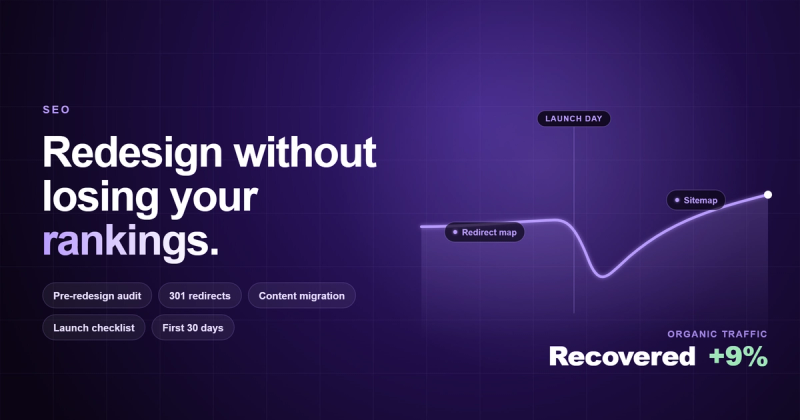
A website redesign doesn't have to wreck your search rankings. With the right preparation (audit your current SEO, plan your redirects, migrate content carefully, and monitor everything post-launch), you can redesign your site and keep the traffic you've earned. Most businesses that lose rankings after a redesign didn't lose them because of the redesign itself. They lost them because nobody thought about SEO until the new site was already live.
I've seen this happen more times than I can count.
Before You Touch a Single Pixel, Ask This Question
Here's the thing nobody asks before a redesign: why are you redesigning?
I once had a client tell me their website "looked dated." When I asked what that meant, they pointed to a competitor's site that had launched the week before. Their competitor had a new hero video, some parallax scrolling, and a dark color scheme. My client wanted the same thing.
Their actual problem? Their phone wasn't ringing. Leads had dried up. But the website itself was ranking on page one for 11 local keywords and bringing in 400 organic visits a month. Those visits just weren't converting because the messaging was unclear and the contact form was buried three scrolls down.
That's not a design problem. That's a messaging problem wearing a design costume.
If you're redesigning because your conversion rate is low, ask whether a full redesign is the right fix. Sometimes you need new copy, a better CTA placement, or faster load times. None of those require tearing down what's already working in search.
The Pre-Redesign SEO Audit (Don't Skip This)
Before anything gets redesigned, you need a snapshot of what's working right now. If you don't know what you have, you can't protect it.
Crawl your existing site. Use Screaming Frog or Sitebulb to get a full list of every URL, its status code, title tag, meta description, H1, and internal links. Export this. You'll need it later.
Pull your keyword rankings. Use Google Search Console or SEMRush to identify which pages rank for which keywords. Sort by traffic. The pages bringing in the most organic visits are the ones you absolutely cannot break during the redesign.
Document your backlink profile. Run your domain through Ahrefs or SEMRush and identify which pages have the most external links pointing to them. If you change or remove those URLs without redirects, you're throwing away authority that took months or years to build.
Screenshot your current analytics. Grab baseline data for the 90 days before the redesign starts: organic traffic, top landing pages, bounce rates, conversion rates. You'll compare against these numbers post-launch to catch problems early.
This audit takes half a day. Skipping it can cost you six months of recovery time.
URL Changes and Redirects: Where Most Redesigns Go Wrong
If your redesign changes any URLs, this section will determine whether you keep your rankings or watch them disappear.
Every old URL that changes needs a 301 redirect to its new location. Not a 302 (temporary). A 301 (permanent). This tells Google: "The page moved here. Transfer the ranking signals."
Build a redirect map before you launch. It's a spreadsheet. Old URL in column A, new URL in column B. Every single page. Yes, even the blog post from 2019 that only gets 12 visits a month. If it has backlinks, those backlinks are valuable.
Common mistakes I see:
The development team changes the URL structure from /services/web-design to /what-we-do/website-design-services without telling anyone. No redirects get set up. Google crawls the new site, finds 404s everywhere, and drops the pages from the index within two weeks.
Or worse: someone redirects everything to the homepage. Every old URL just points to /. Google treats this as a soft 404 because the content doesn't match. You lose the ranking signals anyway.
The rule is simple: one old URL maps to one new URL with matching content. If a page existed before, it needs a home after. If you're genuinely removing a page and there's no equivalent, redirect it to the most relevant remaining page.
Content Migration: Keep What Works, Fix What Doesn't
A redesign is a good time to clean up your content. But "clean up" doesn't mean "delete everything and start fresh."
Identify your top-performing pages from the audit. These get migrated first, and they get migrated carefully. Keep the title tags, meta descriptions, H1s, and body content intact. If you want to improve them, great, but don't change the primary keyword targeting. A page ranking #4 for "emergency plumber Toronto" shouldn't come out of the redesign targeting "Toronto plumbing services" instead. That's a different keyword with different intent.
For underperforming pages, you have three options: update them with better content, merge them into a stronger page, or remove them and redirect to something relevant. Pick one. Don't just let them vanish.
One thing I've learned from building sites for over a decade: the content that performs well in search is rarely the content that looks prettiest. Some of the highest-traffic pages I've worked on had ugly layouts and plain text. The content answered the question better than anyone else. During a redesign, protect the substance. You can make it prettier without making it worse.
Technical SEO Checklist for Launch Day
When the new site goes live, you've got a narrow window to catch problems before Google notices them. Here's what to check on day one:
Test every redirect. Run your redirect map through a bulk checker or Screaming Frog. Look for redirect chains (A redirects to B, B redirects to C), redirect loops, and anything that still lands on a 404.
Submit your updated XML sitemap. Go to Google Search Console, remove the old sitemap, and submit the new one. This tells Google to recrawl your site with the new URL structure.
Check your robots.txt. I've seen staging environments go live with Disallow: / still in the robots.txt file. That one line blocks Google from crawling your entire site. It takes ten seconds to check and can save you weeks of invisible indexing problems.
Verify your canonical tags. Make sure every page points to itself as the canonical URL. If your staging URLs leaked into the canonical tags, Google might index the staging version instead of production.
Run a mobile test. Google uses mobile-first indexing. If the new design broke something on mobile (tiny touch targets, horizontal scroll, content hidden behind JavaScript), your rankings will take a hit even if desktop looks perfect.
Check page speed. That new hero video and those high-res background images might look great, but if they added 4 seconds to your load time, Google and your visitors will both penalize you. Run Lighthouse. Aim for a performance score above 80.
The First 30 Days After Launch
Don't celebrate yet. The first month after a redesign is when problems surface.
Check Google Search Console daily for the first two weeks. Look at the Coverage report for new 404 errors, crawl anomalies, and pages that dropped out of the index. If you see a spike in "Excluded" or "Error" pages, something in your redirect map is broken.
Compare your organic traffic week-over-week against your pre-redesign baseline. A small dip in the first week is normal. Google needs time to recrawl and reassess. If the dip lasts more than two to three weeks, start investigating.
Monitor your top 20 keywords in SEMRush or Ahrefs. If rankings drop for pages that should have transferred cleanly, check whether the redirect is working, whether the content changed, and whether the new page is actually indexable.
Keep your old redirect map active for at least 12 months. Don't remove 301 redirects after a few weeks because "the site is working fine now." External sites, bookmarks, and cached search results will keep sending traffic to old URLs for months.
The Mistake Nobody Talks About: Redesigning for the Wrong Reason
I mentioned this at the top, but it's worth repeating because I see it so often.
Many companies have a messaging problem disguised as a design problem. Their website doesn't convert, so they assume the design is the issue. They spend $15,000 to $50,000 on a redesign, launch a site that looks different but says the same unclear things, and wonder why the numbers didn't change.
Before spending money on a redesign, try this: rewrite your homepage headline, add a clear CTA above the fold, and fix your contact form. Run it for 30 days. If conversions improve, you had a messaging problem. If they don't, then maybe you need a redesign.
The cheapest redesign is the one you didn't need.
FAQ
Will a website redesign hurt my SEO?
It can, but it doesn't have to. The most common cause of SEO damage during a redesign is missing redirects for changed URLs. If you plan your redirect map before launch, migrate your content properly, and monitor Search Console afterward, you can keep your rankings through the process.
How long does it take to recover SEO after a redesign?
If redirects and content are handled properly, you might see a brief dip for one to two weeks while Google recrawls your site. If things went wrong (broken redirects, missing pages, blocked robots.txt), recovery can take three to six months. The severity depends on how quickly you catch and fix the issues.
Should I change my URL structure during a redesign?
Only if your current structure is genuinely bad (long, unreadable URLs with random parameters). If your URLs are clean and already rank well, leave them alone. Every URL change requires a redirect, and redirects lose a small amount of link equity. Don't change URLs for cosmetic reasons.
What's the biggest SEO mistake during a redesign?
Not setting up 301 redirects for changed URLs. This single mistake causes more traffic loss than anything else. The second biggest mistake is launching with the staging site's robots.txt still blocking search engines.
Do I need to hire an SEO specialist for my redesign?
If your site gets meaningful organic traffic (over 500 visits per month from search), yes. The cost of an SEO specialist is far less than the cost of recovering from a botched migration. If your site barely gets organic traffic, you can handle it with a checklist and careful attention to redirects.
Can a redesign actually improve SEO?
Yes. A redesign is a chance to fix technical issues (slow load times, poor mobile experience, messy URL structure), improve content quality, and strengthen internal linking. Many sites see organic traffic increase after a well-planned redesign because they fixed problems that were holding them back.
How do I monitor SEO after launching a redesigned site?
Use Google Search Console to check for crawl errors, indexing issues, and ranking changes daily for the first two weeks. Track your top keywords in SEMRush or Ahrefs. Compare organic traffic against your pre-redesign baseline. Set up alerts for 404 spikes so you catch broken redirects before they cause lasting damage.
Comments