
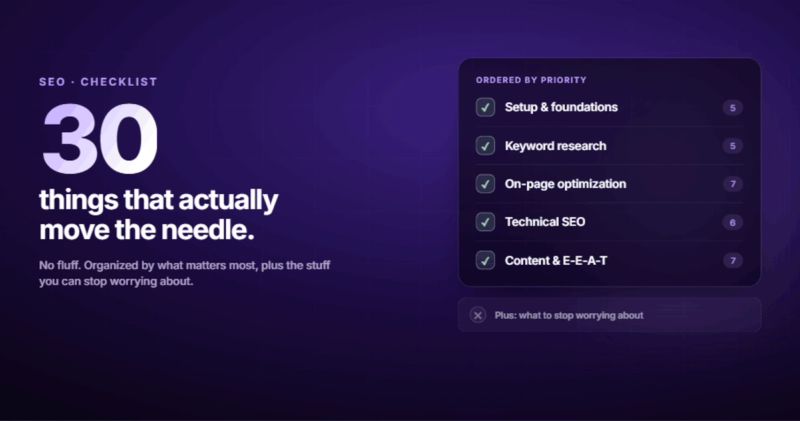
An SEO checklist is a structured list of tasks that, when completed, gives your website the best chance of showing up when someone searches for what you do. Not a magic formula. Not a silver bullet. A checklist. The kind of thing pilots use before takeoff because even experts forget steps when there are forty of them.
I've been doing this long enough to know what actually moves the needle and what's just busywork disguised as optimization. Most SEO checklists you'll find online read like a textbook wrote them. Forty-seven items, no prioritization, no context, no opinion on what matters and what doesn't. You finish reading and you're more confused than when you started.
This one's different. I've organized it by what to do first, what to do next, and what to stop worrying about. Every item on this list is something I've either done for a client or done on my own sites. If it didn't work, it's not here.

1. Set Up Your SEO Foundations First
Before you optimize a single page, you need to see what's happening. Flying blind is how you spend six months "doing SEO" and end up with nothing to show for it.
Google Search Console. This is non-negotiable. It's free, it's from Google, and it tells you exactly what queries are bringing people to your site (and which ones almost are). If you don't have this set up, stop reading and go do it. Everything else depends on this data.
Set up Google Analytics 4 alongside it. GA4 is clunky, I know. The interface feels like it was designed by committee during a fire drill. But it's the standard, and it tracks what matters: which pages people visit, how long they stay, and where they drop off.
Submit your XML sitemap through Search Console. Your sitemap is how you tell Google "here are all my pages, please index them." If you're on WordPress, Yoast or Rank Math generates one automatically. On Webflow, it's built in. On a custom Next.js site, you'll need to generate one yourself.
Check your robots.txt file. This is the file that tells search engines what they can and can't crawl. I once spent two weeks wondering why a client's new service pages weren't ranking. The robots.txt was blocking the entire /services/ directory. A leftover from their staging environment that nobody removed after launch.
2. Keyword Research That Actually Helps
Here's where most website seo checklists get it wrong. They tell you to "find keywords" like it's a treasure hunt. It's not. It's more like grocery shopping. You need to know what you're cooking before you buy ingredients.
Start with what you actually sell or do. Write it down in plain language. If you're a plumber in Leeds, your starting keywords are "plumber Leeds," "emergency plumber Leeds," "boiler repair Leeds." Not "plumbing solutions" or "residential water infrastructure services."
Use a keyword tool (Semrush, Ahrefs, or even Google's free Keyword Planner) to check three things for each keyword:
- Search volume. Are people actually searching for this? If the volume is zero, nobody cares about that phrase no matter how clever it sounds.
- Keyword difficulty. Can you realistically rank for it? A brand new site competing for "best CRM software" is like entering a go-kart in Formula 1.
- Search intent. Is the person looking to buy, learn, compare, or just find a specific website? A blog post won't rank for "buy running shoes." A product page won't rank for "how to choose running shoes."
Group your keywords into clusters. One primary keyword per page, with four or five related secondary keywords woven in naturally. This post targets "seo checklist" as the primary, with "website seo checklist," "seo best practices checklist," and "content seo checklist" as secondaries. You don't force them in. You write about the topic thoroughly, and they appear because they're part of the same conversation.
3. On-Page SEO: The Stuff You Can Control
On-page SEO is where most people should spend 80% of their time. It's the part you have direct control over, and it compounds. Get these right once, and they keep working for months.
Title Tags
Keep them under 60 characters. Put your primary keyword near the front. Make them specific enough that someone scanning ten blue links will click yours. "SEO Checklist: 30 Things That Actually Move the Needle" tells you exactly what you're getting. "The Complete Guide to Search Engine Optimization Best Practices" tells you nothing and gets cut off after "Search Engine Optimi..."
Meta Descriptions
150 to 160 characters. Include your keyword, but more importantly, give people a reason to click. Think of it as the movie trailer for your page. Google sometimes rewrites these based on the query, but having a good one increases your odds.
Headers (H1, H2, H3)
One H1 per page. That's your page title. It should contain your primary keyword. Your H2s are your section headings. Use them to break up the content and include supporting keywords where they fit naturally. H3s go under H2s for sub-topics. Never skip levels. Don't go from H2 to H4. It confuses screen readers and it confuses Google.
URL Structure
Short, readable, keyword-included. /blog/seo-checklist beats /blog/2026/06/the-complete-ultimate-seo-checklist-guide-for-beginners every time. Lowercase, hyphens only, no stop words unless they're needed for clarity.
Your First 100 Words
Get your primary keyword into the first paragraph. Not because Google needs it there (it's smart enough to figure out what your page is about) but because it confirms to both humans and search engines that they're in the right place. When someone searches "seo checklist" and lands on this page, the first paragraph should make them think "yes, this is what I was looking for."
4. Content Quality: The Part Nobody Wants to Hear
You can nail every technical SEO element on this seo best practices checklist and still not rank if your content is thin, generic, or just... boring. Google's gotten good at measuring whether people find your content useful. They watch time on page, bounce rates, and whether searchers click back to try another result.
I once had a client who published 50 blog posts in three months using AI-generated content. Every post had perfect keyword placement, proper headers, meta descriptions, the works. Traffic went up for about six weeks, then dropped off a cliff. Google's helpful content update caught them. Fifty posts. Three months of work. Gone. That's when I stopped treating content as a checkbox exercise.
Write for humans first. Match the search intent. If someone's looking for a checklist, give them a checklist (like this one). If they're comparing two products, give them an honest comparison. If they want a tutorial, walk them through it step by step.
Match the length of what's already ranking. Not because longer is better, but because the top results tell you how much depth Google thinks this topic needs. If the top three results for your keyword are all 3,000+ words, a 500-word post isn't going to cut it. If they're all 800 words, writing 5,000 words is wasting everyone's time, including yours.
And for the love of everything, have an opinion. The internet is drowning in content that says nothing. "SEO is important for your business." Thanks. That's like saying "food is important for your body." Tell me something I can act on. Tell me something you actually believe based on what you've seen work.
5. Technical SEO: The Invisible Foundation
Technical SEO is your site's plumbing. Nobody notices it when it works. Everyone notices when it doesn't.
Page Speed
Run your site through PageSpeed Insights. If your score is below 50 on mobile, you've got problems. The most common culprits: unoptimized images, too many third-party scripts, render-blocking CSS, and hosting that's too slow. I've seen sites jump 20 positions just by switching from shared hosting to a decent VPS and compressing their images.
Mobile-Friendliness
Google uses mobile-first indexing. That means it looks at the mobile version of your site first. If your site is hard to use on a phone (text too small, buttons too close together, horizontal scrolling) you're losing rankings. Over 60% of searches happen on mobile. This isn't a nice-to-have.
Crawlability and Indexing
Check Search Console for crawl errors. Look for pages that return 404s, redirect chains (A redirects to B redirects to C redirects to D), and pages that are indexed but shouldn't be (like your staging site, your tag pages, or your author archives).
Use canonical tags to tell Google which version of a page is the "real" one. If you have the same content accessible at /blog/seo-checklist and /blog/seo-checklist?utm_source=twitter, a canonical tag prevents Google from treating them as duplicate content.
HTTPS
If your site is still on HTTP in 2026, fix that before anything else. Chrome literally warns visitors that your site isn't secure. That's not an SEO problem. That's a trust problem.
6. Image Optimization (The One Everyone Skips)
Images are ranking signals. They show up in image search, they affect page speed, and they give Google additional context about your content. Most sites treat images as decoration. That's a missed opportunity.
Every image needs descriptive alt text. Not "image1.jpg." Not "photo." Something like "SEO audit results showing a website's Core Web Vitals scores." The alt text should describe what the image shows AND connect it to the page topic where that makes sense.
Use WebP format. It's 25-30% smaller than JPEG at the same quality. Compress everything under 200KB. Set explicit width and height attributes to prevent layout shift (that annoying thing where the page jumps around as images load). And use loading="lazy" on every image that's below the fold.
Name your files descriptively. seo-checklist-keyword-research-example.webp is better than Screenshot-2026-06-15.webp. Google reads filenames.
7. Internal Linking: Free Authority You're Leaving on the Table
Internal links are how you tell Google which pages on your site matter most. They're also how you keep readers on your site instead of bouncing back to the search results.
Every blog post should have 3 to 5 internal links. Link to related posts, link to your service pages, and use descriptive anchor text. "Learn more about how SEO and website redesigns connect" is infinitely better than "click here."
Build a mental map of your site's content. Your service pages are the hubs. Your blog posts are the spokes. Every blog post should point back to a relevant service page. If you're writing about SEO checklists, you should be linking to your SEO service page. That's how you funnel authority where it matters.
Don't forget breadcrumbs. They help Google understand your site structure and they give users a way to navigate. Most CMS platforms support them natively or through plugins.
8. E-E-A-T: Prove You're a Real Person With Real Experience
E-E-A-T stands for Experience, Expertise, Authoritativeness, and Trustworthiness. Google introduced the extra "E" for Experience in late 2022, and it's become one of the most important ranking factors since.
The mechanism is straightforward. Google wants to rank content written by people who have actually done the thing they're writing about. Not people who read about it and summarized what they found. Not AI that scraped ten articles and blended them into one.
How you signal this:
- Author bylines with real names on every post
- An author bio that mentions actual credentials and years of experience
- First-person stories and specific examples from real projects
- Published and "last updated" dates visible on every page
- An About page with real company information, real people, real contact details
- Links to external authoritative sources that back up your claims
This is where AI-generated content runs into trouble. AI can produce grammatically perfect text, but it can't tell you about the time it accidentally deleted a client's production database. Those real stories, those specific details, that's what E-E-A-T is measuring.
9. Structured Data: Speak Google's Language
Structured data (schema markup) is JSON-LD code you add to your pages that tells Google exactly what type of content this is. Is it a blog post? A product? A FAQ? A recipe? A local business?
For blog posts, you want Article schema at minimum. Add FAQ schema if you have a FAQ section (like the one at the bottom of this post). Add BreadcrumbList schema for your navigation structure. If you run a local business, add LocalBusiness schema with your address, phone number, and hours.
Here's what Article schema looks like in practice:
{
  "@context": "https://schema.org",
  "@type": "Article",
  "headline": "The SEO Checklist That Actually Works",
  "author": {
    "@type": "Person",
    "name": "Slobodan Gajic"
  },
  "datePublished": "2026-06-23",
  "publisher": {
    "@type": "Organization",
    "name": "2M Webstudio"
  }
}
You don't need to write this by hand. Plugins handle it on WordPress. On custom builds, a single JSON-LD block in your page head covers it. The point is that structured data makes your content eligible for rich results (those fancy search results with star ratings, FAQ dropdowns, and breadcrumbs). It won't guarantee you get them, but without it, you definitely won't.
10. AI Search Optimization: The New Reality
Here's something most seo checklist templates from 2024 don't cover: your content now competes for visibility in AI-generated answers, not just traditional blue links.
Google's AI Overviews, ChatGPT search, Perplexity, and Bing Copilot are all pulling content from web pages to answer questions directly. Your content can influence decisions without the user ever clicking through to your site. That sounds scary, but the optimization is the same stuff you should be doing anyway.
Clear, direct answers to specific questions. Proper heading structure. Quotable statements that an AI can extract and cite. Structured data that tells AI systems exactly what your page covers.
The sites that do well in AI search are the same ones that do well in traditional search: specific, authoritative, well-structured content from identifiable experts. The seo best practices checklist hasn't changed. The surface it appears on has.
11. External Links and Citations
Link out to authoritative sources. Two or three per post is plenty. Link to Google's own documentation, industry studies, .gov or .edu sources when relevant.
Some people worry that external links "leak" authority. They don't. Linking to good sources makes your content more trustworthy. It shows Google you're part of a credible web of information, not an isolated island trying to hoard PageRank. Google's own guidelines on helpful content encourage this.
12. What to Stop Worrying About
A content seo checklist should include what NOT to do. I've seen too many people waste time on things that moved the needle in 2015 but are irrelevant now.
Keyword density. There is no magic percentage. Write naturally. If your keyword appears once in the title, once in the first paragraph, and a few times in the body because you're actually talking about the topic, that's enough.
Meta keywords tag. Google has ignored this since 2009. Stop filling it in.
Exact-match anchor text everywhere. This looks spammy. Vary your anchor text. Use natural phrases.
Submitting your site to 500 directories. This was a thing in 2008. It's not a thing now. If anything, it hurts.
Obsessing over domain authority. DA is a third-party metric made by Moz. Google doesn't use it. It's a useful rough guide for comparing domains, but it's not a ranking factor. Don't buy links just to increase a number Google doesn't look at.
I track two numbers religiously: organic traffic from Search Console (real clicks from real people) and conversions. Everything else is vanity. If your organic traffic is going up and those visitors are doing what you want them to do, your SEO is working. If it's not, no checklist will save you from a bad product or a confusing message.
Frequently Asked Questions
What is an SEO checklist?
It's a structured list of optimization tasks organized by priority. Think of it like a pre-flight checklist for your website. It covers everything from technical setup (can Google actually find your pages?) to content quality (does anyone care what's on them?) to authority signals (does Google trust you enough to show your pages to people?). The point isn't to do everything at once. It's to make sure you don't miss something critical while you're focused on the flashy stuff.
How do I do SEO step by step?
Start with the foundations: set up Google Search Console, submit your sitemap, and make sure your site loads fast on mobile. Then do keyword research to figure out what your audience is actually searching for. Optimize your existing pages (titles, headers, meta descriptions, content) for those keywords. Build internal links between related content. Create new content that fills gaps. Then monitor your results in Search Console and iterate. It's not a one-time project. It's ongoing maintenance, like tending a garden.
What are the basics of SEO for beginners?
Focus on three things: make sure Google can crawl and index your site (technical basics), write content that answers what people are searching for (content), and get other reputable sites to link to yours (authority). That's it. Everything else is refinement of those three fundamentals. Don't let the complexity of advanced SEO prevent you from getting the basics right. A site with clean HTML, fast load times, and genuinely useful content will outrank most of the competition without any fancy tricks.
How often should you audit your SEO?
Do a lightweight check monthly: look at Search Console for crawl errors, check your top pages for ranking changes, review any new 404s. Do a full audit quarterly: site speed, content freshness, internal link structure, technical issues. And do a deep audit twice a year: competitive analysis, keyword gap analysis, content pruning, and strategy adjustments. The frequency matters less than actually doing it. Most sites I've audited haven't been properly reviewed since the day they launched.
Does my website need SEO?
If you want people to find your website through search engines, yes. If all your traffic comes from paid ads, social media, or direct referrals and you're happy with that, technically no. But here's the thing: organic search traffic compounds over time. A blog post you write today can bring in visitors for years without you paying per click. Paid ads stop the second you stop paying. SEO is the long game, and it's the only channel where your investment builds on itself.
What is E-E-A-T in SEO?
Experience, Expertise, Authoritativeness, and Trustworthiness. It's Google's framework for evaluating content quality. The first E (Experience) was added in 2022, and it means Google now specifically looks for evidence that the author has firsthand experience with the topic. A blog post about choosing between Webflow and WordPress written by someone who's built sites on both platforms will outrank a generic comparison written by someone who's never touched either one.
Your Move
This checklist has 30+ items on it. You don't need to do all of them today. Pick the section where you're weakest and start there. If you've never set up Search Console, that's step one. If your technical foundations are solid but your content is thin, focus on that.
The sites that rank well aren't the ones that followed the most seo checklist items in a single afternoon. They're the ones that treated SEO as a system, made consistent improvements over months, and actually measured what happened.
Start with the fundamentals. Measure the results. Adjust. Repeat. That's not just an seo checklist. That's how anything worth building gets built.
Comments