
The Short Answer (Before You Read 4,000 Words)
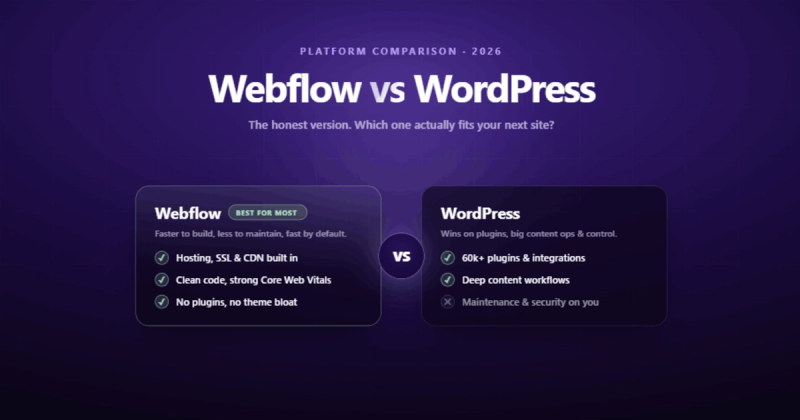
If you're comparing webflow vs wordpress and want the honest version: Webflow is a better fit for most business websites in 2026. It's faster to build on, easier to maintain, and performs better out of the box. WordPress still wins if you need 60,000 plugins, a massive content operation, or full server-level control.
That's the answer. The rest of this post is the reasoning.
The Quick Scorecard
If you're short on time, here's the category-by-category breakdown. If you want the "why" behind each score, keep reading.
| Category | Webflow | WordPress | Winner |
|---|---|---|---|
| Design Freedom | 9/10 | 6/10 | Webflow |
| SEO | 8/10 | 8/10 | Tie |
| Performance | 9/10 | 6/10 | Webflow |
| Total Cost (3 years) | 8/10 | 5/10 | Webflow |
| Security | 9/10 | 5/10 | Webflow |
| E-Commerce | 6/10 | 9/10 | WordPress |
| Plugin Ecosystem | 4/10 | 10/10 | WordPress |
| Content at Scale | 6/10 | 9/10 | WordPress |
| Ease of Maintenance | 9/10 | 4/10 | Webflow |
| Learning Curve | 6/10 | 7/10 | WordPress |
Overall: Webflow 7.4 vs WordPress 6.9. Close, but the gap widens when you factor in maintenance time and hidden costs.
Why This Comparison Still Exists in 2026
WordPress powers about 43% of the web. Webflow powers a fraction of that. So why does this comparison keep coming up?
Because market share doesn't mean "best choice for your next project." Internet Explorer had market share too. The real question isn't which platform is more popular. It's which one will cost you less time, less money, and fewer headaches over the next three years.
I've built sites on both platforms for over a decade. React, Angular, Next.js, WordPress, Webflow, I've written production code on all of them. My agency runs on Webflow now, but I'm not here to sell you on it. I'm here to explain the actual trade-offs so you can make a decision based on your situation, not someone else's blog post.
What Is WordPress, Really?
WordPress is open-source software that you download, install on a server, and manage yourself. Think of it like buying a house. You own it, you can renovate however you want, but you're also responsible for the plumbing, the roof, and making sure nobody breaks in through the back door.
It started as blogging software in 2003. Twenty-three years later, it's become a content management system that tries to do everything: blogs, e-commerce, membership sites, forums, learning platforms. It does all of these things. It does some of them well.
The Gutenberg block editor (and now WordPress 7.0's native AI features) have made the editing experience better. But the core architecture is still PHP, still database-driven, and still dependent on plugins for most functionality beyond basic content publishing.

What Is Webflow, Really?
Webflow is a visual development platform with hosting built in. Think of it like renting a high-end apartment. Someone else handles the infrastructure, security, and maintenance. You focus on making it look and work exactly how you want.
The visual designer gives you the same level of control as writing CSS by hand, except you're doing it through a visual interface. No themes. No page builders. You start with a blank canvas and build the layout yourself, or bring designs straight from Figma.
It's not a toy. Webflow generates clean, semantic HTML and CSS. The code it outputs is often better than what you'd get from a WordPress theme, because there's no legacy bloat or plugin conflicts to work around.
What the Code Actually Looks Like
This is where the rubber meets the road. You can talk about "clean code" all day, but let's look at what these platforms actually produce.
Here's what a typical WordPress theme generates for a simple hero section:
<div class="wp-block-cover alignfull has-parallax"
  style="min-height:620px;margin-top:0px">
  <span aria-hidden="true"
    class="wp-block-cover__background has-background-dim-40
    has-background-dim"></span>
  <div class="wp-block-cover__inner-container
    is-layout-constrained wp-block-cover-is-layout-constrained">
    <p class="has-text-align-center has-large-font-size">
      Welcome to Our Site
    </p>
  </div>
</div>
Seven CSS classes on a single div. A span that exists only for a background overlay. Nested containers for layout. And this is before any plugins add their own markup.
Here's the same hero section from Webflow:
<section class="hero-section">
  <div class="hero-container">
    <h1 class="hero-heading">Welcome to Our Site</h1>
  </div>
</section>
Three elements. Semantic HTML. Readable class names. The visual styling lives in a clean stylesheet, not inline on the element.
Design and Customization: The Biggest Gap
This is where the wordpress or webflow debate gets interesting.
With WordPress, your design lives inside a theme. You pick a theme (or hire someone to build a custom one), then you work within its constraints. Want to move a sidebar? Maybe you can. Want to change how the blog grid lays out on tablet? You're writing custom CSS or hoping the theme author thought of it. Even with block-based themes and Full Site Editing, you're still working inside someone else's design decisions.
With Webflow, there is no theme. You're building the design from scratch with a visual tool that maps directly to CSS properties. Flexbox, grid, custom breakpoints, interactions, animations, all of it, available without writing a single line of code.
I spent ten years writing React and Angular code. When I first opened Webflow's designer, I expected to be frustrated by limitations. Instead, I was frustrated that I'd spent years writing CSS by hand when a visual tool could do the same thing in a quarter of the time.
Here's the practical difference: a design change that takes a developer 4 hours in a WordPress theme takes 20 minutes in Webflow. That's not marketing spin. That's my experience across dozens of client projects.
Webflow vs WordPress SEO: Who Actually Wins?
SEO is where the webflow vs wordpress seo debate gets murky, because both platforms can rank well. The question is how much work it takes.
WordPress SEO
WordPress doesn't have built-in SEO tools. You need a plugin: Yoast, RankMath, All in One SEO, or something similar. These plugins are good, but they're adding functionality that the core platform doesn't provide. Meta titles, XML sitemaps, schema markup, Open Graph tags, all plugin-dependent.
The problem isn't the plugins themselves. The problem is what happens around them. Install a bloated theme, add 15 plugins, skip the image optimization, and your site loads in 6 seconds. Google doesn't care that your Yoast score is green if your Core Web Vitals are red.
Webflow SEO
Webflow includes meta titles, descriptions, Open Graph tags, auto-generated sitemaps, 301 redirects, canonical URLs, and clean semantic HTML, all native. No plugin required. The hosting infrastructure uses AWS with a global CDN, automatic SSL, and HTTP/2, which means performance is handled before you write a single word of content.
Webflow's weakness? The blogging CMS is more limited than WordPress. If you're publishing 50 articles a month with complex taxonomies, categories, tags, and author workflows, WordPress gives you more flexibility. For most business blogs publishing 4-8 posts a month, Webflow's CMS is more than enough.
SEO Feature Comparison
| SEO Feature | Webflow | WordPress |
|---|---|---|
| Meta Titles & Descriptions | Built-in | Plugin required |
| XML Sitemap | Auto-generated | Plugin required |
| Schema/JSON-LD | Custom code embed | Plugin (more options) |
| 301 Redirects | Built-in manager | Plugin or .htaccess |
| Open Graph Tags | Built-in | Plugin required |
| Canonical URLs | Automatic | Plugin required |
| Clean HTML Output | Yes | Theme-dependent |
| Advanced Taxonomy/Tags | Limited | Excellent |
| Multi-author Workflows | Basic | Excellent |
The Honest Take
A well-optimized WordPress site and a well-built Webflow site will rank similarly. The difference is that Webflow makes it harder to build a poorly optimized site. WordPress makes it easy to shoot yourself in the foot with plugin bloat, unoptimized themes, and server-side bottlenecks.
Performance and Speed
Speed isn't a feature. It's the foundation everything else sits on. A slow website doesn't just hurt SEO, it kills conversions. Every extra second of load time costs you visitors, and those visitors don't come back to give you a second chance.
Webflow sites load fast by default. Clean code output, automatic image optimization (WebP conversion, responsive srcset), built-in CDN, and managed hosting mean you're starting from a strong baseline. You can still make a slow Webflow site if you embed heavy third-party scripts, but the platform fights against it.
WordPress sites can be fast. But "can be" is doing heavy lifting in that sentence. A fresh WordPress install is quick. Then you add a theme (adds weight). Then plugins (more weight). Then a page builder (significant weight). Then custom fonts loaded wrong, unoptimized images, render-blocking scripts, and database queries that haven't been cleaned up in three years.
Here's what that plugin bloat typically looks like in the <head> of a WordPress site:
<!-- Plugin: Contact Form 7 -->
<link rel="stylesheet" href="/wp-content/plugins/contact-form-7/includes/css/styles.css" />
<!-- Plugin: Slider Revolution -->
<link rel="stylesheet" href="/wp-content/plugins/revslider/public/assets/css/rs6.css" />
<!-- Plugin: WooCommerce -->
<link rel="stylesheet" href="/wp-content/plugins/woocommerce/assets/css/woocommerce.css" />
<!-- Plugin: Yoast SEO -->
<script src="/wp-content/plugins/wordpress-seo/js/dist/yoast-seo.js"></script>
<!-- Plugin: Elementor -->
<link rel="stylesheet" href="/wp-content/plugins/elementor/assets/css/frontend.min.css" />
<!-- ...and 8 more plugin stylesheets loading on every page -->
Every one of those files loads on every page, whether that page uses the plugin or not. A contact form stylesheet loading on your About page. A WooCommerce stylesheet loading on your blog. It's like packing your entire closet for a weekend trip.
The Real Cost: Not What You Think
"WordPress is free" is the most expensive misconception in web development.
The software costs nothing. But you need hosting ($5-50/month for decent managed hosting, $100-300/month for enterprise). You need a theme ($0-200 one-time, or $50-100/year for premium). You need plugins, some free, many paid ($50-300/year each). You need someone to maintain it all: updates, backups, security patches, plugin conflicts. That's either your time or a developer's invoice.
Webflow costs $14-39/month for most business sites (CMS plan). That includes hosting, SSL, CDN, backups, and security. No plugins to buy. No theme to license. No server to manage.
| Cost Category | WordPress (Annual) | Webflow (Annual) |
|---|---|---|
| Platform/Software | Free | $228-468 |
| Hosting | $120-600 | Included |
| Premium Plugins | $200-800 | $0 |
| Theme/Template | $50-100 | $0 |
| Maintenance/Updates | $500-2,000 | $0 |
| Security Monitoring | $100-300 | Included |
| Estimated Total | $970-3,800/yr | $228-468/yr |
WordPress is free the same way a puppy is free. The purchase price is the smallest number you'll ever see.
Security and Maintenance: Where WordPress Gets Expensive
WordPress's biggest strength, its open-source plugin ecosystem, is also its biggest vulnerability. Every plugin is a potential attack surface. Every outdated plugin is an open door.
In 2024 alone, Wordfence reported thousands of WordPress plugin vulnerabilities. Not because WordPress itself is insecure, but because any plugin author can publish code, and not all of them prioritize security or maintenance.
WordPress maintenance is a recurring task:
- Update WordPress core
- Update plugins (and pray nothing conflicts)
- Update the theme
- Test everything for visual or functional breakage
- Run backups
- Monitor for intrusions
- Repeat every month
Miss an update for a few months and you're running software with known security holes.
I once accidentally deleted a production WordPress database AND its backup on the same day. If that doesn't convince you to take maintenance seriously, nothing will.
Webflow handles all of this. SOC 2 Type II certified, automatic SSL, DDoS protection, managed backups. You don't think about security because the platform handles it. You don't update plugins because there aren't any plugins to update.
For a business owner who wants to focus on their business instead of their website's infrastructure, this difference is worth the subscription cost alone.
Ease of Use: It Depends Who's Using It
This is where most comparison articles get it wrong. They say "WordPress is easier" or "Webflow is easier" without asking: easier for whom?
| User Type | Easier Platform | Why |
|---|---|---|
| Complete beginner, needs a blog today | WordPress | Install a theme, start writing. Lower initial learning curve. |
| Designer wanting pixel-perfect control | Webflow | Visual designer maps to CSS. Steep at first, but the ceiling is unlimited. |
| Marketing team editing content | Webflow | Editor mode shows the live page. No "preview" button confusion. |
| Developer building custom functionality | WordPress | Full PHP/JS access. No platform constraints on what you can build. |
| Business owner maintaining long-term | Webflow | No plugins to update, no security patches, no server management. |
Stop asking "which is easier?" Start asking "easier for whom, doing what?"
E-Commerce: WordPress Still Leads (For Now)
If you're building a serious online store with thousands of products, complex inventory, multiple payment gateways, and subscription management, WooCommerce on WordPress is the more mature option. The ecosystem is massive. The integrations run deep.
Webflow E-commerce works well for smaller stores: under 500 products, straightforward checkout flows, clean product pages. It's beautiful by default and fast to set up. But it lacks the depth of WooCommerce's plugin ecosystem for complex retail operations.
| E-Commerce Need | Best Platform |
|---|---|
| Under 100 products, clean storefront | Webflow |
| 100-500 products, moderate complexity | Either works |
| 1,000+ products, complex inventory | WordPress (WooCommerce) |
| Subscriptions & memberships | WordPress |
| Digital products & downloads | Either works |
| Multi-currency, multi-language store | WordPress |
For most service businesses selling a handful of products or packages alongside their main services, Webflow's e-commerce is more than enough. For a full retail operation, WordPress with WooCommerce (or a dedicated platform like Shopify) makes more sense.
AI Features in 2026: Both Platforms Are Catching Up
WordPress 7.0 shipped in April 2026 with native AI features baked into the core for the first time. Content generation suggestions, block layout recommendations, and automated alt text generation. It's the biggest architectural change since Gutenberg, and it signals that WordPress is taking the AI race seriously.
Webflow launched its Claude AI connector and MCP server in early 2026, offering AI-powered content optimization, analytics insights, and design suggestions directly in the platform.
Both platforms are early in their AI integration. Neither is a reason to choose one over the other right now. Pick your platform based on the fundamentals: design workflow, performance, maintenance burden. Not on AI features that'll look completely different in 12 months.
Enterprise and Scaling
If your organization has 50+ content editors, complex approval workflows, and governance requirements, this section matters. If you're a 10-person company, skip to the next one.
Webflow's enterprise tier includes page branching (like Git for your website), role-based permissions, audit logs, and collaboration tools built into the platform. For marketing teams that need to work on site changes without breaking the live site, page branching is genuinely useful.
WordPress handles enterprise through its VIP hosting tier (WordPress.com VIP) or custom infrastructure. The flexibility is unlimited, but so is the complexity. You can build any workflow you want, as long as you're willing to configure, maintain, and troubleshoot it yourself.
For most businesses under 100 employees, Webflow's built-in collaboration tools are enough. For organizations with deep infrastructure teams and custom requirements, WordPress gives you more rope. To build with, or to hang yourself.
The Headless Approach: Why Not Both?
Here's what most webflow wordpress comparison articles skip: you don't always have to pick one.
A headless CMS setup uses one platform as the content backend and another for the frontend. You could use WordPress as your content engine (it's excellent at content management) and Webflow or a custom frontend for the presentation layer.
Here's a simplified version of what that architecture looks like:
Traditional Setup:
  WordPress --> Theme (PHP) --> Browser
  [Content + Design + Hosting = one system]

Headless Setup:
  WordPress (content API) --> REST/GraphQL --> Webflow or Next.js (frontend)
  [Content in one place, presentation in another]
This approach works when you need WordPress's content flexibility but want better frontend performance and design control. It adds architectural complexity, so it's not for every project. But for teams with developer resources, it's worth considering.
When WordPress Is the Right Choice
I've spent most of this post explaining Webflow's advantages, so let me be direct about when WordPress wins:
- You need specific plugin functionality that has no Webflow equivalent (advanced membership sites, LMS platforms, complex e-commerce)
- Your content operation publishes 30+ posts per month with multiple authors, complex taxonomies, and editorial workflows
- You need full server-level control for compliance, data residency, or custom infrastructure requirements
- Your team already knows WordPress deeply and the switching cost isn't justified
- You're building a web application, not a website (WordPress with custom development can act as an application framework)
If three or more of those apply to you, stick with WordPress. Seriously.
When Webflow Is the Right Choice
- You're a business that needs a professional website without hiring a full-time developer to maintain it
- Design quality matters to your brand and you want pixel-perfect control
- You're tired of plugin updates breaking things and want a platform that handles infrastructure
- Your site is primarily a marketing tool: landing pages, service pages, a blog, and a contact form
- You want to make design changes without waiting for a developer's availability
- Speed and Core Web Vitals matter to your SEO strategy
For most small to mid-sized businesses, agencies, and professional services firms, Webflow is the better choice in 2026. Not because it's trendy. Because the total cost is lower, the maintenance burden is smaller, and the sites perform better out of the box.
Migrating from WordPress to Webflow
If you're considering the switch, here's what the migration actually involves, step by step:
- Export your content. WordPress has a built-in XML export. Convert it to CSV for Webflow's CMS import. Blog posts, team members, case studies, anything structured maps to Webflow CMS collections.
- Rebuild the design. WordPress themes don't convert to Webflow. You're rebuilding the visual layer from scratch. This is the most time-consuming step, but it's also the opportunity to fix every design compromise you've been living with.
- Set up 301 redirects. This is the step people skip and then wonder why their traffic dropped. Map every old URL to its new equivalent using Webflow's built-in redirect manager.
- Migrate forms and integrations. Contact forms, email signups, analytics tracking. Reconnect everything.
- Test on every device. Don't assume responsive behaviour carried over. Check mobile, tablet, and desktop.
- Monitor rankings for 30 days. Some fluctuation is normal. If anything tanks, check your redirects first.
Realistic timeline for a typical business site (20-50 pages, blog with 30-100 posts): 3-6 weeks with an experienced Webflow developer.
Frequently Asked Questions
Is Webflow better than WordPress for SEO?
Neither platform is inherently better for SEO. Webflow gives you clean code and fast performance out of the box, which helps. WordPress gives you more SEO plugins and flexibility for advanced configurations. The biggest factor in SEO performance is your content and site structure, not your platform. That said, Webflow makes it harder to build a slow, poorly structured site, which is a practical advantage.
Can Webflow replace WordPress?
For most business websites, yes. Webflow handles marketing sites, blogs, portfolios, and small e-commerce stores without needing plugins or custom development. It can't replace WordPress for complex web applications, large-scale e-commerce (1,000+ products), or sites that depend on specific WordPress plugins with no alternatives.
Is Webflow free to use?
Webflow has a free plan for learning and prototyping, but you need a paid plan ($14-39/month for most sites) to publish a live website with a custom domain. Unlike WordPress, the paid plan includes hosting, SSL, CDN, and security, so the price you see is closer to the price you actually pay.
How hard is it to migrate from WordPress to Webflow?
Content migration is straightforward using CSV export/import. The real work is rebuilding the design and setting up 301 redirects for every page. A typical business site takes 3-6 weeks. The most common mistake is forgetting to redirect old URLs, which tanks your search rankings.
Is WordPress still relevant in 2026?
WordPress powers 43% of the web. It's not going anywhere. WordPress 7.0 brought native AI features and the platform continues to evolve. The question isn't whether it's relevant. It's whether it's the right fit for your specific project. For content-heavy sites with complex requirements, it's still the strongest option.
Which is faster: Webflow or WordPress?
Webflow is faster out of the box. Clean code, built-in CDN, automatic image optimization. A WordPress site can be just as fast, but it requires careful plugin selection, a quality hosting provider, caching configuration, and ongoing performance monitoring. Most WordPress sites in the wild are slower than most Webflow sites because few people do all of that optimization work.
Can I use Webflow and WordPress together?
Yes, through a headless CMS approach. You can use WordPress as the content backend and serve the frontend through Webflow or a custom setup. This gives you WordPress's content management strengths with better frontend performance. It adds complexity, so it's best for teams with developer resources.

Comments