
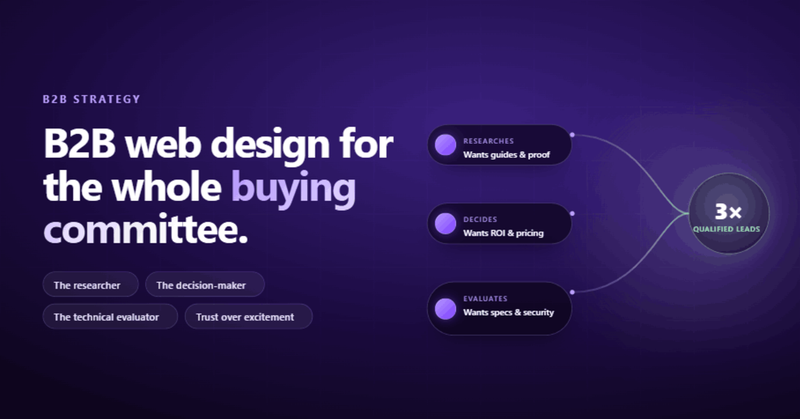
What B2B Web Design Actually Means (And Why Most Companies Get It Wrong)
B2B web design is the process of building websites for companies that sell to other businesses. That's the simple definition. The real one is harder: it's building a site that accommodates 6-10 decision-makers, a sales cycle measured in months, and buyers who will never impulse-purchase anything on your site. If you design a B2B website the same way you'd design a B2C store, you'll end up with something that looks great in your portfolio and does absolutely nothing for your client's pipeline.
I learned this the hard way. A few years back, I built what I thought was a beautiful B2B site for a client. Clean layout, smooth animations, the works. Their sales team used it for three months and then asked me why nobody was filling out the contact form. The homepage had a background video, a tagline that could mean anything, and the actual services were buried on page four. I'd built a B2C site with a B2B logo on it.
That project changed how I think about b2b website development. So here's what I actually know works, stripped of the usual agency fluff.
B2B vs B2C: Different Buyer, Different Site
This is the part everyone skims over, and it's the part that matters most.
A B2C buyer sees a product, feels something, and clicks "Buy Now." The whole process can take 30 seconds. A B2B buyer sees your website, bookmarks it, sends the link to their manager, who forwards it to procurement, who adds it to a spreadsheet with four other vendors, which gets reviewed in a meeting next quarter. Gartner research shows 77% of B2B buyers describe their last purchase as "very complex or difficult."
So what does that mean for your website?
- Your homepage isn't a storefront. It's the first page of a long conversation. It needs to answer "what do you do?" and "why should I care?" in under five seconds. Not "welcome to our innovative solutions ecosystem."
- Every page is a potential entry point. B2B buyers Google specific problems. They land on your case study, your service page, your blog post. Every single page needs to make sense without context.
- Trust outweighs excitement. B2C can sell on emotion. B2B buyers are spending someone else's budget and they need to justify the decision. Testimonials, case studies, and real numbers do more than any animation ever will.
- The buying committee needs different content. The technical lead wants specs. The CFO wants ROI. The end user wants to know if it's easy to use. One homepage hero section can't serve all of them.
If your b2b web design services don't account for this buying process, you're designing for the wrong audience entirely.
The Homepage Two-Second Test
Here's a test I run on every B2B homepage I build. Open the site, start a timer, and close your eyes after two seconds. Can you remember what the company does?
Most B2B sites fail this test. They've got a hero image of people shaking hands, a heading that says "Empowering Teams to Achieve More," and a call-to-action button that says "Learn More." Learn more about what? Nobody knows. Nobody clicks.
The fix isn't clever copywriting. It's honesty. Say what you do. Say who you do it for. Say what happens after they hire you.
One of our clients switched their hero from "Innovative Supply Chain Solutions" to "We Help Manufacturers Cut Shipping Costs by 20-30%." Form submissions went up 3x in six weeks. Nothing else on the page changed. They didn't need a redesign. They needed a sentence.
The most professional thing you can do is tell people what you do within two seconds of landing on your page. Everything else is decoration.
Navigation and Site Structure That Actually Helps People
B2B sites have a navigation problem. They've got 47 service pages, 12 industry pages, a resource library, a partner portal, and a careers section. Everything is "important." So the navigation becomes a junk drawer with dropdown menus three levels deep.
The rule I follow: if a visitor can't find your core services in one click from any page, the structure is broken.
What Works
Group your navigation by what visitors actually want to do, not by your internal org chart. Most B2B visitors fall into three categories: "What do you offer?", "Can you prove it works?", and "How do I talk to someone?" Your primary navigation should answer all three.
A typical structure that works for b2b web development projects:
- Services/Solutions (grouped by problem solved, not by internal department)
- Case Studies/Work (proof it works, with real numbers)
- Resources/Blog (for the researchers in the buying committee)
- About (who you are and why that matters)
- Contact (always visible, always one click away)
Skip the mega-menus with 40 links. If someone needs a sitemap to navigate your site, the information architecture has failed.
Content That Serves the Whole Buying Committee
Here's where most B2B websites fall apart. They write all their content for one person, usually the marketing director who signed off on the project. But as I said earlier, B2B purchases involve 6-10 people. Each one has different questions.
Your website needs content for at least three distinct readers:
The Researcher
This person is doing the initial legwork. They're Googling, comparing, building a shortlist. They want blog posts, guides, and comparison pages. They want to understand the problem before they evaluate solutions. This is where your b2b web design content strategy earns its keep. Answer their questions before they ask them.
The Decision-Maker
This person signs the check. They don't read your blog. They want a case study that shows ROI in their industry, a clear pricing structure (or at least a ballpark), and proof that companies like theirs have succeeded with you. Give them a 2-minute path from landing page to "request a proposal."
The Technical Evaluator
This person needs to know your solution won't break their existing systems. They want technical documentation, integration details, security certifications, and API specs. If you're a b2b website design agency, you need to make this information accessible without burying it.
The mistake I see constantly: companies create beautiful top-of-funnel content and then have nothing for the person who's actually ready to buy. It's like running a restaurant with great curb appeal but no kitchen.
Trust Signals That Actually Work in B2B
B2B buyers are spending $50,000, $500,000, sometimes millions on a decision. They're not clicking "buy" based on a nice color scheme. They need reasons to trust you.
Here's what actually moves the needle:
Case studies with numbers. Not "we helped Company X achieve great results." That means nothing. "We helped Company X reduce their cost-per-lead by 41% in 90 days" means everything. Specificity is the language of trust.
Client logos. Yes, they're overused. They still work. When a visitor sees that companies they recognize work with you, it shortcuts the trust calculation. Put them near the top of the page.
Testimonials from real humans. With names, titles, and company names. Bonus points for video. "Great company to work with! - J.M." is worthless. "They rebuilt our entire lead gen pipeline and we saw 3x more qualified demos within a quarter - Jamie Martinez, VP Marketing, Acme Corp" is gold.
Security and compliance badges. SOC 2, GDPR, ISO certifications. If your buyers operate in regulated industries, these aren't optional. They're the price of admission.
Your actual team. B2B relationships are between people, not logos. Show who works at your company. Real photos, not stock images of people in blazers pointing at whiteboards.
Performance and Mobile: The Stuff Nobody Wants to Talk About
I once spent two weeks building a custom animation system for a client's homepage. Silky smooth. Perfectly timed. The client's actual customers were on 4G connections in rural areas. Nobody ever saw the animations. They bounced before the page finished loading. That's when I stopped designing for my own internet connection.
Page speed isn't a nice-to-have. Google's own data shows that 53% of mobile users leave a page that takes longer than 3 seconds to load. For B2B, the problem is even worse. Your buyer is probably on a corporate network with a VPN, which means your site is already slower than you think.
The checklist is boring but non-negotiable:
- Compress images. Use WebP. Keep hero images under 200KB.
- Kill the background videos. Nobody watches them and they add 5-10MB to your page.
- Lazy-load everything below the fold.
- Set explicit width and height on images to prevent layout shift.
- Test on a real phone with a throttled connection. Not your latest iPhone on office WiFi.
And mobile. Over half of initial B2B research now happens on mobile devices. The buyer is Googling you during a meeting, on a train, at a conference. If your site is a desktop-first afterthought on mobile, you're losing people before they even get to your value proposition.
Responsive design isn't a feature. It's the baseline for any serious b2b website development project in 2026.
Conversion Without Being Pushy
B2B sites have a conversion problem, but it's not what you think. The problem isn't that they don't have enough CTAs. It's that every CTA says "Request a Demo" and nothing else.
Not every visitor is ready for a demo. Most aren't. They're in research mode. If the only option you give them is "talk to sales," you lose everyone who isn't ready for that conversation yet.
Layer your calls-to-action by intent:
- Low commitment: Download a guide, read a case study, subscribe to a newsletter. This captures the researcher.
- Medium commitment: Watch a recorded demo, attend a webinar, use a ROI calculator. This warms up the evaluator.
- High commitment: Book a call, request a proposal, start a free trial. This is for the buyer who's ready.
Put the right CTA at the right stage. A blog post should offer a related guide download, not a sales call. Your pricing page should offer a conversation with sales, not a newsletter signup.
Forms matter too. Every extra field you add to a form reduces completions. For a top-of-funnel download, you need an email address. That's it. Save the 15-field qualification form for when someone explicitly asks for a proposal.
SEO That Compounds Over Time
Most b2b web design services treat SEO as an afterthought. The design team builds the site, then someone says "oh, we should add some keywords." That's backwards.
SEO should shape the site structure from day one. Here's why: your B2B website's biggest long-term traffic source is organic search. Not ads, not social, not email. Search. And search traffic compounds. A blog post you write today can bring in leads for years.
The structural stuff that matters:
One page per core topic. Don't try to rank for "B2B consulting" and "B2B strategy" and "B2B advisory" on the same page. Each keyword cluster deserves its own page with unique, deep content.
Internal linking. Every page should link to 3-5 related pages on your site. This passes authority around and helps Google understand your site's topical relevance. It also helps visitors find what they need.
Heading hierarchy. One H1 per page (your page title). H2s for major sections. H3s for subsections. Never skip levels. This sounds basic and it is, but I audit B2B sites every week that have three H1s on the homepage and no H2s anywhere.
Schema markup. Article schema on blog posts, Organization schema site-wide, FAQ schema on FAQ sections. This helps search engines understand your content and can get you rich results in the SERPs.
The biggest SEO mistake in b2b web development? Building a beautiful site with 5 pages and no blog. You've got a brochure, not an asset. A blog gives you a reason to target dozens of keywords your buyers are searching for. It's the engine that feeds the rest of the site.
Structuring Content for AI Search
This is the topic nobody else is covering, and it might be the most important one for the next two years.
AI-powered search (Google's AI Overviews, ChatGPT search, Perplexity) is changing how B2B buyers find information. These systems don't just look at keywords. They parse your content's structure, pull specific answers from your pages, and either cite you or summarize you into oblivion.
What this means for your B2B site:
Answer questions directly. If someone asks "what does a B2B web design agency do?", the answer should be in the first paragraph of your relevant page. Not buried after a 300-word preamble about the history of the internet.
Use clear headings that match search queries. H2s like "How Much Does B2B Web Design Cost?" are more useful than "Our Investment Tiers." The heading itself should contain the question buyers are asking.
Structure data explicitly. Tables, lists, and well-organized sections are easier for AI to parse and quote. If your pricing is described in flowing prose, an AI system will skip it. If it's in a clean table with rows and columns, it'll pull it right into a summary.
Be the primary source. AI systems trace information back to authoritative sources. Original research, proprietary data, and unique case studies give you citation-worthy content that generic "thought leadership" never will.
I still don't fully understand how all the AI ranking factors work. Nobody does, honestly. But structuring your content for machines to parse correctly? That's good practice regardless of what Google does next.
Post-Launch Is Where the Real Work Starts
Here's the uncomfortable truth about b2b web design: the launch is the beginning, not the end.
I've seen too many companies spend six months and $80,000 on a website redesign, pop champagne on launch day, and then never touch the site again. Two years later, they're back asking for another redesign because "the site isn't performing." It wasn't the design. It was the abandonment.
A B2B website should be treated like a product, not a project. That means:
Monthly content updates. New blog posts, updated case studies, fresh testimonials. Google notices when a site goes stale. So do your visitors.
Quarterly performance reviews. Look at your analytics. Which pages are getting traffic but not converting? Which CTAs are people ignoring? Where are visitors dropping off? The data tells you what to fix.
A/B testing. Change one thing at a time and measure the result. Headline variations, CTA button copy, form length. Small changes, measured over weeks, compound into significant improvements.
Train your team. If your marketing team can't update the blog, add a case study, or change a headline without calling a developer, your site has a maintenance problem. The CMS should empower non-technical users to make content changes independently.
The companies that get the most from their B2B websites aren't the ones with the fanciest designs. They're the ones that treat the website as a living system and invest in it consistently after launch.
Frequently Asked Questions
What is B2B web design?
B2B web design is the process of creating websites for companies that sell products or services to other businesses. Unlike B2C sites, B2B websites need to accommodate longer sales cycles, multiple decision-makers, and a buying process that relies heavily on trust, proof, and detailed information.
How much does a B2B website cost?
A basic B2B website from a freelancer might cost $5,000-$15,000. A mid-range site from a specialized agency typically runs $25,000-$75,000. Enterprise-level B2B sites with custom integrations, CRM connections, and complex functionality can exceed $100,000. The real cost question isn't what you pay upfront. It's what you lose in leads if the site doesn't convert.
How is B2B different from B2C web design?
B2C sites sell to individuals who buy on emotion and convenience. B2B sites sell to committees who buy on logic and ROI. This means B2B sites need more proof (case studies, testimonials), more depth (technical docs, whitepapers), and a longer nurture path (multiple CTAs for different stages). The design looks different because the buyer is different.
Do I need a specialized B2B web design agency?
Not necessarily, but it helps. A generalist agency can build a good-looking site. A B2B-focused agency understands the buying cycle, knows how to structure content for multiple stakeholders, and has experience with lead generation funnels. If your website's primary job is generating qualified leads, working with people who've done it before saves you expensive trial-and-error.
How long does a B2B website take to build?
A straightforward B2B site typically takes 8-12 weeks from kickoff to launch. Complex projects with custom integrations, CRM setup, and migration of existing content can stretch to 16-20 weeks. The longest phase is usually content, not design or development. Writing good B2B copy takes time because it requires understanding the buyer, not just the brand.
What pages does a B2B website need?
At minimum: homepage, services/solutions pages, about page, case studies, blog, and contact page. Most B2B sites also benefit from industry-specific pages, a resources section, and a pricing page (even if it's just ballpark ranges). Every page should have a clear purpose and a next step for the visitor.
Comments