
What Retargeting Ads Actually Are (And Why 97% of Your Traffic Leaves Without Buying)
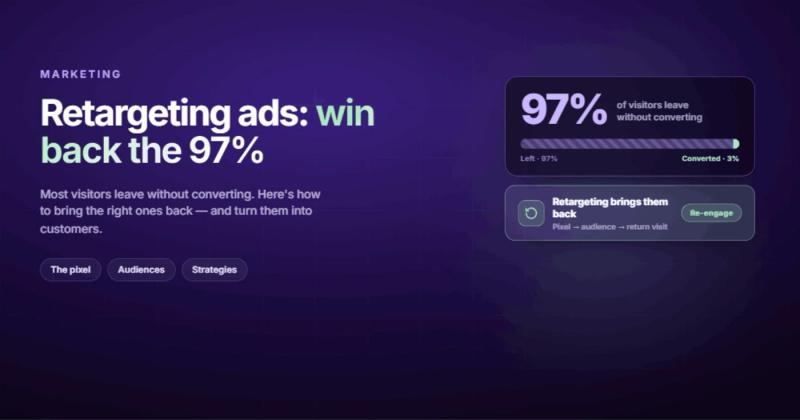
Here's a number that should bother you: roughly 97% of people who visit your website leave without doing anything. No form fill, no purchase, no sign-up. They looked around, maybe read half a page, and disappeared.
Retargeting ads are how you follow up with those people. They're paid ads shown specifically to visitors who already interacted with your website, your app, or your content. The visitor leaves your site, and later they see your ad on Facebook, on a news site, in their Instagram feed, or in Google search results.
The reason retargeting ads work better than regular advertising is obvious once you think about it: you're not introducing yourself to a stranger. You're reminding someone who already showed interest. They already know what you do. They already spent time on your site. The sale is half-made. You're finishing the conversation they started.
According to research by DemandSage, retargeted visitors are 70% more likely to convert compared to first-time visitors. That gap isn't a rounding error. It's the difference between a marketing channel that works and one that burns money.

How Retargeting Works: The Pixel, the Cookie, and the Follow-Up
The mechanics are simpler than most marketing content makes them sound.
You place a small piece of code on your website called a retargeting pixel. When someone visits your site, this pixel drops a cookie into their browser. The cookie is tiny, invisible, and doesn't collect personal information like names or emails. It's an anonymous tag that says "this browser visited this website."
After the visitor leaves, that cookie allows ad platforms like Google Ads or Meta to recognize the browser. When that person scrolls through Facebook, reads an article on a news site, or searches on Google, the ad platform checks: does this browser have a retargeting cookie from one of our advertisers? If yes, it can show your ad instead of a random one.
That's it. That's the whole system.
The pixel itself is usually a snippet of JavaScript you paste into your site's <head> tag. If you're running a Webflow site, you add it in project settings under Custom Code. WordPress has plugins for it. Every modern CMS makes this a 5-minute job.
Here's what the Meta pixel code looks like in practice:
<!-- Meta Pixel Code -->
<script>
  !function(f,b,e,v,n,t,s)
  {if(f.fbq)return;n=f.fbq=function(){n.callMethod?
  n.callMethod.apply(n,arguments):n.queue.push(arguments)};
  fbq('init', 'YOUR_PIXEL_ID');
  fbq('track', 'PageView');
</script>
<!-- End Meta Pixel Code -->
One line of code. That's what separates businesses that can retarget from businesses that can't. Install it now, even if you don't plan to run retargeting ads for months. The pixel starts collecting visitor data immediately, and you can't retarget people who visited before it was installed.
Retargeting vs Remarketing: The Difference That Barely Matters
You'll see these two words used interchangeably everywhere, and honestly, the distinction is shrinking by the year.
Traditionally, retargeting meant showing ads to past visitors using cookies and pixels (what we just described). Remarketing meant re-engaging past customers through email. Google muddied this further by calling their cookie-based ad product "remarketing" inside Google Ads.
In practice, both terms describe the same idea: reaching people who already know you exist. The channel differs (ads vs email), but the strategy is identical. If someone in a meeting corrects you on this distinction, they're not wrong. But they're not being helpful either.
For this post, I'm using "retargeting" to mean all forms of paid advertising that target previous visitors. If you're doing email follow-ups to past customers, that's remarketing in the traditional sense, and it works well alongside retargeting ads as part of a broader website marketing strategy.
Types of Retargeting Campaigns Worth Running
Not all retargeting is the same ad on the same platform. There are several distinct approaches, and each works differently depending on where your audience spends time.
Display Retargeting
Banner ads across the Google Display Network and other ad exchanges. Your ad shows up on news sites, blogs, forums, and apps. Display retargeting has the widest reach (Google's Display Network covers over 90% of internet users worldwide, according to Google's own documentation) but the lowest engagement rates. People have trained themselves to ignore banner ads. Still, the impressions keep your brand visible, and the CPMs are cheap.
Social Media Retargeting
Facebook, Instagram, LinkedIn, TikTok. These platforms let you retarget visitors inside their feeds, where attention is higher than on random websites. Social retargeting tends to convert better than display because the ad format feels native. A retargeting ad in someone's Instagram feed looks like any other post. On a news site, it looks like an ad.
Search Retargeting
When a past visitor searches for related terms on Google, your ad gets priority. This is powerful because the person is actively looking for something. They visited your site last week, didn't convert, and now they're searching again. You show up at the exact moment of intent. Google calls this RLSA (Remarketing Lists for Search Ads).
Email Retargeting
If you have someone's email address (from a newsletter signup, an abandoned cart, or a free download), you can upload that list to ad platforms and show ads specifically to those people. This bridges the gap between your email marketing and your paid advertising. The audience is smaller but the targeting is precise.
Dynamic Retargeting
Instead of showing the same generic ad to everyone, dynamic retargeting shows people the specific products or pages they viewed. Someone looked at red sneakers on your e-commerce store? They see an ad for those exact red sneakers. This is standard on platforms like Google Ads and Meta, and it dramatically improves click-through rates because the ad feels personally relevant.
How to Build a Retargeting Strategy That Doesn't Annoy People
Here's where most businesses mess up retargeting: they treat it like a volume play. Install pixel, retarget everyone, blast the same ad forever. Then they wonder why their frequency scores are through the roof and their brand sentiment is dropping.
Good retargeting is specific. It shows the right message to the right person at the right moment. Here's how to get there.
Step 1: Segment Your Audience by Behavior
A homepage bouncer and a checkout abandoner are not the same person. Stop treating them like they are.
Create separate audiences based on what people actually did on your site:
- Visited the homepage but went nowhere else (low intent, needs awareness)
- Read multiple pages or blog posts (building interest, needs a reason to come back)
- Visited a pricing or services page (high intent, needs a push)
- Started checkout but didn't finish (highest intent, needs urgency or reassurance)
- Already converted (exclude them, or upsell them something else)
Each segment gets a different ad with a different message. The homepage bouncer sees a brand story. The pricing page visitor sees a testimonial or case study. The cart abandoner sees a reminder with maybe a small incentive.
Step 2: Set Frequency Caps
There's a point where retargeting stops being helpful and starts being creepy. That point is lower than you think.
Cap your ad frequency at 3-5 impressions per day per user on display. On social, 1-2 per day is plenty. If someone has seen your ad 15 times and hasn't clicked, showing it a 16th time won't change their mind. It'll make them resent your brand.
Step 3: Set Time Windows
Someone who visited your site yesterday is a better retargeting candidate than someone who visited 60 days ago. Weight your spending toward recent visitors.
A reasonable default: aggressive retargeting for the first 7 days, lighter touch from 7-30 days, and stop after 30 days unless they re-engage. For high-ticket B2B services, you can extend to 60-90 days because the sales cycle is longer.
Step 4: Rotate Your Creative
Ad fatigue is real. Running the same ad for weeks will tank your click-through rates. Rotate creative every 2 weeks. You don't need a massive production budget for this. Three or four variations of the same message, tested and rotated, will outperform one "perfect" ad that runs until everyone's sick of it.
"I once spent two weeks building a custom animation system for a client's homepage. Silky smooth. Perfectly timed. The client's actual customers were on 4G connections in rural areas. Nobody ever saw the animations. They bounced before the page finished loading. Same lesson applies to retargeting creative: what matters isn't what looks impressive to you. It's what actually reaches the person on the other end."
Step 5: Exclude Converters
Nothing screams "we don't know what we're doing" like showing an ad for something someone already bought. Set up conversion exclusions so that people who complete your goal (purchase, sign-up, form submission) stop seeing the retargeting ad immediately. You can move them into a different campaign (upsell, cross-sell, referral) but stop asking them to do the thing they already did.
Common Retargeting Mistakes That Burn Money
I've seen these go wrong in predictable ways. Here are the patterns.
Retargeting too small an audience. If your website gets 200 visitors a month, your retargeting audience is too small for most platforms to optimize effectively. Google Ads needs at least 1,000 active users in a list before it'll run remarketing. Facebook can work with smaller lists but the delivery will be inconsistent. Fix the traffic problem first. SEO and content marketing build the audience pool that retargeting draws from.
No landing page alignment. Your retargeting ad promises one thing. Your landing page shows something else. The visitor clicks, gets confused, and bounces again. Match the ad creative to a specific landing page built for that audience segment. If your ad shows a specific product, don't dump people on the homepage. A solid landing page is what turns a retargeting click into a conversion.
Ignoring the privacy signals. Users who opted out of tracking shouldn't see your ads. Platforms handle most of this automatically, but make sure your cookie consent implementation is solid. Beyond compliance, it's just respectful. Someone who clicked "reject cookies" has told you something. Listen.
Running retargeting without a conversion goal. If you don't have a clear conversion event (purchase, form fill, demo booking), you can't measure whether retargeting works. Set up conversion tracking before you spend a dollar on retargeting. Without it, you're driving in the dark.
Forgetting the creative refresh. An ad that performed well in week one will look stale by week four. Your audience is seeing it repeatedly. The novelty is gone. Budget time for creative refreshes, or use dynamic creative that varies automatically.
The Cookieless Future: What Changes and What Doesn't
Third-party cookies are dying. Google has waffled on the exact timeline, but the direction is clear. Safari and Firefox already block third-party cookies by default. Chrome will follow eventually.
What this means for retargeting: the old pixel-and-cookie model will get less effective for cross-site display retargeting. Showing ads on random websites based on browser cookies will become harder.
What doesn't change: first-party data. Your own website data, your email lists, your CRM. Platforms like Meta and Google are shifting toward server-side tracking and conversion APIs that don't rely on browser cookies. Meta's Conversions API sends event data directly from your server to Meta, bypassing the browser entirely.
The practical takeaway: start collecting first-party data now. Email addresses, phone numbers, account sign-ups. Build your own audience lists instead of relying entirely on browser cookies. Businesses that own their customer data will keep retargeting effectively. Businesses that relied on cookie-based tracking alone will struggle.
Also worth watching: Google's Privacy Sandbox initiative, which proposes alternatives like Topics API for interest-based targeting without individual tracking. The mechanisms are changing. The principle (show relevant ads to interested people) stays the same.
Retargeting for Service Businesses (Not Just E-Commerce)
Most retargeting content online focuses on e-commerce: abandoned carts, product feeds, dynamic ads showing the exact item someone viewed. But retargeting works just as well for service businesses. It just looks different.
If you're a B2B company or a service provider, your "abandoned cart" is someone who visited your services page and left. Your retargeting ad isn't a product image. It's a case study, a client testimonial, or a specific claim about results you've delivered.
The segmentation still applies. Someone who read your blog gets a different ad than someone who visited your pricing page. Blog readers might see an ad for a related resource or lead magnet. Pricing page visitors should see social proof: "We helped [company] achieve [specific result]."
Service businesses often have longer sales cycles, which means retargeting windows should be longer (30-90 days instead of 7-14). And because the average deal value is higher, the return on even a modest retargeting budget can be significant.
The biggest missed opportunity I see with service businesses: not retargeting at all. They assume retargeting is "an e-commerce thing" and leave money on the table. If people visit your service pages and don't convert, retargeting is how you stay in their consideration set until they're ready to buy.
Which Retargeting Platform Should You Use?
The answer depends on where your audience spends time, not which platform has the best marketing materials.
| Platform | Best For | Minimum Audience | Starting Budget |
|---|---|---|---|
| Google Ads | Display + Search retargeting, widest reach | 1,000 users | $10-20/day |
| Meta (Facebook/Instagram) | B2C, visual products, social proof ads | 100 users (but 1,000+ recommended) | $5-15/day |
| B2B, high-ticket services, professional targeting | 300 users | $25-50/day | |
| TikTok | Younger demographics, short-form video creative | 1,000 users | $20/day |
Most businesses should start with Meta (Facebook/Instagram) or Google Ads. Meta has the best audience matching and the most granular segmentation options. Google Ads gives you both display and search retargeting in one platform. LinkedIn is worth adding if you sell B2B services where the cost per acquisition justifies LinkedIn's higher CPMs.
Don't spread your budget across five platforms. Pick one, learn it, optimize it, then expand. A $500/month retargeting budget split across four platforms is $125 each. That's not enough for any of them to optimize effectively.
Frequently Asked Questions About Retargeting Ads
How much do retargeting ads cost?
Retargeting CPMs (cost per thousand impressions) typically range from $2-10 on Google Display, $5-15 on Facebook/Instagram, and $15-50 on LinkedIn. Because retargeting audiences are warmer, your cost per conversion is usually 2-4x lower than prospecting campaigns targeting cold audiences. A $500-1,000/month budget is enough to get started and see meaningful data.
Are retargeting ads effective?
Yes. Retargeted visitors convert at 2-3x the rate of first-time visitors on average. The effectiveness depends on audience segmentation, creative quality, and landing page relevance. Poorly executed retargeting (same ad, no frequency cap, no exclusions) will waste money. Well-executed retargeting consistently delivers the highest ROAS of any paid advertising channel.
How long should I retarget someone?
For e-commerce with low-to-mid price points: 7-14 days aggressively, then taper off by day 30. For B2B services with longer sales cycles: maintain lighter retargeting for 60-90 days. After 90 days without re-engagement, the visitor has likely moved on and your ad spend is better used elsewhere.
Is retargeting creepy?
It can be, if done badly. Following someone around the internet with the same ad for weeks is annoying. Showing someone a relevant reminder a few times within a reasonable window is just good advertising. The line between helpful and intrusive is frequency, duration, and relevance. Get those right and retargeting feels like good timing, not surveillance.
Do I need a lot of traffic for retargeting to work?
Most platforms need at least 1,000 monthly visitors to build a retargeting audience that's large enough to optimize. Below that, focus on building traffic first through SEO, content marketing, or prospecting ads. Once you're consistently hitting 1,000+ monthly visitors, retargeting becomes viable.
What's the difference between a retargeting pixel and a tracking cookie?
The pixel is the code you install on your website. The cookie is what the pixel sets in the visitor's browser. Think of the pixel as the security camera and the cookie as the visitor badge. The pixel identifies visitors. The cookie lets ad platforms recognize them later. Both are required for retargeting to work, and both require proper cookie consent notices under GDPR and similar privacy laws.
Comments