
What Bad UX Actually Is (And Why You Keep Building It)
Bad UX is any interaction that makes your user stop and think when they shouldn't have to. It's the form that asks you to re-enter your address after the page refreshes. The navigation menu with 47 items. The checkout flow that adds a "surprise" shipping fee on step four of five.
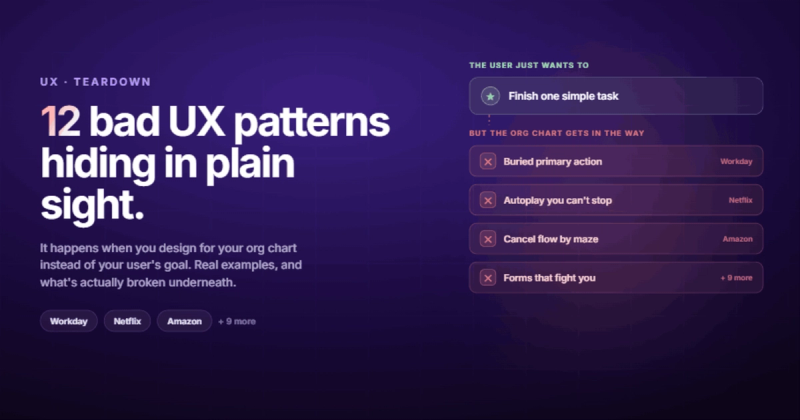
Here's the short answer if that's all you came for: bad UX happens when you design for your org chart instead of your user's goal. The user wants to do one thing. You made them do six things first. That's it. That's the whole diagnosis.
But the examples are where it gets interesting, because some of the worst offenders are companies with massive design budgets. Companies that employ hundreds of UX researchers. Companies that should know better.
I once spent an entire afternoon chasing an infinite re-render that only happened when a component was loaded inside one specific parent. It worked perfectly everywhere else. The culprit? A useEffect that created a new array reference every render, which triggered itself, which created a new array... You get the picture. Bad UX isn't always a design problem. Sometimes it's an engineering problem that nobody tested from the user's chair.
So let's look at 12 real bad UX examples from products you probably use every day. Not to be mean about it. To figure out what's actually going wrong underneath, and make sure you don't repeat it.

1. Workday: The Job Application That Feels Like a Second Job
Workday is the poster child for bad UX in 2026, and it has earned that title through years of consistent disregard for the people actually using the product.
Here's how it works. You upload your resume. Workday parses it (badly). Then it asks you to manually re-enter your entire work history, education, and skills into separate fields. For every single application. If you're applying to ten jobs, that's ten times typing the same employer name, the same dates, the same degree.
The information is right there in the PDF you uploaded thirty seconds ago. The system just doesn't care.
The real problem isn't the technology. Workday can parse resumes. The real problem is that Workday's customer is the HR department, not the job applicant. So the interface is optimized for the buyer (structured data for recruiters), not the user (a person who wants to apply quickly and move on). When your user and your customer are different people, the user always loses.
2. Microsoft Teams: When Everything Is a Chat, Nothing Is
Microsoft Teams has a "Teams" section and a "Chat" section. Both are for chatting. If that sentence confused you, imagine being a new employee on your first day trying to figure out where your team actually communicates.
Inside the "Teams" section, there's no clear visual hierarchy between headers and channels. Everything sits in the sidebar with the same font weight, the same indentation level, and roughly the same icon style. You end up scanning a wall of text that all looks identical, trying to remember if "Project Alpha" is a team, a channel, or a group chat.
Teams keeps adding features without removing old ones. The result is an interface that tries to be Slack, Zoom, SharePoint, and email all at once. It does all of them, but none of them well.
There's a principle in UX that most teams ignore: every feature you add makes every other feature harder to find. Teams is what happens when you treat that principle as a suggestion rather than a law.
3. Netflix: Autoplay as a Hostage Negotiation
You open Netflix. You're browsing. You pause on a title for two seconds to read the description. Suddenly the trailer starts blasting through your speakers while your partner sleeps in the next room.
Netflix knows this is annoying. They added an option to turn it off in 2020, buried three levels deep in account settings on the web (not in the app). The default is still "on." They kept it that way because autoplay increases a metric they care about (engagement time), even though it degrades a metric users care about (not being startled at midnight).
This is the core tension in bad UX: when the company's goals and the user's goals diverge, someone has to lose. Netflix chose the user.
4. Amazon: The Product Page That Contains Everything and Communicates Nothing
Amazon's product pages are a masterclass in how to bury important information under mountains of irrelevance. You want to know if a laptop bag fits a 15-inch MacBook. The answer is on the page. Somewhere. Between the "Frequently bought together" widget, the "Sponsored products related to this item" carousel, four different review sections, a video from the seller, a comparison table you didn't ask for, and a Q&A section where someone asked if the bag comes in purple three years ago.
The critical specs (dimensions, materials, compatibility) sit below the fold, mixed in with marketing copy. You have to scroll past ads for competing products to find basic information about the product you're already looking at.
Amazon makes too much money from this layout to change it. Every "sponsored" block on a product page is revenue. The user experience is the cost of that revenue, and Amazon has decided the trade-off is worth it. For them.
5. LinkedIn: The Social Network That Cries Wolf
LinkedIn sends you a notification when someone views your profile. When someone celebrates a work anniversary. When a connection posts for the first time in a while. When a recruiter searches for your skills. When someone you don't know endorses you for a skill you don't have.
The notification bell is always red. Always. Because everything is "important" on LinkedIn, which means nothing is important on LinkedIn.
This is a specific type of bad UX called notification fatigue. When you train users to ignore your notifications because 95% of them are irrelevant, the 5% that actually matter (a real recruiter, a real connection request) get lost in the noise. The messaging system compounds the problem with "InMail" promotions mixed into legitimate conversations.
Good notification systems are like good referees: you only notice them when something actually needs your attention. LinkedIn's notification system is the referee who blows the whistle every 30 seconds for no reason.
6. Slack: Death by a Thousand Pings
Slack was supposed to kill email. Instead, it became email with sound effects.
The notification system is granular, which sounds like a feature until you realize that "granular" means you need to configure notification preferences per channel, per workspace, per device, per schedule. Most people never do this. So they get pinged for everything: every message in every channel they've ever joined, including the #random channel someone added them to six months ago.
The real bad UX here isn't the notifications themselves. It's the default. Slack defaults to notifying you about everything, which means new users are immediately overwhelmed. The fix exists (mute channels, set schedules, use sections), but you have to discover it yourself. Good UX doesn't require a tutorial to become usable. If your product requires a "getting started guide" for basic notification management, your defaults are wrong.
7. Facebook Ads Manager: Complexity Cosplaying as Power
Facebook Ads Manager uses a three-tier structure: Campaigns contain Ad Sets, which contain Ads. This makes sense once you learn it. The problem is that it takes most people weeks to learn it, and the interface does nothing to help.
The terminology is opaque. "Campaign Budget Optimization" vs "Ad Set Budget" sounds like the same thing. "Lookalike Audiences" vs "Custom Audiences" vs "Saved Audiences" requires a course to understand. The reporting dashboard shows you dozens of metrics but provides no guidance on which ones matter for your specific goal.
Nobody has ever hired my agency because we use Webflow instead of WordPress. They hired us because we promised to solve a specific problem. Stop leading with your tech stack and start leading with the outcome. The same principle applies to UX: stop designing for what your tool can do and start designing for what the user needs done.
Meta could fix this. They could create a simplified mode for small businesses running their first campaign. They don't, because the complexity keeps businesses paying for professional web design agencies and ad managers. The bad UX is a business model.
8. Ryanair: Dark Patterns Dressed Up as a Booking Flow
Ryanair's website is the textbook example of dark patterns in UX. During the booking process, you'll encounter pre-selected add-ons (insurance, priority boarding, seat selection) that you have to actively deselect. The "no thanks" option is styled to look like an error or a disabled button. The "add insurance" button is bright and prominent. The "decline" option is grey text on a grey background.
This isn't an accident. It's designed to make you pay for things you didn't want by making it harder to say no than to say yes. The checkout flow includes at least three screens where you need to actively refuse something.
Dark patterns work in the short term. They increase revenue per booking. But they destroy trust over time, and they're increasingly being flagged by regulators in the EU and US. If your conversion rate depends on tricking people, you don't have a product problem. You have an ethics problem.
9. Government Websites: Where UX Goes to Die
Most government websites look like they were designed in 2004 because many of them were designed in 2004. But the visual datedness isn't the real issue. The real issue is the language.
Government sites use legal terminology where plain English would work. "Submit your Form 1099-MISC reconciliation" when they mean "tell us how much you paid contractors." Multi-step forms that don't save progress, so if your session times out on step 7 of 12, you start over. Error messages that say "Invalid input" without telling you what's invalid or how to fix it.
The UK's GOV.UK redesign proved this doesn't have to be the case. They rewrote everything in plain English, simplified navigation, and focused on task completion. The result: fewer support calls, faster task completion, and actual usability. The technology exists. The budget exists. What's usually missing is the institutional will to prioritize users over bureaucratic convention.
10. Cookie Consent Banners: The Internet's Worst Shared Experience
Every website you visit in 2026 hits you with a cookie consent banner. That part is required by law. The bad UX is everything else about how it's implemented.
"Accept All" is a big, colourful button. "Manage Preferences" is a text link in 11px font. If you click "Manage Preferences," you get a panel with 47 toggles for different tracking categories, all pre-selected to "on." Some sites require you to individually deselect each one. Some hide the "Reject All" button behind a second click. Some use the phrase "Legitimate Interest" as a separate category that "Reject All" doesn't cover.
The GDPR said users should be able to reject cookies as easily as they accept them. The industry's response was to make acceptance as easy as possible and rejection as tedious as possible, technically compliant while violating the spirit of the regulation.
If your website redesign includes a cookie banner, make "Reject All" the same size and colour as "Accept All." Your analytics will take a hit. Your users will respect you for it.
11. Zoom: The Controls That Play Hide and Seek
Zoom hides its meeting controls after a few seconds of inactivity. The toolbar disappears, and you have to move your mouse to bring it back. During a meeting. While you're talking. While someone is sharing their screen and you need to find the "Raise Hand" button that was right there a second ago.
The mute button, the most frequently used control in any video call, requires you to first reveal the hidden toolbar and then find it. In a tool where "you're on mute" has become a cultural phrase, the mute control should be permanently visible and the size of a dinner plate.
Zoom also has tooltips that appear over meeting content. You hover near a control, a tooltip pops up covering the presentation, and now you're reading "Click to share your screen" instead of watching the actual screen share. The controls should serve the meeting, not compete with it.
12. Spotify: Great at Playing Music, Bad at Organizing It
Spotify's core experience (finding and playing music) is solid. The bad UX lives in playlist management, which is where power users spend most of their time.
Reordering songs in a long playlist on mobile is an exercise in frustration. You press and hold to drag a track, and the scroll behaviour fights you the entire time. If your playlist has 200 songs and you want to move track 180 to position 5, good luck. The drag speed is too fast or too slow, and there's no "move to position" option.
Collaborative playlists don't show who added which song (they used to). The "Liked Songs" collection has no folders, no sub-categories, no way to organize beyond "the order you liked them." If you've liked 3,000 songs over six years, your Liked Songs is a timeline of your musical history with zero organizational structure.
The fix is straightforward: add playlist folders, a "move to" function, and contributor labels. Spotify is a $70 billion company. This isn't a resource problem. It's a priority problem.
What Bad UX Actually Costs Your Business
Bad UX isn't just annoying. It's expensive. And most companies undercount the cost because they only measure what's visible.
The visible costs are conversion drops. Studies show 88% of users won't return to a website after a bad experience. Mobile users are even less forgiving: 90% report abandoning apps over poor UX. If your checkout flow has unnecessary friction, you're losing revenue on every transaction.
The invisible costs are worse. Support tickets from confused users. Internal training time because the tool is unintuitive. Brand damage from frustrated customers telling their friends. The developer time spent building workarounds for design decisions nobody questioned.
I've seen businesses spend six figures on a website marketing strategy while their actual website loses visitors at the checkout because of a confusing form. The marketing drives traffic. The bad UX drives it away. It's a leaking bucket, and no amount of water fixes a hole.
I read Hormozi's book and had that uncomfortable moment every agency owner dreads. I realized I was selling 'websites' just like everyone else. No niche, no specific problem, no real offer. That book broke me out of the commodity trap. The same thing applies to UX: if you're designing 'a website' without solving a specific user problem, you're building a commodity that happens to have buttons on it.
Common UX Mistakes and How to Avoid Them
After looking at twelve examples, the patterns become obvious. Most bad UX comes from a small set of repeated mistakes.
Designing for stakeholders, not users. Workday designs for HR departments. Amazon designs for advertisers. LinkedIn designs for engagement metrics. When your design prioritizes anyone other than the person using the product, the experience suffers. Before every design decision, ask: who benefits from this? If the answer isn't the user, reconsider.
Wrong defaults. Slack's notification defaults are too aggressive. Cookie banners default to "accept all." Netflix defaults to autoplay. Defaults are the most powerful UX decision you'll make because most users never change them. If your default creates a bad experience, you've created a bad experience for everyone who doesn't go digging through settings.
Feature accumulation without removal. Microsoft Teams. Jira. Salesforce. They keep adding features because "customers asked for it" without removing or simplifying existing ones. Every feature adds cognitive load. The best products have opinions about what not to include.
Treating mobile as an afterthought. If your web design works on desktop but breaks on mobile, it doesn't work. Over 60% of web traffic is mobile. Spotify's playlist management and Gmail's bulk selection problems both stem from mobile being treated as a smaller desktop rather than a different interaction model.
Confusing visual design with UX. Zara's website looks beautiful. Navigating it is a nightmare. Aesthetics and usability aren't the same thing. A gorgeous interface that nobody can figure out is worse than an ugly one that works. Function first, then form. Always.
Frequently Asked Questions About Bad UX
What makes UX bad?
UX is bad when it creates unnecessary friction between the user and their goal. That friction can be visual (cluttered layouts), structural (too many steps), informational (confusing copy or labels), or behavioural (dark patterns that trick users into unintended actions). If a user has to think about the interface instead of their task, the UX has failed.
What's the difference between dark UX and bad UX?
Bad UX is usually unintentional. It comes from poor design decisions, lack of testing, or accumulated complexity. Dark UX (or dark patterns) is intentional. It's designed to manipulate users into actions they didn't intend: pre-checked boxes, hidden unsubscribe links, confusing cancellation flows. Bad UX is incompetence. Dark UX is strategy. Both cost you users, but dark UX can also cost you legal trouble.
How does bad UX affect conversions and revenue?
Directly and measurably. Research shows 88% of online consumers are less likely to return after a bad experience. Every additional form field reduces conversions by roughly 11%. Slow page loads (which is a UX problem, not just a tech problem) cost retailers $2.6 billion in lost sales annually. If your B2B web design has a clunky contact form, you're losing leads before they even reach your sales team.
Can complexity ever be good UX?
Yes, but only when the complexity matches the task. A professional video editing tool should be complex because video editing is complex. The mistake is adding complexity where the task is simple. Booking a flight shouldn't require 12 screens. Applying for a job shouldn't take 45 minutes. Match the complexity of the interface to the complexity of the task, and you'll be fine.
How do you fix bad UX on an existing website?
Start with data, not opinions. Run session recordings (Hotjar, FullStory) to see where users actually struggle. Check your analytics for pages with high bounce rates or low time-on-page. Then fix the worst offenders first: forms with too many fields, navigation that requires more than two clicks to reach key pages, checkout flows with surprise costs. You don't need a full Webflow rebuild. You need to find the three things losing you the most users and fix those.
Comments