
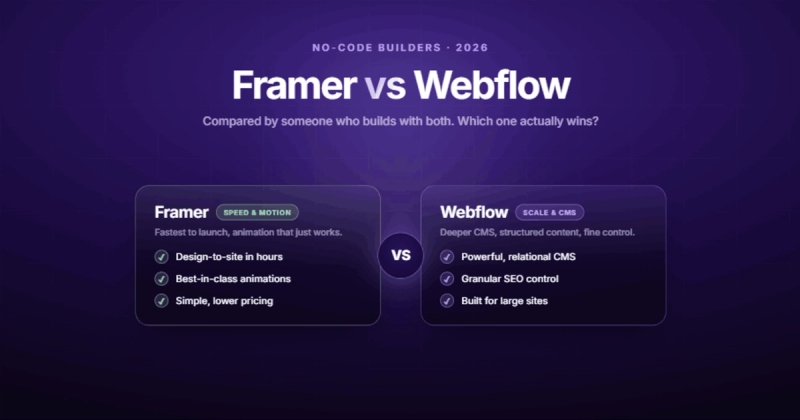
Framer vs Webflow is the wrong question. The right question is: what are you building, and how long do you need it to last?
If you're shipping a portfolio site or a single landing page and want it live by Friday, Framer is probably the faster path. If you're building a marketing site with a blog, case studies, SEO requirements, and a marketing team that needs to edit content without calling a developer, Webflow is the stronger choice. That's the short answer. The rest of this post is the reasoning.
I've built production sites on both platforms. I've migrated sites from one to the other. I've watched clients outgrow Framer in six months and watched others waste three weeks learning Webflow when Framer would've been done in three days. The "which is better" framing misses the point entirely. They solve different problems, and the gap between them got more interesting in 2026.
Framer vs Webflow: The 30-Second Version
| Category | Framer | Webflow |
|---|---|---|
| Best for | Landing pages, portfolios, campaign sites | Marketing sites, blogs, content-heavy businesses |
| Learning curve | Low (feels like Figma) | Steeper (closer to writing CSS visually) |
| CMS | Basic (10 collections max on personal) | Mature (40 collections, 1M items, relational fields) |
| E-commerce | Third-party only | Native |
| SEO tools | Basic meta fields | Full control (schema, redirects, clean code) |
| Animations | Built-in, slick, easy | Powerful but manual (Interactions 2.0) |
| Pricing (basic site) | From $5/mo | From $14/mo |
| Enterprise ready | Limited | SOC 2, ISO 27001, SSO, granular roles |
If the table answered your question, great. If you want the real story behind those one-liners, keep reading.
Who Should Actually Use Framer
Framer is for people who think in design, not in structure. If you've ever opened Figma and wished you could just publish what's on the canvas, Framer is that wish granted. The editor feels native to designers. You drag, you style, you preview, you publish. There's very little friction between the idea and the live page.
That speed is real, and it matters. A 5-page brochure site on Framer ships faster than the same site on Webflow. No contest. If a startup needs a landing page for a Product Hunt launch next Tuesday, I'd point them to Framer without hesitation.
Framer also does animations extremely well out of the box. Scroll-triggered transitions, hover effects, page transitions. Things that would take careful setup in Webflow's Interactions panel come nearly free in Framer. For design-led microsites and campaign pages, this matters.
Here's where it gets honest, though. That speed advantage has a ceiling. The moment your project needs structured content (a blog with categories, a team directory, case studies with shared data), Framer's CMS starts showing its limits. More on that in a minute.
Who Should Actually Use Webflow
Webflow is for people who are building something that needs to grow. If your site has a blog, if you're running SEO campaigns, if your marketing team needs to publish content without opening a support ticket, Webflow handles that.
After a decade of writing React code, I found myself setting up a Webflow profile and deliberately hiding my JavaScript background. Sometimes the smartest business move is meeting clients where they are, not where you want them to be.
I came to Webflow from React and Next.js. The learning curve was real, and I'll be upfront about that. Webflow thinks in CSS. If you've never written a line of CSS, the box model, flexbox, and grid concepts will slow you down for the first week or two. But that investment pays off. You end up with clean, semantic HTML and a level of control that Framer doesn't offer.
Webflow's CMS is its biggest advantage over Framer, and it's not close. 40 collections, relational fields, conditional visibility, dynamic pages powered by structured data. When a client says "I want to filter case studies by industry and show related blog posts," that's a Tuesday afternoon in Webflow. In Framer, that's a conversation about whether you should migrate.
If you're choosing a no-code website builder for a business that plans to be around in two years, Webflow is the safer bet.
Ease of Use: Framer Wins the First Week, Webflow Wins the First Year
Every comparison post says "Framer is easier." That's true on day one. It's misleading by month three.
Framer's editor is intuitive if you're a designer. You select, you style, you see the result. There's no separate "style panel" concept. The interface merges design and development into one surface. For someone coming from Figma or Sketch, the learning curve is almost flat.
Webflow's editor is more structured. You work with elements, classes, states. You think about responsive breakpoints explicitly. It's closer to writing CSS through a visual interface than it is to "designing a page." This feels slower at first.
But here's what most comparisons miss. As your site grows past 10 pages, Framer's lack of structure becomes the problem. Without a class system, you end up styling the same element differently across pages. Global changes become manual find-and-replace operations. Webflow's class system, the thing that made it harder to learn, is the thing that makes it maintainable at scale.
Sound familiar? It's the classic trade-off between fast-to-start and fast-to-maintain. Pick the one that matches how long you'll be living with this site.
CMS: This Is Where the Real Gap Lives
If your site is static (no blog, no dynamic content, no collections), skip this section. Both platforms will serve you fine. But if you need a CMS, this is the deciding factor.
Framer's CMS
Framer's CMS got better in 2026. You can create collections, add fields, and generate pages from data. For a simple blog or a team directory, it works. But "works" and "works well for a growing business" are different things.
On personal plans, you're limited to 10 CMS collections. There are no relational fields between collections. No conditional visibility based on CMS data. No multi-reference fields. If you want your blog posts to link to author profiles, and those author profiles to show their posts, you're duct-taping it together.
Webflow's CMS
Webflow supports up to 40 CMS collections per project and up to 1 million items per collection (as of January 2026). You get relational fields, multi-reference fields, conditional visibility, and dynamic filtering. Your marketing team can log into the Webflow Editor and publish a blog post without touching the design at all.
For context: this site runs on a headless CMS with Next.js, but when I build client sites on Webflow, the CMS is the single feature that keeps them from outgrowing the platform. I've written about this in our Webflow vs WordPress comparison too.
| CMS Feature | Framer | Webflow |
|---|---|---|
| Max collections | 10 (personal) | 40 |
| Max items | 1,000 | 1,000,000 |
| Relational fields | No | Yes |
| Multi-reference | No | Yes |
| Conditional visibility | Limited | Full |
| Editor role (non-designer) | Limited | Full Editor UI |
SEO: Webflow Isn't Just Better, It's a Different Category
This section matters more than most comparison posts acknowledge. If organic search is part of your growth strategy (and for most businesses, it should be), the platform's SEO capabilities aren't a nice-to-have. They're the foundation.
Framer gives you basic meta fields: title, description, OG image. That's table stakes. You get auto-generated sitemaps and basic page-level settings. For a landing page that lives off paid traffic, that's enough.
Webflow gives you everything Framer does, plus clean semantic HTML output, custom 301 redirects, auto-generated sitemaps with priority control, schema markup support, canonical URL management, and granular control over how your pages get crawled. You can set up proper heading hierarchies, alt text workflows, and technical SEO fundamentals without writing code.
The HTML that Webflow outputs is also cleaner. Framer wraps elements in extra divs and uses inline styles more heavily. This isn't a theoretical concern. Google's crawlers parse your HTML. Clean structure makes their job easier. When you're competing for the same keyword against 50 other pages, these details compound.
Nobody has ever hired my agency because we use Webflow instead of WordPress. They hired us because we promised to solve a specific problem. Stop leading with your tech stack and start leading with the outcome.
If your site needs to rank, if organic traffic is how you get customers, Webflow's SEO tooling gives you structural advantages that Framer simply doesn't match yet.
AI Features and AEO: The 2026 Angle Nobody Expected
Both platforms shipped AI features in 2026, but they aimed at different problems.
Framer has Workshop, an AI component generator. Describe what you want ("a pricing table with a toggle and a highlighted plan") and Framer builds it. For prototyping and getting a first draft on canvas, it's genuinely fast. Framer also added AI-powered copy generation directly in the editor.
Webflow went a different direction. Their AI generates full page designs from a brief, which is useful for getting past the blank-canvas problem. But the bigger move was on the content side: better structured data support and improved semantic HTML output that plays well with AI search engines like ChatGPT, Perplexity, and Google's AI Overviews.
This matters because AEO (Answer Engine Optimization) is becoming real. AI search tools pull answers from pages with clean structure, clear headings, and well-organized content. Webflow's output is better suited for this. Framer's inline-style-heavy output gives AI parsers less to work with.
We've covered how AI-generated content interacts with SEO separately, but the takeaway here is: if your site needs to show up in AI search results (and increasingly, it does), the platform's HTML output quality is a real factor.
Pricing: Framer Is Cheaper Until It Isn't
Framer starts at $5/month for a basic site. Webflow starts at $14/month. On paper, Framer wins.
But pricing comparisons that stop at the monthly fee are misleading. Here's what actually determines cost:
Framer's $5 plan caps you at 1,000 CMS items and 10 collections. If you need more, you jump to $15/month. Add a custom domain and basic analytics, and you're at $15/month regardless. Need more than one contributor editing the site? That's another tier.
Webflow's $14/month Basic plan doesn't include the CMS. For CMS access, you're at $23/month. Add e-commerce and you're at $39/month. For the full feature set, Webflow is more expensive.
| Use Case | Framer Cost | Webflow Cost |
|---|---|---|
| Simple landing page | $5/mo | $14/mo |
| Business site + blog | $15/mo | $23/mo |
| E-commerce | $15/mo + third-party | $39/mo (native) |
| Enterprise (SSO, compliance) | Not available | Custom pricing |
The real cost isn't the subscription. It's what happens when you hit the ceiling. If you build on Framer and outgrow its CMS in 8 months, the migration cost dwarfs whatever you saved on monthly fees. Factor in the cost of your time, and "cheaper" starts looking different.
Design and Animations: Different Strengths, Not Better vs Worse
Framer's animation system is genuinely impressive. Scroll-triggered effects, page transitions, micro-interactions. They're built into the core editor. You select an element, add a transition, set the trigger. Done. For a product launch page or a portfolio showcase, Framer produces results that would take significantly more effort in Webflow.
Webflow's Interactions 2.0 is more powerful in absolute terms. You can trigger animations based on scroll position, element visibility, mouse movement, navbar state, page load, and timed delays. You can chain multi-step animations with precise easing curves. But it's manual. You build each interaction step by step.
The practical difference: a designer with no animation experience will get better results faster in Framer. An experienced Webflow developer will build more sophisticated, more controlled animations in Webflow. Neither platform is "better" at animations. They're better for different people.
Enterprise Readiness: The Question That Kills Framer Deals
If you're a startup or a freelancer, skip this section. If you're selling to a company with a procurement team, read it twice.
Webflow has SOC 2 Type II certification, ISO 27001 compliance, SAML SSO, granular role-based permissions, and dedicated enterprise support. When a VP of marketing takes your proposal to their security team, these boxes need to be checked. Webflow checks them.
Framer doesn't have SOC 2. Doesn't have ISO 27001. SSO support is limited. Role-based permissions are basic. For a company that needs vendor compliance documentation before signing a contract, Framer is a harder sell. Not because the product is insecure, but because the paperwork isn't there.
I've watched deals stall because the platform couldn't pass a security review. It's not a technical problem. It's a procurement problem. And procurement problems kill projects just as dead as technical ones.
Integrations and Ecosystem
Webflow's integration ecosystem is wider. Native integrations with tools like HubSpot, Mailchimp, Google Analytics, and hundreds of others through Zapier and Make. A mature API for headless setups. A large marketplace of templates and cloneable projects. A community that's been building for over a decade.
Framer's ecosystem is younger but growing. Fewer native integrations, but the plugin system is improving. If you need a specific marketing automation tool connected to your site, check whether it integrates with Framer before committing. Don't assume.
For headless architectures where the design lives on the platform but the data comes from somewhere else, Webflow's API is more mature. Framer is catching up, but "catching up" means you're building on a platform that's still figuring out its developer story.
When to Migrate from Framer to Webflow
This is the section most comparison posts won't write because it requires having actually done it.
Migrate when your CMS needs outgrow Framer's limits. When your marketing team can't publish without a designer. When you need proper 301 redirects for an SEO migration. When your enterprise client's security team rejects the vendor questionnaire.
Don't migrate because someone on Twitter said Webflow is "more professional." Migrate because you've hit a real wall and the cost of staying is higher than the cost of moving.
A Framer-to-Webflow migration typically involves rebuilding the design in Webflow's editor (there's no automated converter), migrating CMS content manually or via CSV, setting up 301 redirects for every existing URL, and re-implementing any custom code or integrations. Budget 2-4 weeks for a 20-page site with a blog.
I once spent two weeks building a custom animation system for a client's homepage. Silky smooth. Perfectly timed. The client's actual customers were on 4G connections in rural areas. Nobody ever saw the animations. They bounced before the page finished loading. That's when I stopped designing for my own internet connection.
The point isn't that animations don't matter. The point is that the platform decision should be driven by what your users need, not by what looks impressive in a demo.
Performance and Core Web Vitals
Both platforms produce fast sites by default. Neither is slow. But there are differences worth knowing.
Framer sites tend to have slightly better out-of-the-box Lighthouse scores for simple pages. The platform optimizes aggressively for initial load. For a 3-page portfolio, you'll get 90+ performance scores without thinking about it.
Webflow sites give you more control over performance. You can lazy-load images, defer scripts, optimize asset delivery, and fine-tune what loads when. For larger sites with dozens of pages and heavy CMS content, this control matters. We've written about why websites feel slow and the fixes that actually work.
The honest answer: for most sites under 20 pages, performance differences between the platforms are negligible. The bigger performance factor is the decisions you make (image sizes, font loading, third-party scripts) rather than the platform itself.
The Verdict: Pick the Tool That Matches the Job
Stop asking "which is better." Start asking "what am I building?"
Choose Framer if: You're building a landing page, a portfolio, or a campaign site. You want it live fast. You're a designer who thinks visually. The site doesn't need a blog, complex CMS, or enterprise compliance. You want beautiful animations without a learning curve.
Choose Webflow if: You're building a marketing site that needs to grow. You need a real CMS. You care about SEO. Your marketing team needs to edit content independently. You're selling to companies with procurement requirements. You want a platform with a 10-year track record.
The best no-code website builder for marketing sites is the one that won't make you start over in 18 months. For most businesses with real content and growth plans, that's still Webflow.
Frequently Asked Questions
Is Framer better than Webflow for beginners?
For designers, yes. Framer's editor feels like Figma, so the learning curve is nearly flat. For non-designers or anyone building a content-heavy site, Webflow's steeper learning curve pays off because its structure scales better as your site grows.
Can Framer replace Webflow for a business website?
For small, static business sites (under 10 pages, no blog), Framer works fine. For business sites that need a blog, case studies, team pages, or dynamic content, Webflow's CMS is significantly more capable. The more content you have, the bigger the gap.
Which is better for SEO, Framer or Webflow?
Webflow. It outputs cleaner HTML, gives you full control over meta tags, supports 301 redirects, generates proper sitemaps, and supports schema markup. Framer covers the basics (meta titles, descriptions) but lacks the depth needed for a serious organic search strategy.
Is Framer cheaper than Webflow?
At the entry level, yes. Framer starts at $5/month vs Webflow's $14/month. But once you need CMS features, custom domains, and multiple contributors, the price gap narrows. Factor in potential migration costs if you outgrow Framer, and the total cost of ownership can actually be higher.
Can I migrate from Framer to Webflow?
Yes, but there's no automated tool. You'll rebuild the design in Webflow, migrate CMS content via CSV export/import, and set up 301 redirects for every URL. Budget 2-4 weeks for a typical business site. The SEO risk is manageable if you handle redirects properly.
Which platform is better for e-commerce?
Webflow has native e-commerce with product management, checkout, and inventory tracking built in. Framer requires third-party tools like LemonSqueezy or Shopify embeds. For a simple digital product, either works. For a real online store, Webflow is the clear choice.
Do professional agencies use Framer or Webflow?
Both, but for different project types. Agencies tend to use Framer for quick campaign sites, microsites, and design-forward portfolios. Webflow is preferred for client marketing sites, content platforms, and projects that need ongoing CMS management by non-technical teams.
Which has better animations, Framer or Webflow?
Framer makes animations easier with built-in transitions and scroll effects that work out of the box. Webflow's Interactions 2.0 is more powerful but requires manual setup. For quick, polished animations, Framer wins. For complex, precisely controlled animation sequences, Webflow offers more depth.

Comments