
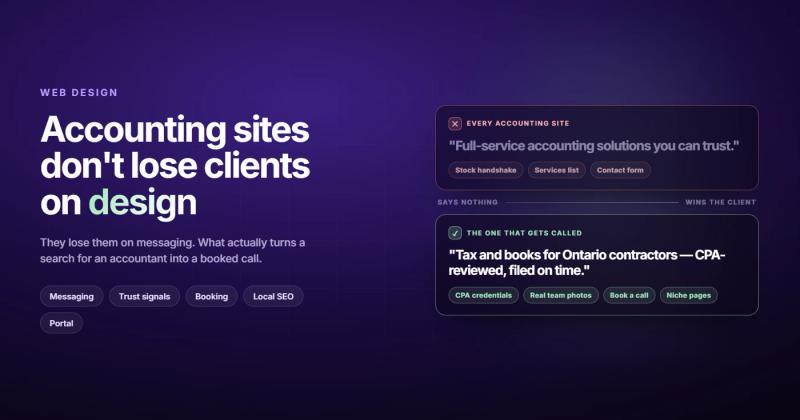
A great accounting website does one thing above everything else: it makes the right visitor think "these people get my situation." Not impressive. Not beautifully animated. Just specific enough that a restaurant owner searching for bookkeeping help lands on your page and immediately feels like you wrote it for them.
Most accounting websites fail at this. They look professionally designed, feel vaguely trustworthy, and are completely interchangeable. You could swap the logo on half of them and nobody would notice.
Here's what websites for accountants actually need, and what most firms get completely wrong.
What Makes a Great Accounting Website?
The best accounting websites share five characteristics: a specific value proposition that names the type of client served, services described in client language (not accountant language), visible trust signals such as credentials and real results, a single prominent call to action, and content that answers the questions prospects are actually searching for.
Design matters. But it's a distant second to messaging. A clean, fast website with the right words beats a stunning website that says nothing specific.
Why Most Accounting Websites Don't Work
Spend an hour browsing accounting firm websites and you'll see the same phrases repeated on every single one:
- "Your trusted financial partner"
- "Helping businesses and individuals achieve their financial goals"
- "Serving [City] since [year]"
- "Comprehensive accounting solutions for all your needs"
These phrases say absolutely nothing. Every accounting firm could put them on their site. Which means they communicate nothing to the person comparing three firms on a Tuesday afternoon.
The real problem isn't design. It's messaging. Most accounting websites read like they were written for other accountants, not for the clients they're trying to attract.
I spent months building practice management software for an Irish GP clinic. The domain complexity was brutal: prescriptions, drug interactions, vaccination batch tracking, PPSN numbers. But the hardest part wasn't the code. It was writing content that explained what the software did in a way that made a non-technical practice manager trust it enough to switch. Accounting firms have the same problem: deep expertise that's genuinely hard to translate into language clients can act on. The firms that crack this are the ones that win online.
The firms with the highest-converting websites figured out how to describe their expertise in plain terms, for a specific type of client. That's the actual job. Design is just the container.

10 Things Your Accounting Website Actually Needs
1. A Value Proposition That Names Someone
Generic: "We provide accounting services for businesses and individuals."
Specific: "We handle bookkeeping and tax for restaurant owners in Austin so you can focus on the kitchen, not the spreadsheets."
The specific version talks to one type of person. It names their world, their pain, and their location. Someone who matches that profile reads it and thinks: "That's me." Someone who doesn't? They weren't your client anyway.
Niching down feels scary. It always does. But accounting is a trust business. The more specific you are about who you serve, the more trustworthy you appear to that exact person. Generalists feel like a risk. Specialists feel like the answer.
2. Services Described in Client Language
Most accounting websites list services as: Tax Preparation, Bookkeeping, Payroll, Advisory, Audit Support.
That's accounting language. Clients search for things like "help with quarterly taxes for freelancers" or "bookkeeper for small business in [city]." They don't know the difference between "advisory services" and "CFO consulting." They know they're stressed about cash flow and don't want to pay more tax than legally required.
Your services page should lead with what the client gets, not what you technically do. "Tax planning that finds deductions your previous accountant missed" is more compelling than "Comprehensive tax services." Every time.
3. Trust Signals That Actually Matter for Accountants
Every profession has its own version of trust signals. For accounting, clients are looking for:
- CPA license number (or equivalent designation), proves you're qualified, not just a bookkeeper with a spreadsheet
- Professional affiliations: AICPA membership, state CPA society, relevant industry associations
- IRS PTIN (for tax preparers), clients filing taxes want to know you're registered with the IRS
- Years in practice, especially important for small firms competing against established practices
- Named team members with real photos: people hire accountants, not accounting firms. Show who will actually handle their work.
The AICPA recommends displaying professional credentials prominently on firm websites because potential clients actively look for them when deciding whether to call. Stock photos of smiling strangers with calculators don't build trust. Real photos of real people with real credentials do.
4. A Client Portal That's Easy to Find
If your firm uses a client portal (most accounting firms do), put the login link in the navigation. Not buried in the footer. Not hidden under "Resources." In the main nav, visible immediately.
Your existing clients visit your website regularly. If they have to hunt for the portal, every visit is a small frustration. Small frustrations compound over months and years. Put it where they expect it: that's good CPA website design in practice, not just in theory.
5. Mobile Design That Actually Works
Over 60% of local business searches happen on mobile. Someone sitting in a waiting room, Googling "CPA near me," lands on your website on their phone. If it loads slowly, is hard to read, or buries your phone number, they go back and click the next result.
Mobile responsiveness isn't optional for local search. Your text needs to be readable without zooming. Your phone number needs to be tappable. Your contact form needs to work with thumbs, not just a mouse. These aren't design preferences: they're the cost of being found.
6. Fast Load Speed
Accounting websites don't need to be fancy. They need to be fast.
A page that takes four seconds to load on a mobile connection loses visitors before they see a single word. Google's Core Web Vitals factor into local search rankings. A slow accounting website doesn't just frustrate clients: it ranks lower than a faster competitor doing everything else the same.
Most accounting websites slow down from three sources: unoptimized images (someone uploaded a 5MB photo), too many plugins (WordPress sites with 30+ active plugins), or cheap shared hosting that can't handle even modest traffic spikes during tax season.
Fix the images first. That's where 80% of the performance problem usually lives.
7. One Clear Call to Action Per Page
The accounting websites that convert best don't give visitors six options. They give them one.
"Book a free 15-minute call" outperforms "Contact us / Request a quote / Download our tax guide / Subscribe to our newsletter / Learn more about our team / Call us today" every single time.
Six CTAs is choice paralysis dressed up as helpfulness. Every extra option you add reduces the likelihood that someone takes any of them. Pick the action that matters most and put that one, clearly, everywhere.
8. Social Proof From Your Specific Client Types
Generic testimonial: "Great accountants! Very professional. Would recommend."
Specific testimonial: "They saved our restaurant $18,000 in the first year by restructuring how we categorize equipment purchases. We'd been with our previous accountant for six years and never had that conversation."
The specific version does three things: it names the client type (restaurant owner), it quantifies the result ($18,000), and it creates a contrast with the status quo. That's a story that actually lands.
If you serve multiple industries, get testimonials from each. A real estate investor reading your site needs to see that you understand real estate accounting, not that some vague "business owner" was satisfied with your service.
9. Local SEO That Goes Beyond a Google Maps Embed
Most accounting firms serve a geographic area. If you're a CPA in Denver, you want to show up when someone searches "CPA Denver" or "tax accountant near me."
That means your website needs your city and state in your page title, H1, and first paragraph. It needs a Google Business Profile that matches your website exactly (same name, address, phone). It needs your NAP (name, address, phone) in the footer on every page, local schema markup in your code, and Google reviews from real clients.
A website alone won't get you ranking locally. But a well-optimized website combined with a complete Google Business Profile puts you in the running. Most accounting firms have neither set up properly, which means the window is still open for anyone who bothers.
If you want to go deeper on this, the full SEO checklist has everything organized by priority. But for accounting firms, local search comes first, before worrying about any broader content strategy.
10. Content That Answers Real Client Questions
Your potential clients are searching things like "how to reduce self-employment tax," "what expenses can a freelancer deduct," or "LLC vs S-Corp tax advantages." If your website has articles that answer these questions, you show up in those searches.
You're not selling at that point. You're demonstrating that you know what you're talking about. By the time someone reads three of your articles and then calls you, they're not comparing you to competitors. They already trust you.
This is content done right: not writing because "you should blog," but writing content that finds people at the exact moment they're realizing they need an accountant. That's when they're most receptive and most likely to actually call.
For accounting firms that are also selling to other businesses, the principles in B2B web design apply directly: the decision-making process is similar, and the trust bar is just as high.
What Good Accounting Websites Actually Look Like
The best accounting and CPA websites in 2026 look more like boutique consulting sites than traditional firm websites. Here's what they're doing that most firms aren't:
Niche landing pages for each industry served. Instead of one generic "Services" page, high-performing firms build separate pages for each client type: "Accounting for restaurants," "Tax planning for real estate investors," "Bookkeeping for ecommerce businesses." Each page talks directly to that audience, answers their specific questions, and has its own CTA. Each page also has a much better shot at ranking in search.
Founder photos above the fold. The top-converting accounting sites lead with a photo of a real person, not an office building or a stock photo of a handshake. People hire accountants. They want to see who they're potentially calling before they make the call. A face builds more trust in two seconds than five paragraphs of "we're committed to your success."
Pricing signals (even without fixed pricing). Not every firm publishes exact prices, but the effective ones give some signal: "Starting from $X per month for small business bookkeeping" or "Fees based on complexity, book a free call to get an estimate." Total price opacity feels like a red flag to most people. Give enough information to let someone know whether they can afford you before they invest time in a call.
Online booking integrated directly into the site. Not "call us during business hours." An actual scheduling tool where someone can book a 15-minute intro call at 10pm on a Sunday, when the anxiety about their finances is highest and they're most motivated to finally sort things out. That's the moment you want to be available.
Which Platform Should You Build On?
Honest answer: the one your web designer knows best. Platform debates are mostly a distraction from the real work, which is figuring out what to say.
That said, accounting websites don't need complex functionality. They need to load fast, look professional, and be easy to update when your services or team changes. Webflow and WordPress are both solid choices for firms that want design flexibility. Squarespace and Wix work fine for solo practitioners who need something simple and self-maintainable.
What matters far more than platform is having a clear strategy before any design work starts. The platform is just where the strategy lives. If you're still figuring out who you serve and what you want the site to do, that's where to start, not with templates or color palettes.
If you're on a site built in 2015 that hasn't been touched since, the platform probably isn't your biggest problem. The content is. Fix the messaging first, then worry about the container.
A Note on Accounting Website Templates
Templates are a reasonable starting point, not a finished product. An accounting website template from Webflow, Squarespace, or Wix gives you a visual framework: layout, spacing, mobile responsiveness baked in. What it doesn't give you is the messaging, the credibility signals, or the content strategy that actually makes the site perform.
The mistake most firms make with accounting website templates is treating them as a done-for-you solution. They fill in the placeholder text with generic copy, add a stock photo of a handshake, and call it live. Six months later they wonder why the site isn't generating calls.
A template is like a blank invoice form. Useful structure, but what you write on it is what actually matters. The firms that get the most out of templates are the ones who already know what they want to say and use the template to say it clearly.
For firms thinking about a full build or redesign, understanding the website strategy process should come before any template decision. Otherwise you're choosing colors for a house with no blueprint.
Accounting Website Quick Checklist
Before you brief a designer, make sure you can answer these clearly. If you can't, more design won't fix the underlying problem.
- Who is the specific type of client you want? Not "small businesses": what kind? What industry?
- What problem do you solve that the general-practice firm down the street doesn't?
- What credentials, affiliations, or certifications should be visible on the site?
- Do you have real testimonials with real names, results, and ideally real photos?
- What's the one action you want visitors to take? Book a call, complete a form, or call your number?
- Do you serve a geographic area? Which city or cities should the site rank for?
- Do you have current, non-stock photos of yourself or your team?
- Do you use a client portal? Where will the link appear?
Eight questions. If you can answer all eight, you're ready to talk to a designer. If not, answering them first will save you months of frustration and probably a few thousand dollars.
And when you are ready to hire someone, it's worth reading about how to evaluate a web design agency before you start getting proposals. The wrong agency for an accounting firm is a specific kind of wrong.
Frequently Asked Questions
How much does an accounting firm website cost?
A basic site from a freelance designer typically runs $1,500 to $5,000. A professionally designed and strategically built site from an agency is usually $5,000 to $15,000. Template-based options on Squarespace or Wix cost $200 to $500 per year in platform fees, plus your time to set it up properly. The real cost of a bad website (one that looks fine but converts nobody) is usually much higher than the cost of doing it right the first time.
What pages does an accounting website need?
At minimum: a homepage with a specific value proposition, a services page organized by client type or problem (not just service name), an about page with real team photos and credentials, and a contact page with multiple ways to reach you. A blog adds SEO value that compounds over time. A client portal link belongs in the main navigation if you use one.
Do accountants need a website in 2026?
Yes. Not because everyone has one, but because your potential clients will Google you before calling, even if they found you through a referral. If they can't find a website, or if the site doesn't look credible, some of them won't call. That means paying for referrals and then losing the conversion at the last step. Not a great trade.
What makes an accounting website stand out from competitors?
Specificity. Most accounting websites try to appeal to everyone and end up speaking to no one. Pick a niche (an industry, a business type, a life stage) and build the site around that specific client. You'll rank better in search and convert better when the right person lands on your page. The firms doing this consistently outperform the generalists, even when the generalists have better-looking sites.
Is SEO worth it for accounting websites?
Local SEO is worth it immediately. Most accounting clients search with a location attached ("CPA in [city]" or "tax accountant near me"). Ranking for those searches requires a complete Google Business Profile, consistent name/address/phone information across the web, and a site with the right local signals in the right places. General content SEO takes longer but builds compounding traffic over years. Start with local. Add content strategy once the local foundation is solid.
What's the best website builder for accountants?
Webflow for firms that want design flexibility and strong performance. WordPress for firms that need plugin ecosystem depth or have existing WordPress infrastructure. Squarespace for solo practitioners who need something simple and self-maintainable. Wix works but has SEO limitations that get more annoying as your site grows. The platform genuinely matters less than having the right content and a clear strategy behind it.
Comments