
What SEO for a New Website Actually Means
SEO for a new website means building the technical foundation, content, and authority signals that help search engines find, understand, and rank your pages. You're not "doing SEO" later. You're building it into the walls from the start, or you're tearing down drywall six months from now.
Most people treat SEO as something you bolt on after launch. That's backwards. A new site is a blank slate. No penalties, no legacy mess, no five-year-old blog posts cannibalizing each other. You get to do things right the first time. That's rare.
The tricky part? Google doesn't trust new domains. You have zero authority, zero backlinks, and zero track record. Everything in this guide is about building that trust as fast as possible without cutting corners that hurt you later.
Keyword Research Before You Write Anything
Here's what happens without keyword research: you write pages about what you think matters, using words you use internally, and then wonder why nobody finds them. Your customers don't use your vocabulary. They use theirs.
For a new site, forget the high-volume keywords for now. A brand-new domain trying to rank for "project management software" is like opening a food truck and competing with McDonald's on day one. You'll burn time and budget getting nowhere.
Instead, start with long-tail keywords. Terms with 100-500 monthly searches and low competition. These are your early wins, and early wins do two things: they bring real traffic, and they signal to Google that your site actually answers questions people are asking.
How to Find the Right Keywords for a New Site
- Open Google Search Console (you've set it up already, right?) and note what impressions you're getting, even at zero clicks
- Use a tool like Ahrefs, SEMrush, or even Ubersuggest to find keywords with KD under 30
- Check what your competitors rank for and find gaps they've ignored
- Look at "People Also Ask" boxes for your main topics. Those questions are content gold
- Group your keywords into clusters. One page per cluster, not one page per keyword
One mistake I see constantly: people target the same keyword across multiple pages. That's keyword cannibalization, and it confuses Google about which page should rank. Map one primary keyword to one page. Period.
Technical SEO: The Foundation Nobody Sees
Think of technical SEO like the wiring in a house. Nobody compliments your wiring. But when it's wrong, nothing works. Your content can be excellent and your design can be beautiful, but if Google can't crawl and index your pages properly, none of it matters.
Get HTTPS Set Up Before Anything Else
If your site isn't on HTTPS, Google will flag it as "Not Secure" in Chrome. That alone kills trust. Most hosting providers include free SSL certificates now. There's no excuse to launch without one.
Submit Your XML Sitemap
Your sitemap tells Google exactly which pages exist and which ones matter. Most CMS platforms generate this automatically. If you're on Webflow, it's handled for you. WordPress needs a plugin like Yoast or RankMath.
Submit it through Google Search Console and Bing Webmaster Tools. Yes, Bing. It's a five-minute task and it feeds into other search engines too.
Set Up Google Search Console Immediately
Search Console is the single most important free tool for SEO. It shows you which queries bring impressions, which pages are indexed, and what errors Google found. If you only do one thing from this entire guide, do this one.
Verify your domain, submit your sitemap, and check back weekly. The data takes a few days to start flowing, but once it does, you'll see exactly where Google is placing you in results.
Configure robots.txt Correctly
This tiny file tells search engines what they can and can't crawl. The most common mistake on new sites? Accidentally blocking entire sections. I've seen people launch with Disallow: / still active from their staging environment. That single line tells Google to ignore your entire site.
Clean URL Structure
Your URLs should be short, readable, and include the target keyword. /blog/seo-for-new-website is good. /blog/2026/08/post-id-47832?ref=nav is not. Decide on your URL structure before launch because changing URLs later means 301 redirects, and redirects always leak some link equity.
On-Page SEO: Where Content Meets Structure
On-page SEO is where most new website owners either overthink things or ignore them entirely. It's not about cramming keywords into every sentence. It's about giving Google clear signals about what each page covers.
Title Tags and Meta Descriptions
Your title tag is the single strongest on-page ranking signal. Keep it under 60 characters, put your primary keyword near the front, and make it specific. "SEO Tips" is vague. "SEO for New Websites: A Step-by-Step Guide" tells Google and users exactly what they'll get.
Meta descriptions don't directly affect rankings, but they affect click-through rates. A good description is 120-150 characters, includes the keyword naturally, and gives people a reason to click. Write it like a movie trailer for your page, not a summary.
Heading Hierarchy
One H1 per page. That's your page title. H2s break the content into major sections. H3s go under H2s for subtopics. Never skip levels. This hierarchy helps Google understand the structure and helps readers scan the page.
Put your secondary keywords in H2s where they fit naturally. If a heading reads like keyword soup ("Best New Website SEO Strategy Checklist 2026"), you've gone too far.
Image Optimization
Every image needs alt text that describes what's in the image. Not "image1.jpg". Not "photo." Something like "screenshot of Google Search Console performance report" works because it's descriptive and naturally includes relevant terms.
Compress your images before upload. A 4MB hero image will tank your page speed, and page speed affects everything from rankings to bounce rate. Use WebP format when possible. Most modern CMS platforms support it.
Content Strategy That Actually Works for New Sites
Here's the real question: what should you actually write about?
Don't start with 50 blog posts. Start with 5 really good ones. Each one should target a specific keyword cluster, answer a specific question, and be genuinely better than whatever's currently ranking. I know "be better" sounds vague, so here's what it means in practice: more depth, more specific examples, more updated information, and a clearer structure.
I once spent two weeks building a custom animation system for a client's homepage. Silky smooth. Perfectly timed. The client's actual customers were on 4G connections in rural areas. Nobody ever saw the animations. They bounced before the page finished loading. That's when I stopped designing for my own internet connection.
The lesson applies to content too. Don't write for yourself. Write for the person typing the query. What do they actually need? Answer that, and Google rewards you for it.
Match Search Intent
Before writing a single word, search your target keyword and look at what's already ranking. If the top 10 results are all step-by-step guides, don't write an opinion piece. If they're all comparison tables, don't write a 3,000-word essay. Google has already figured out what users want for that query. Match the format.
This is something we covered in depth in our post on search intent optimization. The short version: informational queries need guides, commercial queries need comparisons, and transactional queries need product pages.
Publish Consistently, Not Constantly
Two well-researched posts per month beat eight thin ones. Google's algorithms are good at detecting filler content. If your post reads like it was written to meet a publishing quota rather than to answer a question, it'll sit on page four forever.
Build a content calendar around your keyword clusters. Each new post should link to existing posts (internal linking, more on that below) and expand your topical authority in a specific area.
Internal Linking: Free Authority Distribution
Internal links pass authority from one page to another within your site. They also help Google understand your site structure and discover new pages faster. For a new site with zero backlinks, internal linking is one of the few tools you actually control.
Every new page should link to 3-5 other relevant pages on your site. Every time you publish a new post, go back to older posts and add links to the new one where it makes sense. This creates a web of connections that helps both users and search engines navigate your content.
Use descriptive anchor text. "Read more" tells Google nothing. "Build a website marketing strategy that compounds" tells Google exactly what that linked page is about.
Backlinks: Building Trust From the Outside
Backlinks are links from other websites to yours. They're still one of the strongest ranking factors, and for a new site, they're also the hardest thing to earn. You have no reputation yet. Nobody knows you exist.
Forget about buying links or doing mass outreach to random bloggers. Those tactics either don't work anymore or get you penalized. Here's what actually moves the needle for new sites:
- Create content worth linking to. Original research, unique data, or genuinely useful resources get linked naturally
- Guest post on relevant industry blogs. One thoughtful article on a respected site beats 50 spammy directories
- Get listed in legitimate business directories for your industry
- Build relationships with people who write about your space. Share their work, comment thoughtfully, be a real human
For new sites specifically, focus on earning 10-20 quality backlinks in your first six months rather than chasing hundreds. A handful of links from relevant, authoritative domains carry more weight than a pile of links from random sites with no connection to your industry.
Site Speed and Mobile: Non-Negotiable
Google uses Core Web Vitals as a ranking signal. Three metrics matter: Largest Contentful Paint (how fast the main content loads), Cumulative Layout Shift (how much the page jumps around while loading), and Interaction to Next Paint (how quickly the page responds to clicks).
For a new site, you have the advantage of starting clean. No legacy plugins, no bloated theme, no years of accumulated JavaScript. Keep it that way.
Test your site with Google PageSpeed Insights before launch. If you're scoring below 80 on mobile before you've even added content, something is structurally wrong. Fix it now, not after you have 200 pages built on a slow foundation.
Mobile-first isn't a suggestion. Google indexes the mobile version of your site first. If your desktop site looks great but your mobile version has tiny text, buttons too close together, or horizontal scrolling, that's what Google sees.
Schema Markup: Speak Google's Language Directly
This is one area where most new website SEO guides fall short. Schema markup is structured data you add to your pages that tells search engines exactly what your content is. Article, FAQ, Product, LocalBusiness. Instead of letting Google guess, you spell it out.
For a new site, implement these schema types at minimum:
| Schema Type | Where to Use It | Why It Matters |
|---|---|---|
| Organization | Site-wide | Tells Google who you are, your logo, social profiles |
| Article | Blog posts | Helps qualify for rich results in search |
| FAQ | Pages with FAQ sections | Can trigger expandable FAQ results in SERPs |
| BreadcrumbList | Every page | Shows site hierarchy in search results |
| LocalBusiness | Homepage / contact | Critical for local search visibility |
Schema doesn't directly boost rankings, but it increases your chances of earning rich results (those expanded snippets, star ratings, and FAQ dropdowns in search). For a new site competing against established domains, any extra visibility in the SERPs is worth the effort.
Answer Engine Optimization: The Part Nobody Talks About Yet
Here's something the other guides on this topic aren't covering: AI-powered search is changing how people find information. Google's AI Overviews, ChatGPT search, Perplexity. These tools pull answers directly from web content and present them without requiring a click.
For a new site, this is actually an opportunity. AI search tools tend to pull from content that directly answers questions in clear, structured formats. That's exactly the kind of content a new site should be creating anyway.
Structure your content with clear questions as headings and direct answers in the first sentence below. Use FAQ sections with proper schema. Write concise, factual answers that AI tools can quote directly. This is something we focus on heavily in our SEO and AEO service because the sites that prepare for this now will have a significant head start.
Monitoring: How to Know If It's Working
You can't improve what you don't measure. Here are the tools you need, and none of them cost anything:
- Google Search Console for search performance, indexing status, and technical issues
- Google Analytics (GA4) for traffic, user behavior, and conversions
- PageSpeed Insights for Core Web Vitals monitoring
Check these weekly for the first three months, then biweekly once things stabilize. Here's what to watch:
- Indexed pages (is Google finding your content?)
- Impressions (are you showing up in search results?)
- Click-through rate (are people clicking when they see you?)
- Average position (where are you ranking?)
- Core Web Vitals (is your site technically healthy?)
Don't panic if your numbers are flat for the first month or two. New sites go through what the SEO community calls the Google Sandbox, a probation period where Google is evaluating whether your site is legitimate. It passes. The work you put in now compounds once it does.
A Realistic Timeline: What to Expect
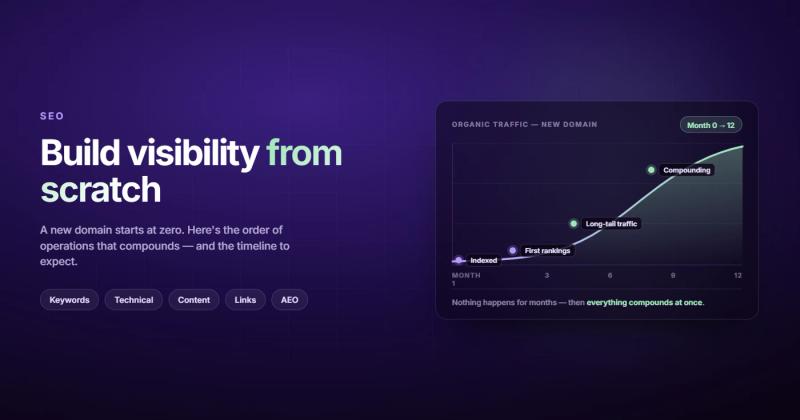
People ask "how long does SEO take?" like it has a single answer. It doesn't. But here's a realistic timeline based on what I've seen across dozens of website strategy projects:
| Timeframe | What Happens |
|---|---|
| Week 1-2 | Google discovers and starts indexing your pages |
| Month 1-2 | Pages appear in search results, mostly beyond page 3 |
| Month 3-4 | Long-tail keywords start pulling real traffic |
| Month 6 | Consistent organic traffic growth if content is strong |
| Month 9-12 | Competitive keywords become achievable with backlinks |
The sites that move fastest through this timeline are the ones that launched with technical SEO already handled, published consistent high-quality content, and earned a few genuine backlinks early on. The sites that stall are the ones that launched, forgot about SEO for three months, then wondered why nothing was happening.
New Website SEO Checklist: The Quick Reference
If you've read everything above and want a condensed checklist you can actually work from, here's the full SEO checklist distilled for new sites specifically:
- Set up HTTPS with a valid SSL certificate
- Register and verify Google Search Console
- Submit your XML sitemap
- Check your robots.txt isn't blocking anything important
- Build a clean URL structure with keywords in slugs
- Write unique title tags and meta descriptions for every page
- Use proper heading hierarchy (one H1, logical H2/H3 structure)
- Compress and add alt text to all images
- Implement schema markup (Organization, Article, FAQ)
- Add 3-5 internal links per page with descriptive anchor text
- Set up Google Analytics (GA4)
- Test page speed on mobile before launch
- Create and publish 5 pillar content pieces targeting low-competition keywords
- Start building backlinks through quality content and genuine outreach
Frequently Asked Questions
How long does SEO take for a new website?
Most new websites start seeing meaningful organic traffic within 3-6 months if the technical foundation is solid and content is published consistently. Competitive keywords can take 9-12 months. The timeline depends heavily on your industry's competition level and how aggressively you create content and earn backlinks.
Can a new website rank on Google without backlinks?
Yes, but only for low-competition keywords. Backlinks remain one of the strongest ranking signals, and for competitive terms, you'll need them. The good news is that even 10-20 quality backlinks from relevant sites can make a real difference for a new domain. Focus on earning them naturally through great content rather than buying them.
Is SEO worth it for a small business website?
It's one of the best investments a small business can make. Paid ads stop working the moment you stop paying. SEO compounds over time. A blog post you publish today can bring traffic for years. The cost of not doing SEO is paying for every single visitor through ads, forever.
What's the difference between indexing and ranking?
Indexing means Google knows your page exists and has stored it in its database. Ranking means Google considers your page good enough to show for specific search queries. A page can be indexed without ranking for anything useful. Indexing is step one. Ranking is the goal.
Do I need a blog for SEO on my new website?
Not necessarily a "blog" in the traditional sense, but you need regularly updated content that targets specific keywords and answers questions your audience is asking. Whether you call it a blog, resource center, or knowledge base doesn't matter. What matters is that you're consistently publishing content that earns search visibility and builds topical authority.
Should I hire an SEO agency or do it myself?
If you have the time to learn and implement everything in this guide, you can handle the basics yourself. Where agencies earn their fee is in technical audits, content strategy at scale, and avoiding the mistakes that cost you rankings during launches and redesigns. If SEO is critical to your business model, professional help pays for itself through faster results and fewer costly mistakes.
Comments