
I had agency emails silently bouncing for days. SPF and DKIM were never configured on the domain, so Gmail blocked everything with a cryptic 550-5.7.26 error. From my side the emails looked sent. They arrived nowhere. I found out because a prospect messaged me on LinkedIn asking if I'd ghosted him.
Nothing on the website looked broken. Nothing ever does.
That's the whole reason a website audit checklist exists. It's a structured pass over seven areas of your site (analytics, crawlability, speed, on-page SEO, content, UX, and security plus accessibility) that surfaces the problems you've stopped being able to see. Not a design opinion. A list of things that are either working or broken, checked in an order that keeps you from burning a week on the wrong fix.
Most checklists you'll find online give you 80 items with no ranking. This one gives you an order, and a way to decide what to fix first.
What a website audit actually checks
A website audit is a review of how your site performs against the things that affect whether people find it, stay on it, and do something once they're there. Technical health, search visibility, content, usability, accessibility, security.
Here's where most audits go sideways. People treat "audit" as a synonym for "list of complaints about the design." You get a 40-slide deck telling you the hero font is dated and the blue should be a different blue. Those are opinions wearing a lab coat.
The real question an audit answers is narrower: where is this site leaking? Traffic that never arrives. Visitors who bounce. Pages Google can't see. Forms that swallow leads. Every item on a good checklist traces back to a leak you can measure.
Which means the checklist has a dependency order. You can't measure a leak with a broken gauge, and that's the step almost everyone skips.
Check your analytics before you check anything else
Every website audit checklist I read while researching this post starts with page speed or meta tags. None of them start with "confirm your data isn't lying to you."
That's backwards. Your audit is going to produce a list of priorities, and those priorities come from numbers. If the numbers are wrong, you'll spend your next quarter optimizing a page that was never the problem.
I run a car accessories store in Serbia, opremazaauto.rs. I assumed the buyers were men. Obviously men, right? Car parts. Then I looked at the actual data and women were the majority of our customers. Every assumption I'd baked into the product pages was aimed at the wrong person.
I run a car accessories store, and the data surprised me: women were actually the majority of our buyers. It was a reminder to never assume you know your audience without looking at the numbers.
That only works if the numbers are real. Here's what I found in one client's <head> during an audit last spring:
<!-- Hard-coded in the theme header -->
<script src="https://www.googletagmanager.com/gtag/js?id=G-A1B2C3"></script>

<!-- Added again by an "SEO" plugin -->
<script src="https://www.googletagmanager.com/gtag/js?id=G-A1B2C3"></script>

<!-- GTM container, which also fired G-A1B2C3 -->
<script src="https://www.googletagmanager.com/gtm.js?id=GTM-XYZ123"></script>
Three sources, one measurement ID. Every pageview counted three times. Their bounce rate looked incredible because a "bounce" requires a single-event session and they were firing three. Eighteen months of reporting, quietly wrong.
So before anything else, verify four things: your analytics tag fires exactly once per page, your conversion events actually fire when a form submits (test it, don't trust the tag assistant), your internal traffic and your own IP are filtered out, and Google Search Console is verified on the version of the domain people really visit.
Then start the checklist.

The website audit checklist: 7 areas in dependency order
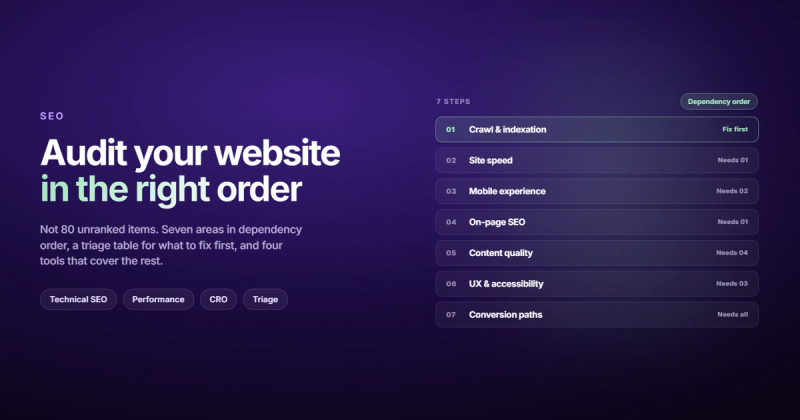
Work these in order. Each one assumes the previous one is clean. If you jump to step 5 while step 2 is broken, you'll be optimizing copy on a page Google isn't allowed to index.
01. Analytics and tracking integrity
- Analytics tag fires once per pageview, not two or three times
- Form submissions, calls, and checkout steps register as conversion events
- Internal and office traffic excluded
- Search Console verified on the canonical domain, with sitemap submitted
- Thank-you pages excluded from organic landing page reports (they skew everything)
02. Crawlability and indexing
This is where the expensive mistakes hide. A single stray line in robots.txt can take a section of your site out of search entirely, and the site will look perfectly fine to you while it happens.
robots.txtisn't blocking anything you want ranked- No accidental
noindexon live pages (staging rules that shipped to production are the classic) - Indexed page count in Search Console roughly matches your real page count
- Canonical tags point to the correct URL, and only one version of each page resolves
- XML sitemap contains only indexable 200-status URLs
- No orphan pages sitting with zero internal links pointing at them
- Redirect chains collapsed to a single hop
Google's own SEO starter guide is the reference here, and it's shorter than most blog posts written about it. If you want the deeper version of this step, I broke it down in our guide to what a technical SEO audit service actually covers.
03. Speed and Core Web Vitals
Run PageSpeed Insights on your five highest-traffic pages, not just your homepage. Your homepage is usually the fastest page on the site and the least representative.
Use field data (the "real users" section) over lab scores. Lab data tells you what happens on a simulated mid-tier Android. Field data tells you what happened to actual humans in the last 28 days. Those two numbers disagree more often than you'd like.
- Largest Contentful Paint under 2.5 seconds on mobile field data
- Interaction to Next Paint under 200ms
- Cumulative Layout Shift under 0.1 (usually images missing width and height attributes)
- Images in WebP or AVIF, sized for their container, not 3000px wide at 400px display
- No render-blocking third-party scripts above the fold
- Fonts preloaded, with a sane fallback so text renders immediately
Google's Core Web Vitals documentation defines the thresholds. If your numbers are bad and you want the mechanism rather than the metric, we wrote about why your website feels slow and why the fix is rarely what the audit tool suggests.
04. On-page SEO
- One H1 per page, containing the thing the page is actually about
- Title tags 50 to 60 characters, unique across the site, keyword near the front
- Meta descriptions 120 to 150 characters, written as a reason to click
- Heading hierarchy doesn't skip levels (no H2 straight to H4)
- Image alt text describes the image, empty
alt=""for decorative ones - Internal links use descriptive anchor text, never "click here"
- Article, FAQ, and Breadcrumb schema present and validating
Export every title and meta description to a spreadsheet and sort alphabetically. Duplicates jump out in about four seconds. It's the least clever technique in this post and it finds more issues than any tool.
05. Content quality and decay
Content doesn't fail loudly. It just slowly stops being true. Pull every URL with its organic traffic for the last 12 months versus the 12 before that, then sort by the decline.
- Pages that lost 30% or more of their traffic year over year, flagged for a refresh
- Stats, screenshots, and pricing older than two years, updated or removed
- Thin pages under 300 words that exist for no reason, merged or deleted
- Two or more pages competing for the same query, consolidated into one
- Every commercial page has one obvious next step
Deleting pages feels like losing ground. It usually isn't. A site with 40 pages that each earn their place outranks a site with 400 pages where 350 are filler, because the 350 dilute how clearly your site signals what it's about.
06. UX and the conversion path
Open your site on your phone, on cellular, and try to become a lead. Don't use your laptop and don't use office WiFi. The gap between those two experiences is where most conversion problems live.
- Submit every form and confirm the email arrives in a human's inbox
- Phone numbers are
tel:links, email addresses aremailto:links - Tap targets at least 48 by 48 pixels, body text at least 16px
- No horizontal scroll at 360px wide
- Navigation makes sense to someone who has never seen your site
- A visitor can tell what you do within two seconds of landing
Form testing sounds too basic to bother with. It's the single most common broken thing I find, and the one that costs the most per day it goes unnoticed. If this area is where your problems cluster, a focused CRO audit or UX audit digs further than a general pass will.
07. Accessibility and security
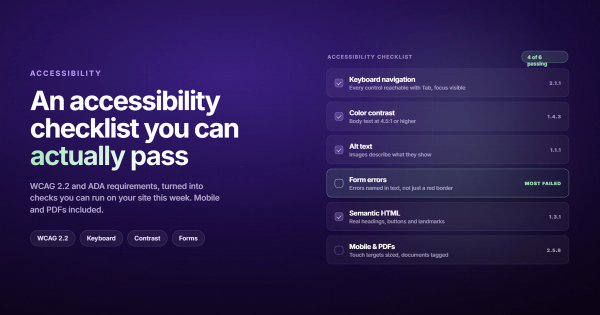
- Full keyboard navigation, with a visible focus indicator on every interactive element
- Body text contrast of at least 4.5:1 against its background
- Form inputs have real
<label>elements, not just placeholder text - HTTPS everywhere, with no mixed-content warnings
- CMS, plugins, and dependencies patched
- Automated off-site backups that you have actually restored from once
That last one is personal. I once deleted a production WordPress database and then discovered I'd also deleted the backup from Google Drive earlier that week. A backup you've never restored from is a hypothesis, not a backup.
For accessibility, the W3C's WCAG 2.2 quick reference is the actual standard. Our website accessibility checklist turns it into something you can work through in an afternoon.
How to decide what to fix first
You now have 40 to 60 findings. This is the point where most audits die in a shared Google Doc, because a flat list gives you no reason to start anywhere.
Score each finding two ways. Impact: if I fix this, does revenue or traffic move? Effort: how many hours and how much risk? Then sort.
| Impact | Effort | What to do | Typical example |
|---|---|---|---|
| High | Low | Fix today | Broken contact form, stray noindex, duplicate analytics tag |
| High | High | Schedule as a project | Site speed rebuild, information architecture change, CMS migration |
| Low | Low | Batch into one session | Missing alt text, duplicate meta descriptions, redirect chains |
| Low | High | Write it down and leave it | Design system refactor, moving off a working plugin on principle |
That bottom row is the discipline. Low impact and high effort describes most of what agencies sell as a redesign.
One more rule, learned the hard way. I once tried to fix my TV's upside-down picture through the service menu, changed one wrong setting, and ended up with a TV that played sound perfectly and showed nothing but black. Change one thing at a time, and know how to undo it before you touch it.
Website audit tools worth using
You need four tools. Anything beyond that is a subscription you'll cancel in March.
| Tool | Covers | Cost |
|---|---|---|
| Google Search Console | Indexing, queries, Core Web Vitals field data | Free |
| PageSpeed Insights | Speed, lab and field data per URL | Free |
| Screaming Frog | Full crawl: titles, status codes, canonicals, orphans | Free to 500 URLs |
| Ahrefs or Semrush | Content decay, backlinks, competitor gaps | ~$100+/month |
The free website audit tools that hand you a letter grade in exchange for your email are lead magnets. They'll tell you your score is C+ and that you should talk to someone. They won't tell you your form is broken.
How often to audit your website
Full pass once a year for a site under 50 pages. Twice a year if you publish weekly or run ecommerce. Plus an immediate audit after any migration, redesign, or CMS change, because those are the three events that break indexing.
Between full audits, a 15-minute monthly check covers most of the risk: Search Console coverage report, Core Web Vitals, one test form submission, and a glance at your top 10 pages for traffic drops. Quarterly audits sound diligent and mostly produce the same findings three times before anyone acts on one.
Doing it yourself or hiring a website audit service
Steps 1, 4, 6, and most of 7 are genuinely DIY. You need a spreadsheet, two free tools, and a focused afternoon. If you own the site, you'll also catch things an outsider never would, because you know which pages were supposed to be doing the work.
Steps 2, 3, and 5 get harder fast. Diagnosing why Google deindexed 300 pages, or why LCP is 4.1 seconds when the images are already optimized, is pattern recognition built from doing it repeatedly. That's where SEO and technical audit work earns its fee.
The honest split: run the checklist yourself first. Fix everything in the high-impact, low-effort box. Then hire someone for what's left, and hand them your findings so you're not paying them to rediscover what you already know.
Website audit checklist FAQ
How long does a website audit take?
A focused DIY pass on a site under 50 pages takes four to six hours spread over two sessions. A professional audit on a mid-sized site runs 15 to 30 hours, mostly because the crawl, the content analysis, and the writeup each take real time. Anyone promising a full audit in an hour is running a tool and emailing you the PDF.
How much does a website audit cost?
Free if you do it yourself with Search Console, PageSpeed Insights, and Screaming Frog. Agency pricing typically runs $500 to $3,000 for a single-discipline audit (technical SEO, or UX, or CRO) and $3,000 to $10,000 for a full multi-discipline audit on a large site. Price tracks the size of the crawl and how much strategy comes attached.
What's the difference between a website audit and an SEO audit?
An SEO audit is one section of a website audit. It looks at crawlability, indexing, on-page signals, and backlinks: everything affecting whether you rank. A website audit includes that, then adds speed, usability, conversion path, accessibility, and security. You can rank well and still convert terribly, which is why the wider pass matters.
Can I audit my website myself?
Yes, and you should do it at least once before paying anyone. Working through the checklist yourself teaches you which parts of your site you don't understand, which is the most useful output of the whole exercise. Bring in help for the technical diagnosis, not the inventory.
What should a website audit report include?
Every finding with the URL it affects, a severity score, the fix, and a rough effort estimate. If the report doesn't tell you what to do on Monday morning, it's a document, not an audit. Screenshots of your own homepage with red circles on them don't count as findings.
Do I need a website audit template or a spreadsheet?
A spreadsheet is enough. Four columns: finding, URL, impact, effort. Add a fifth for status once you start fixing. Pre-built website audit templates come with 200 rows designed for enterprise sites, and you'll spend longer deleting irrelevant rows than you would building your own.
Start with your forms
If you read this far and only do one thing, open your site on your phone and submit every form on it. Right now. Check that the email lands.
It takes nine minutes and it's the highest-yield nine minutes in this entire post. The rest of the checklist finds problems that cost you growth. A broken form costs you the leads you already earned, and it does it silently, which is the worst way for anything to break.
Then come back and work steps 1 through 7 in order. Keep the findings in one spreadsheet, sort by impact over effort, and fix the top five before you look at the other forty. That's the part nobody does, and it's the only part that matters.


Comments