
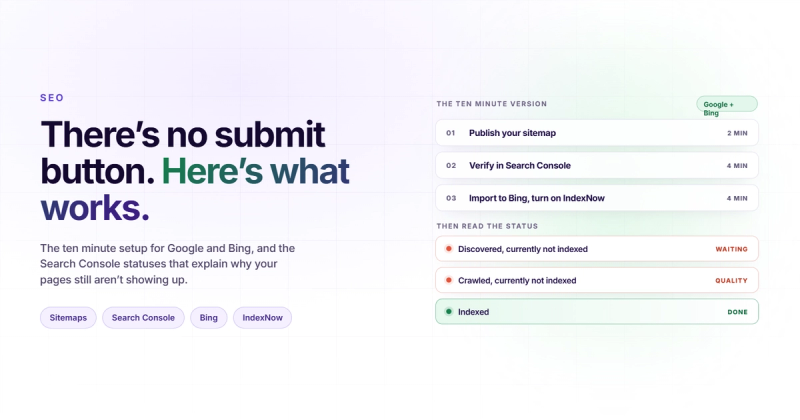
Here is the short version: to submit your website to search engines you need two free accounts and one file. Create an XML sitemap, verify your domain in Google Search Console and Bing Webmaster Tools, paste the sitemap URL into each, then use URL Inspection (Google) or URL Submission (Bing) for any single page you want crawled sooner. Bing's index feeds Yahoo and DuckDuckGo. Google feeds Google. There is no third account you're missing.
That takes about ten minutes. People still pay money for it, which is the interesting part.
Submitting your site is like handing a librarian a copy of your book. It gets catalogued. It does not get read. Almost every frustrated "I submitted my site and nothing happened" question is really a question about the second half of that sentence, and no submission form will answer it.
Do You Even Need to Submit Your Website?
Mostly, no. Google finds pages by following links. If a single indexed page anywhere on the internet links to you, Googlebot will arrive on its own schedule whether you asked or not. On most client launches I've run, Google had already found the new site before I finished setting up Search Console, because something public was linking to it.
So why bother? Three situations where submission does real work:
- A brand new domain with zero inbound links. Nothing points at you, so nothing leads a crawler to you. This is the one case where submission is genuinely the difference between weeks and days.
- A page you just published and want crawled today. A pricing change, a correction, a time-sensitive post.
- A migration or redesign, where you need the new URL structure read quickly so the old pages stop competing with the new ones. If that's where you are, read our guide on redesigning without losing your rankings before you touch Search Console.
Everything else is housekeeping. Useful housekeeping, like having a smoke alarm. You still want it.
And the version of the question nobody asks: if submission mattered as much as the blog posts imply, Google would have kept the public form. They killed it in 2018. That tells you how much weight it carries.
Find Your XML Sitemap First (Most People Guess Wrong)
You can't submit what you can't locate, and this is where the ten minutes usually turns into forty. Try these URLs in your browser, in this order:
yourdomain.com/sitemap.xmlis the default for Webflow, Framer, Squarespace, Shopify and most modern frameworks.yourdomain.com/sitemap_index.xmlis what Yoast and Rank Math generate on WordPress. The plain/sitemap.xmloften redirects here.yourdomain.com/robots.txtwill usually name the real one if the first two miss.
That third option is the reliable one, because the sitemap location is declared in robots.txt by convention. Open yours and look for a line like this:
User-agent: *
Allow: /

Sitemap: https://www.2m-webstudio.com/sitemap.xml
If that line isn't there, add it. It costs nothing and every crawler reads robots.txt before it reads anything else, so you are effectively submitting your sitemap to every search engine at once, including the ones that have no submission form at all.
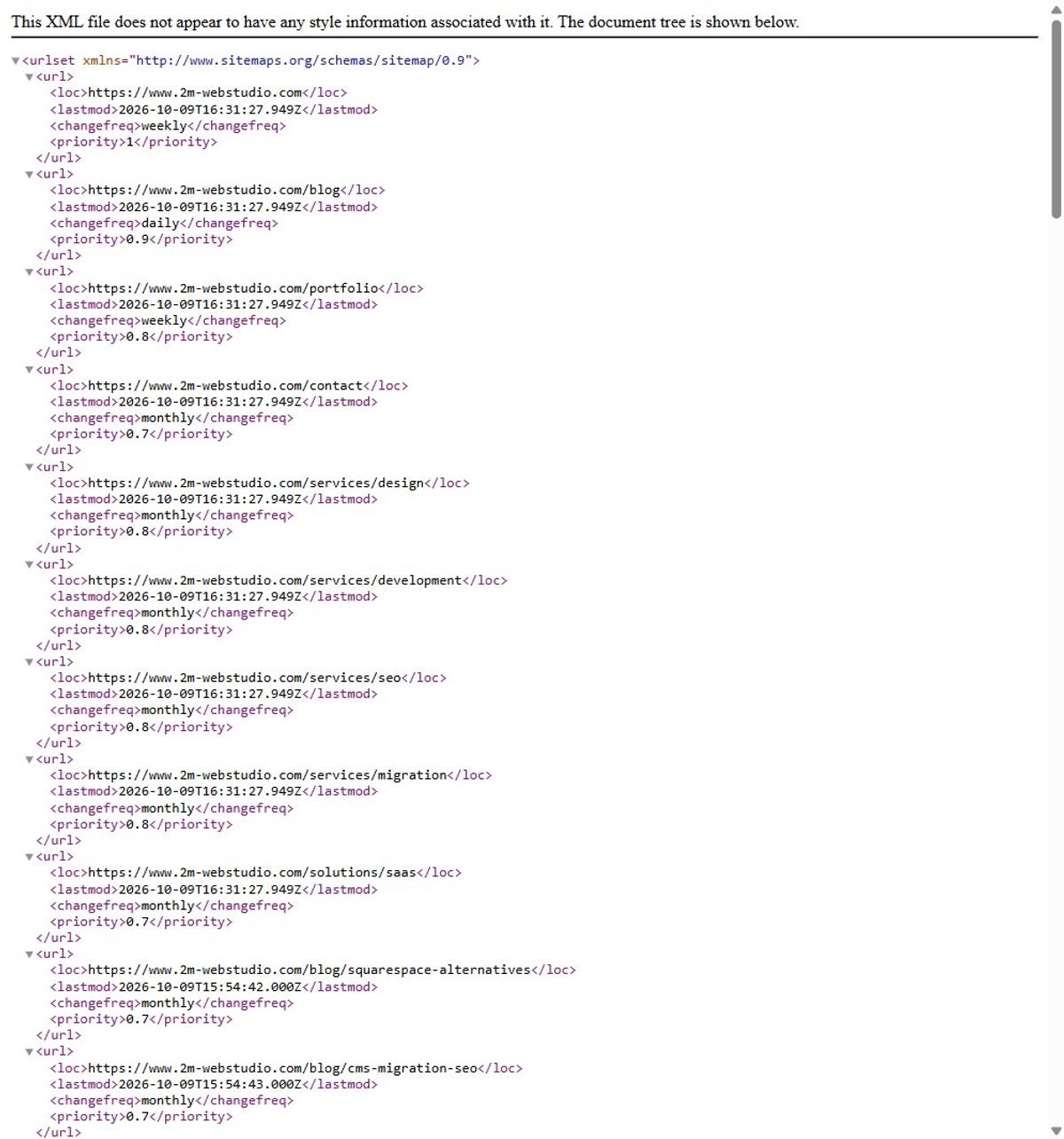
Two things to check while you have the file open. Does it list the pages you actually care about, and does it list anything you'd be embarrassed by? I have seen sitemaps proudly including /thank-you, /cart, three different staging subdomains and a page called /test-DO-NOT-DELETE. A sitemap is a recommendation, and recommending junk teaches a crawler that your recommendations are worthless.
How to Submit Your Website to Google
Four steps, and only the first one is annoying.
Step 1: Verify you own the domain
Go to Google Search Console and add a property. You get two choices, and the choice matters more than the setup guides suggest. A Domain property is verified by DNS TXT record and covers every subdomain and both http and https. A URL prefix property is verified by HTML file, meta tag, Google Analytics or Google Tag Manager, and covers exactly one protocol plus hostname combination.
Pick the Domain property. The DNS record is a five minute job at your registrar, and it saves you from the classic mistake of verifying http://yourdomain.com and then wondering for a month why the report is empty.
Step 2: Submit the sitemap
Sitemaps in the left sidebar, paste the URL, hit submit. You want "Success" in the status column. "Couldn't fetch" after a few hours means a real problem: the URL 404s, it's blocked in robots.txt, or your host is serving it as text/html instead of application/xml.
Do this once. Not weekly. Google re-reads the sitemap on its own and uses the lastmod dates to decide what changed.
Step 3: Request indexing for a specific page
Paste a URL into the search bar at the top of Search Console, which runs the URL Inspection tool, then click "Request indexing". This is the closest thing to a submit button that still exists.
There are two limits worth knowing, and Google states both plainly in its own documentation on asking Google to recrawl your URLs: there's a daily quota on individual submissions, and "requesting a recrawl multiple times for the same URL won't get it crawled any faster." Requesting the same page five times doesn't make you five times more urgent. It makes you one person who submitted five times.
Step 4: Confirm it worked
Wait a few days, then re-run URL Inspection on the same page. You want "URL is on Google". Anything else is information, not failure, and we'll decode the common ones further down.
One thing Search Console will not tell you is whether being indexed did you any good. Indexed and invisible is the normal state of the web. Moving a page up once it's indexed is an entirely different job.
How to Submit Your Website to Bing (and Yahoo, Free)
Bing Webmaster Tools is the most underrated free account in SEO, and the reason is structural rather than sentimental. Bing's index is what answers Yahoo searches, what fills in DuckDuckGo's results, and what several AI answer engines reach for when they need live web results. One submission, several surfaces.
Setup is faster than Google because of one button: when you create the account you can import your sites directly from Google Search Console, verification included. Thirty seconds, done.
After that you have two tools Google doesn't offer in the same shape:
- URL Submission, with a daily allowance measured in the thousands rather than the tens. For a site publishing real volume, that difference is the whole ballgame.
- IndexNow integration, which pushes changes automatically instead of waiting to be asked. More on that next.
You do not need to do anything for Yahoo. Yahoo Search has run on Microsoft's index since the two signed their search deal in 2009. Every "how to submit your website to Yahoo" tutorial that gives you separate steps is padding its word count.
IndexNow: The Part Worth Automating
Everything above is manual. IndexNow is the opposite idea: instead of a crawler asking your site what changed, your site tells the search engines the moment something changes.
It's an open protocol, so there's no account and no dashboard. You generate a key, host it as a text file at your domain root, and POST your changed URLs. In practice it's one HTTP request:
curl -X POST "https://api.indexnow.org/IndexNow" \
  -H "Content-Type: application/json" \
  -d '{
    "host": "www.2m-webstudio.com",
    "key": "your-key-here",
    "urlList": [
      "https://www.2m-webstudio.com/blog/new-post",
      "https://www.2m-webstudio.com/sitemap.xml"
    ]
  }'
Per the IndexNow FAQ, you can send up to 10,000 URLs in a single POST, and the participating engines are Bing, Yandex, Naver, Seznam.cz, Yep and Amazon. Read that list again. Google is not on it, and has never been on it, despite having run a public test of the protocol years ago that quietly went nowhere.
So IndexNow is worth maybe twenty minutes of your life, as a webhook on publish, and zero minutes if your platform has a plugin for it. It is not the secret Google backdoor that half the internet implies it is.
DuckDuckGo, Yandex, Baidu and the Long Tail
Here's every engine people ask about, what you actually do, and whether it's worth your afternoon.
| Search engine | How you submit | Worth doing? |
|---|---|---|
| Search Console: sitemap + URL Inspection | Yes, first thing | |
| Bing | Bing Webmaster Tools: import from Google, submit sitemap | Yes, second thing |
| Yahoo | Nothing. Runs on Bing's index | Already done |
| DuckDuckGo | Nothing. No submission exists, results lean on Bing | Already done |
| Yandex | Yandex Webmaster: verify, submit sitemap | Only if you sell in Russia or Turkey |
| Baidu | Baidu Ziyuan, which needs a Chinese phone number and realistically an ICP licence plus mainland hosting | Only with a China strategy and a budget |
| Brave, Ecosia, Startpage | Nothing. They license Google, Bing or their own crawl | Already done |
The pattern is hard to miss. Two accounts cover roughly everything an English-language business cares about, and the rest of the list exists so that articles about search engine submission can be longer.
AI Answer Engines Have No Submit Button
This is the question I get now instead of the old one. How do I submit my website to ChatGPT, to Perplexity, to Google's AI Overviews?
You can't. There's no form, and anyone selling you one is selling you nothing. What you control is narrower and more boring:
- Don't block the crawlers you want. Open your robots.txt and look for
GPTBot,OAI-SearchBot,ClaudeBot,PerplexityBotandGoogle-Extended. Plenty of sites blocked all of them in 2023 during the great scraping panic and never revisited the decision. If you want to appear in AI answers, you have to be readable by the thing writing them. - Get indexed in Bing, not just Google. Several AI products reach for a live web index when the question needs current information, and Bing's is the one they can license.
- Be the clearest page on your specific question. Answer engines quote the page that states the answer in a form that can be lifted. That's a content problem, and we go deeper on it in our roundup of LLM SEO checkers.
You'll also see llms.txt recommended as the AI equivalent of a sitemap. I've added it to a few sites because it takes two minutes and can't hurt. I have no evidence it does anything, no major engine has confirmed reading it at answer time, and I'd be lying if I told you otherwise.
How to Check If Your Website Is Indexed
The reflex is to type site:yourdomain.com into Google. Do it, but don't trust the number. The result count is an estimate, it fluctuates wildly between refreshes, and it has been known to show zero for sites that are demonstrably indexed. Use it as a yes/no, never as a metric.
The real answers live in two places:
- Search Console, Pages report. It splits your URLs into indexed and not indexed and tells you why for each bucket. This is the only source that's actually authoritative, because it's the index talking.
- URL Inspection, for a single page, when you need a definite answer right now.
Bing Webmaster Tools has the same pair under Site Explorer and URL Inspection. Worth checking, because Bing and Google disagree about which of your pages deserve to exist more often than you'd expect.
Submitted but Still Not Indexed? Read the Status Literally
This is the part the other guides skip, and it's the part you came for if you're reading this at 11pm.
Submission is a request to look. Indexing is a decision to keep. Those are separate systems, and Search Console tells you exactly which one you're stuck in, as long as you read the status as the engineering statement it is rather than as a mood.
| Search Console status | What it actually means | What to do |
|---|---|---|
| Discovered, currently not indexed | Google knows the URL exists but hasn't spent a crawl on it yet. Usually a crawl-priority judgement about your whole site, not that page | Add internal links to it. Fix site speed. Wait. Resubmitting changes nothing |
| Crawled, currently not indexed | Google read the page and chose not to keep it. This is a quality or duplication verdict | Make the page substantially better or merge it into a page that already works |
| Duplicate, Google chose different canonical | Another URL says the same thing and Google picked that one | Consolidate, or fix the canonical tag if Google picked wrong |
| Excluded by noindex tag | Your page is telling Google to stay out | Remove the tag. Check your CMS defaults and your staging-to-production process |
| Blocked by robots.txt | The crawler never got in the door | Fix the rule. Then request indexing, because a blocked page was never evaluated |
| Soft 404 | The page returns 200 but looks empty or looks like an error | Add real content, or return a proper 404 or 410 |
Notice how few of these are fixed by submitting again. Five of the six are fixed somewhere else entirely, which is why "submit website to search engines" is the wrong search for most of the people typing it.
The two that catch experienced people are noindex and robots.txt, because both fail silently. There's no error, no warning, no email. Your page is simply absent and everything looks fine.
I once had agency emails bouncing for days because SPF and DKIM weren't set up on the domain. Gmail just blocks you with a cryptic error and nobody tells you. A stray noindex is the same category of problem: the system is working exactly as configured, and the configuration is wrong.
So before you blame the index, check your own page. View source and search for noindex. Open robots.txt and read it line by line. A proper site audit catches both in the first ten minutes, and it's a better use of an evening than refreshing Search Console.
Skip the "Submit to 500 Search Engines" Services
You've seen the ads. Submit your site to 500 search engines for $29.
There are not 500 search engines. There are, generously, five with their own index, and two of them accept submissions in the way these services imply. The other 498 entries are directories, parked domains and aggregators that license results from the two you already submitted to yourself in ten minutes.
It's the SEO equivalent of paying someone to add your phone number to the phone book, then paying them again next month to add it harder. Nothing happens, and nothing was ever going to.
If you have budget and you want it spent on indexing, spend it on the reason pages don't get indexed: thin content, slow pages, a flat internal link structure where nothing links to anything. That's what our SEO and AEO work actually digs into, and it's less fun to sell than a 500-engine button.
FAQ
How long does it take Google to index a new site after submitting?
Days to weeks for a brand new domain, hours to days for a new page on an established site. Google's own line is that crawling "can take anywhere from a few days to a few weeks" and that a request is not a guarantee of inclusion at all. If you're past a month with nothing indexed, you have a technical or quality problem, not a patience problem.
Do I need to resubmit my sitemap every time I publish?
No. Submit it once per search engine. Both Google and Bing re-fetch it on their own schedule and use lastmod to spot changes. If you want faster than that, use IndexNow for Bing and URL Inspection for Google on the specific page.
How do I submit my website to Google without Search Console?
You don't. The old public submission URL was retired in 2018, and Search Console is now the only way to submit a sitemap or request indexing. You can still get discovered without any account by earning a link from a page that's already indexed, which is how most of the web gets found.
Is there a free way to submit a website to all search engines at once?
Close to it. Put a Sitemap: line in your robots.txt and every crawler that visits will find it, including engines with no submission form. Add IndexNow and one POST reaches Bing, Yandex, Naver, Seznam, Yep and Amazon. Google still needs Search Console.
Why is my page crawled but not indexed?
Google read it and decided it wasn't worth storing. That's almost always thin content, a near-duplicate of another page on your site, or a page that exists for structural reasons rather than for a reader. Resubmitting won't change the verdict. Changing the page will.
Does submitting my website help it rank?
Not directly. Submission affects whether you're in the index and how fast you get there. Position inside the index is decided by relevance, links and quality, which is a separate and much longer project. Being indexed is the entry fee, not the prize.
Should I submit my site to Yandex and Baidu?
Only if you sell to those markets. Yandex takes ten minutes and is worth it for Russian or Turkish traffic. Baidu realistically needs mainland hosting and an ICP licence, so treat it as a market-entry project rather than an SEO task.
The Boring Version That Works
Two accounts. One sitemap line in robots.txt. One URL Inspection request when you publish something you care about. An IndexNow webhook if you ship often enough to notice.
That's the entire job, and it's the same job it was five years ago. The reason it keeps getting written about as though it were complicated is that the simple version doesn't sell anything.
Get it done this afternoon, then go spend the rest of the month on the part that's genuinely hard: being the page worth keeping. If you want a second pair of eyes on why your pages aren't landing, tell us what you're seeing and we'll look at the actual index data rather than guessing.


Comments